What you get —
and what you don’t
MatrixAI Studio runs on your own machine. You frame the problem and it makes several engines compete on your data, picks the winner by the mean of a cross-validation, keeps the test set for the final figure and tells you why — every decision with its reason, and the choice written in a receipt. If you would rather build one network yourself, expert mode is still there. There is a demo in the browser with sample data, the core is AGPL, and the manuals show every screen. This page says what that is good for — and, just as plainly, what it is not.
Every screenshot on this page was taken driving the real product — the study ones from the same live session as the Studio tour, the expert-mode ones from the manual’s. Every number was measured; where a result was bad, it is shown as bad. Nothing here is a mock-up. The first four sections are the main path, the study; the rest is expert mode, and it is labelled as such.
Several engines compete — and the champion says why
You frame the problem — the target, the kind of problem, what one row stands for — and the study tries every engine on several parts of your development data, each with its own cross-validation. The standard package races gradient-boosted trees (LightGBM and scikit-learn) against a reference baseline and, since v2.8, our own neural network (in both packages, with its own time: 60 s per attempt, added to the budget, so no other engine loses a second). It only competes if it was measured on every part of the cross-validation, and the study picks per dataset: it wins only where it is the best. The GPU package keeps our previous network too, as an experimental engine; in the CPU package the new network takes its place. The champion is the one with the best mean over its parts, and the screen names it, says what that engine is and gives the reason in plain words. When the paired comparison against the runner-up does not show an improvement, it says that too: a choice under uncertainty, not a clear winner. A few engines, not hundreds, and no hyperparameter search.
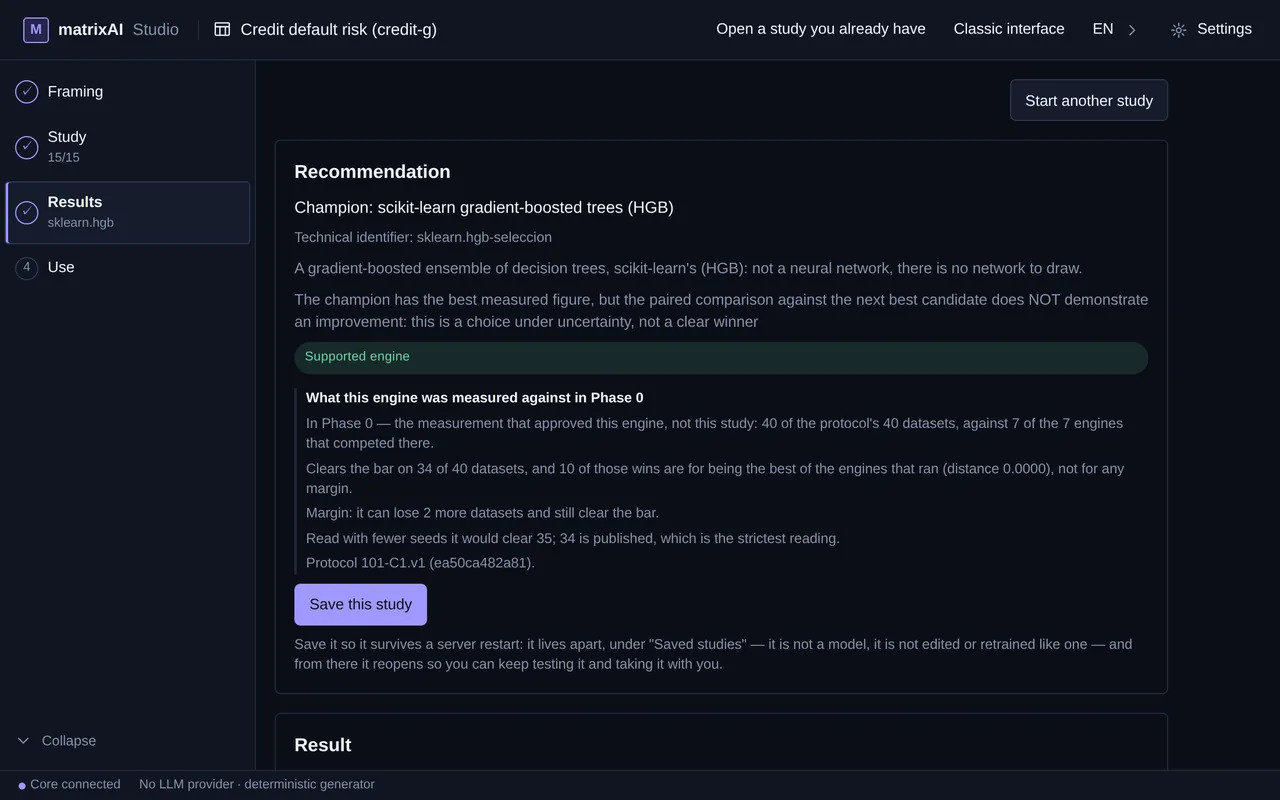
The test set stays apart, and the evidence is written down
The figure that counts comes from data no candidate saw while competing: the test set is kept intact until the end, and the comparison shows each engine’s mean over its parts — the one that decides — with the range, so a lucky split cannot pick the champion. Below it, the evidence says what applies and what does not, and why, and the receipt records what competed, what won and under which rule. The receipt comes out Unsigned until you configure your own signing key; its signature is an HMAC, so a third party cannot verify it without that key. It documents the choice — it is not a certificate.
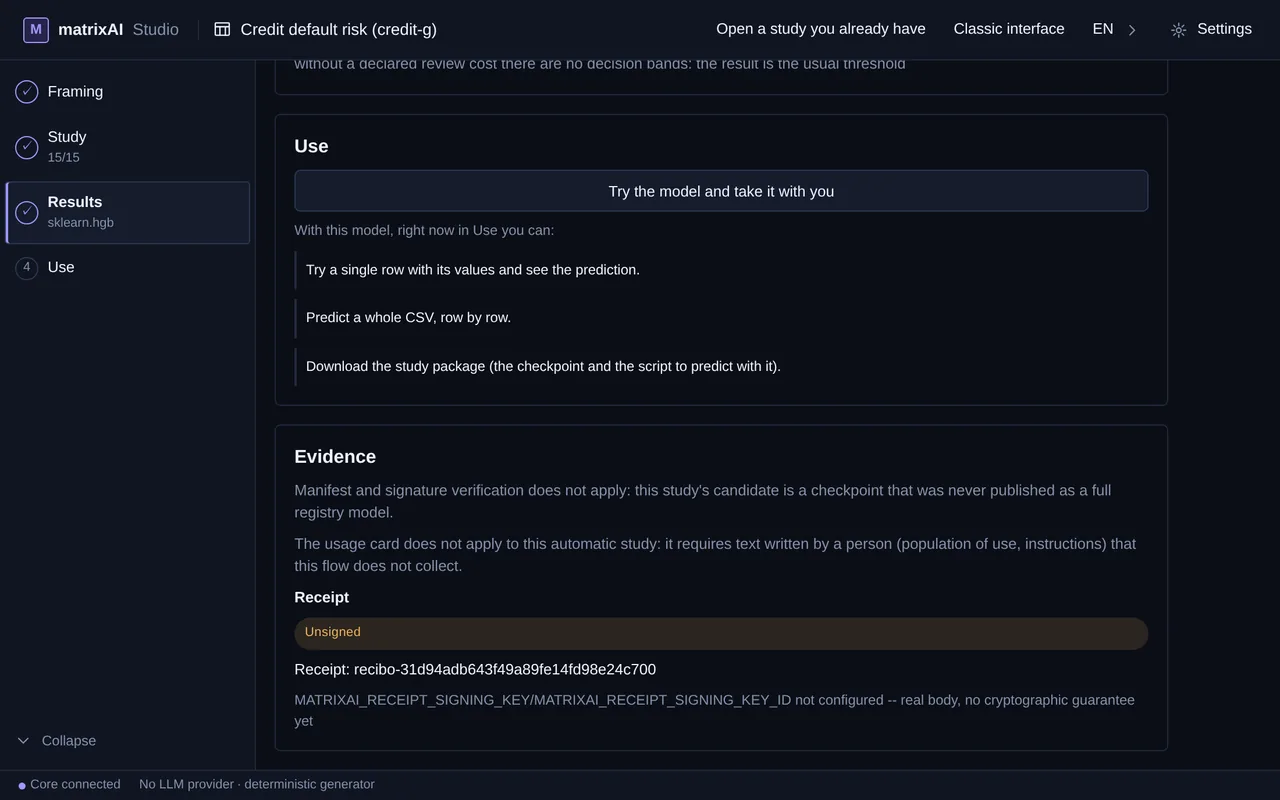
The winner’s package, and the whole study
Build the package and you get the winner with its preparation recipe and a predict.py that predicts like the screen does — with Python, outside the Studio, but it needs the Studio’s engines: it does not run on a machine without them. The receipt is not in that package: it travels in estudio-completo.zip, the full study, which you reopen in another Studio. A page that predicts in the browser (ONNX) is offered only when LightGBM wins a binary classification, with its decision chosen and no date columns; otherwise the option is shown switched off with its reason. Your data never leaves your machine — except the 5 rows and the counts you send to your LLM if you tick the optional proposal described below.
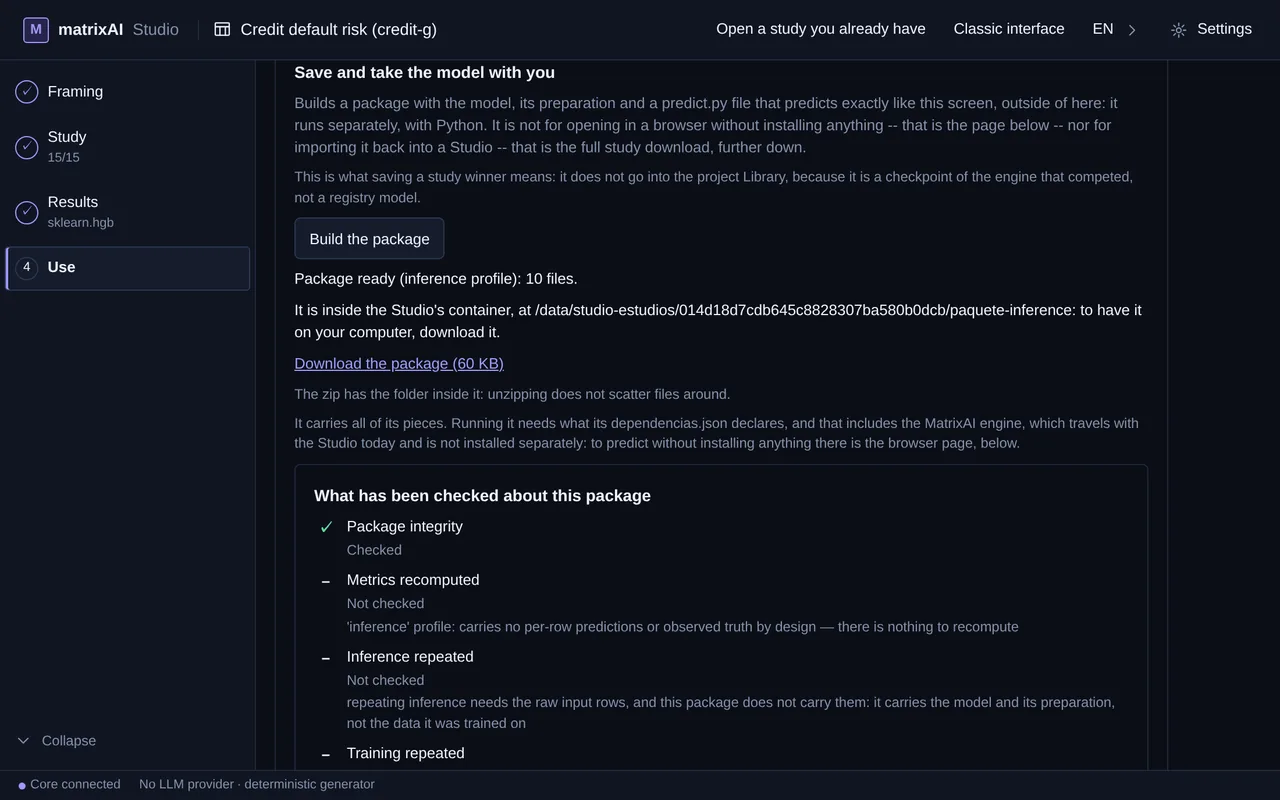
The LLM can propose the framing — and you confirm it
If you have an LLM configured in Settings, you can tick “Let the LLM propose the fields”. It then proposes the empty fields of the framing — target column, problem type, positive class, observation unit, prediction time and horizon — and each proposed field carries a “Proposed by the LLM” mark until you edit it. What goes out: the column names, a few counts for each column (type, % empty, distinct values) and 5 real rows of your CSV, to the LLM configured at that moment, which the notice names before you tick. What you send is your responsibility: with personal data, do not tick the box or remove it from the CSV first. What it does not do: it does not fill in what you already wrote, it confirms nothing — you review and confirm — it needs a configured LLM, and it is not in the hosted demo. Without the tick, this sends nothing.
Or build one network yourself
Expert mode is still in the product, behind a switch: Turn on expert mode on the Studio’s home screen. There you describe one model in a sentence, upload a CSV or start from a template, and the core builds that one network, phase by phase — the way of working the Studio had before the study. It is a different tool: nothing in it makes engines compete. What follows is what expert mode gives you.
Describe it — the schema stays on the table
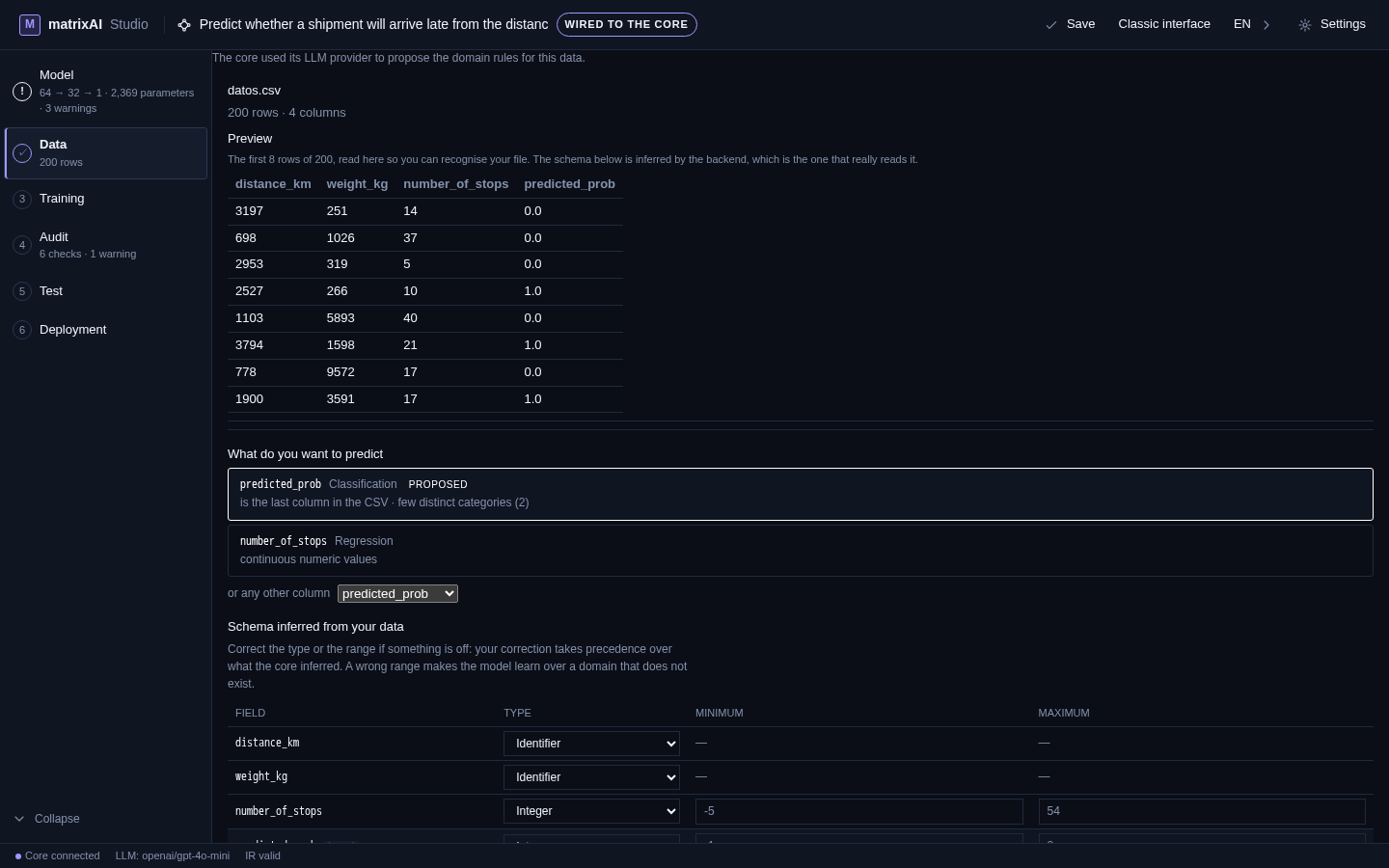
Three ways in: a sentence, your CSV, or a template from the catalogue. Whichever door you take, the core reads the data, proposes a target with its reason — and the alternative it considered — and prints the schema it inferred: every field, its type, its range, all editable. It proposes; you decide. And the screen warns you about the part that matters: a wrong range makes the model learn over a domain that does not exist.
A trace with names on it
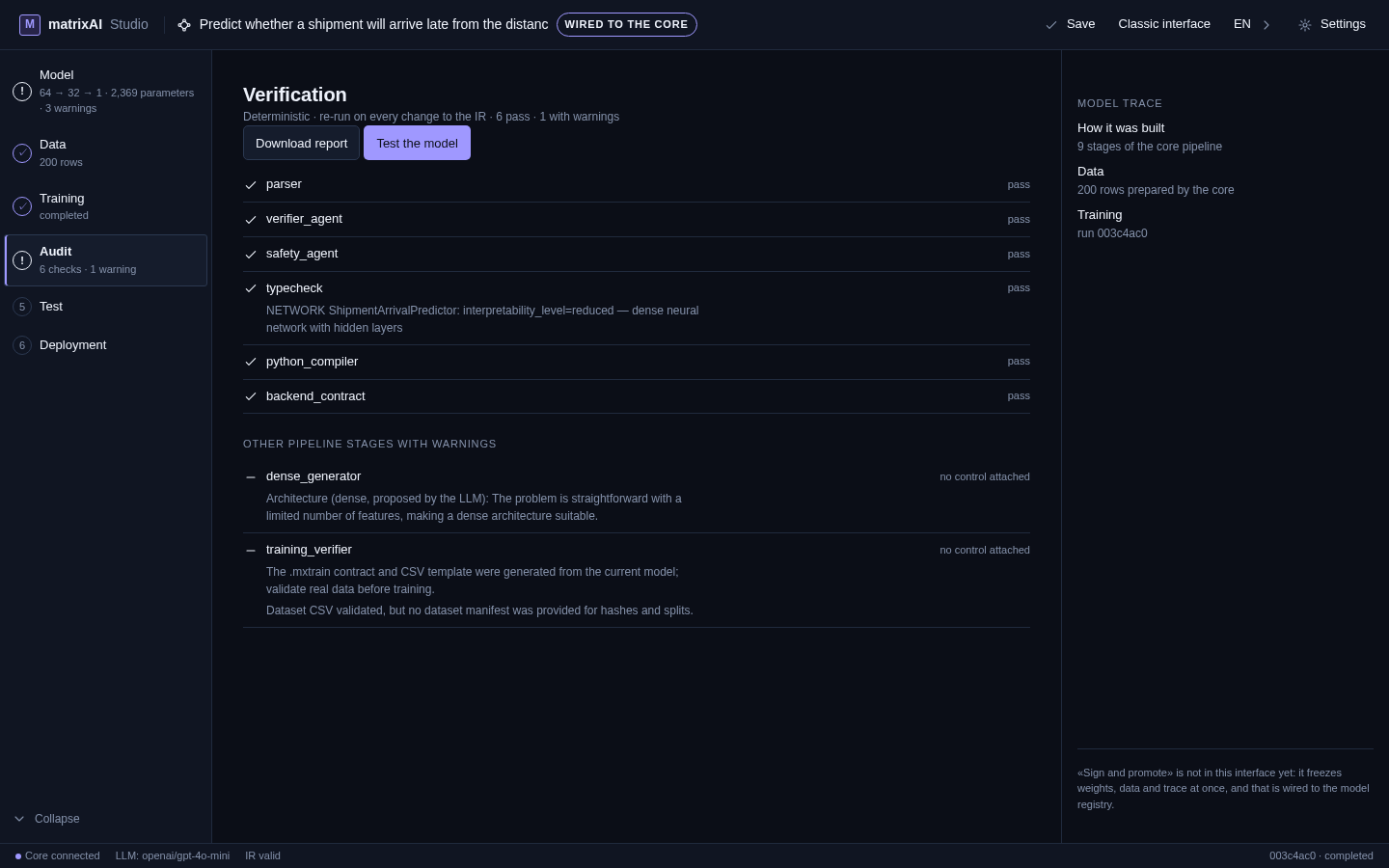
The audit is not a training summary. Six checks run against the model itself — parser, verifier_agent, safety_agent, typecheck, python_compiler, backend_contract — and they re-run on every change, so the verdict cannot go stale behind your back. The pipeline stages that carry no pass/fail are listed apart with whatever they did report, instead of disappearing under a green tick. The whole verification downloads as a file, and the trace links the model to the data it was prepared with and the training run it belongs to.
Checked before a single weight moves
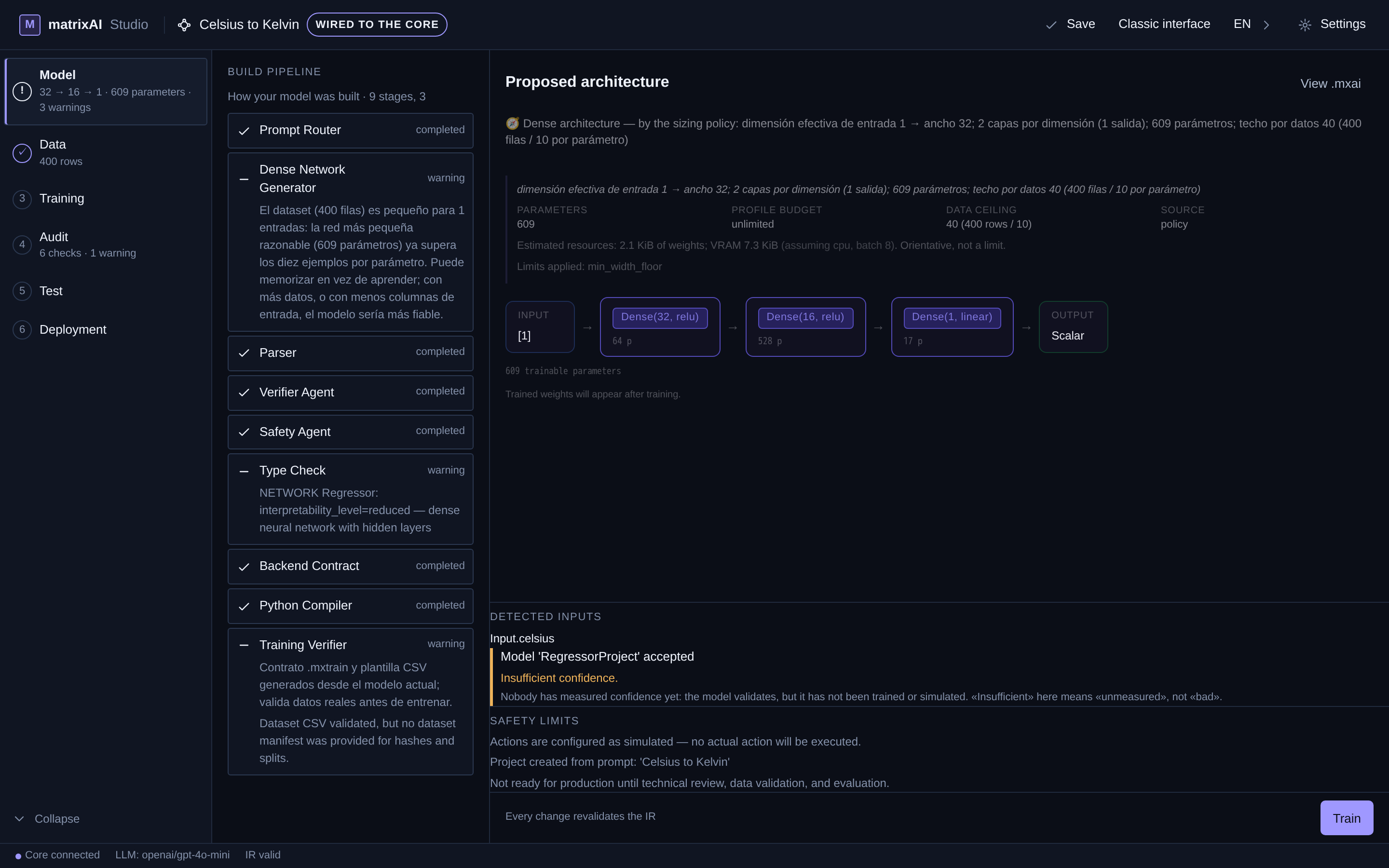
Before training, the model is already an object you can verify: the type check types the network and states its interpretability level, and the parameter count is printed so you can redo the arithmetic yourself — a 64 → 32 → 1 network over three inputs is 2,369 parameters, and that is what the screen says. The resource estimate arrives with figures, not adjectives, and it works in both directions: a small model announces kilobytes, and when we asked for a 2,953,150,466-parameter network, the answer was that training it needs ~26.8 GiB — the hosted demo refuses it outright, and the downloadable Studio shows the warning with its figures and leaves the decision to you. A tool that tells you the bill before you commit is the difference between an estimate and a promise.
Its export predicts without MatrixAI
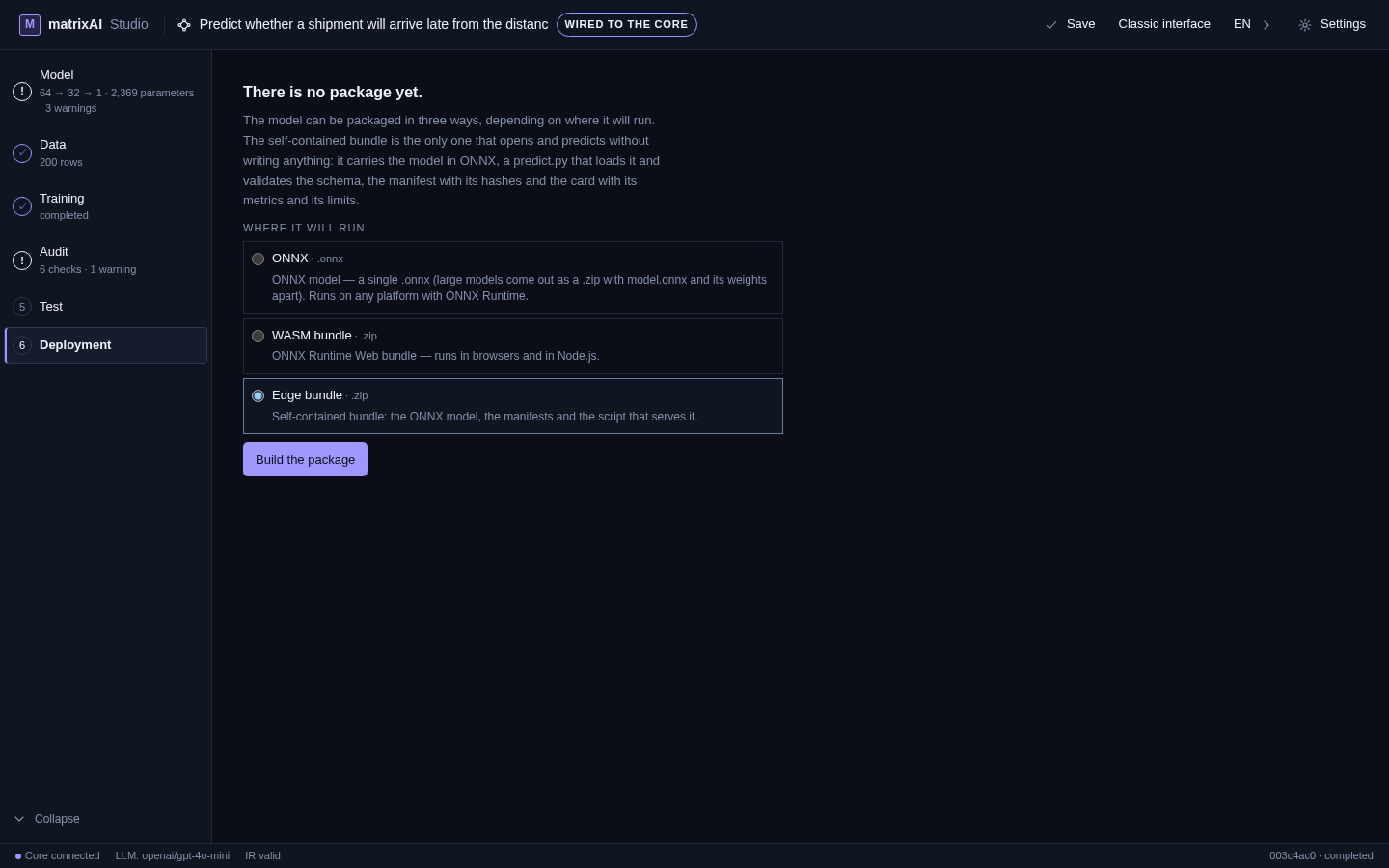
This is the expert-mode export, not the study’s package. The self-contained bundle carries the model in ONNX, a predict.py that loads it and validates the schema, the manifest with its hashes, and the model card with its metrics and its limits. You feed it raw values — no MatrixAI installed, no service to call. And the parity is measured, not assumed: in an August audit of that export, the exported model, loaded with a plain ONNX runtime, returned the same answer as the Studio on all six test inputs — six of six.
Real data, declared limits: tomorrow’s rain in Santander
The template catalogue includes a case built on five years of real daily history for Santander, Spain (Open-Meteo): temperatures, pressure, humidity, wind, cloud cover, dew point and today’s rain, with the target built by shifting rainfall one day back — each row predicts tomorrow using only what was known that day, never data from the future. The card also carries, in red and before you create anything, the limit of its data: it does not allow commercial use. Next to it, a wave-height case on five years of real hourly marine data. That is the pattern everywhere: what something is good for and what it is not, printed where you decide.
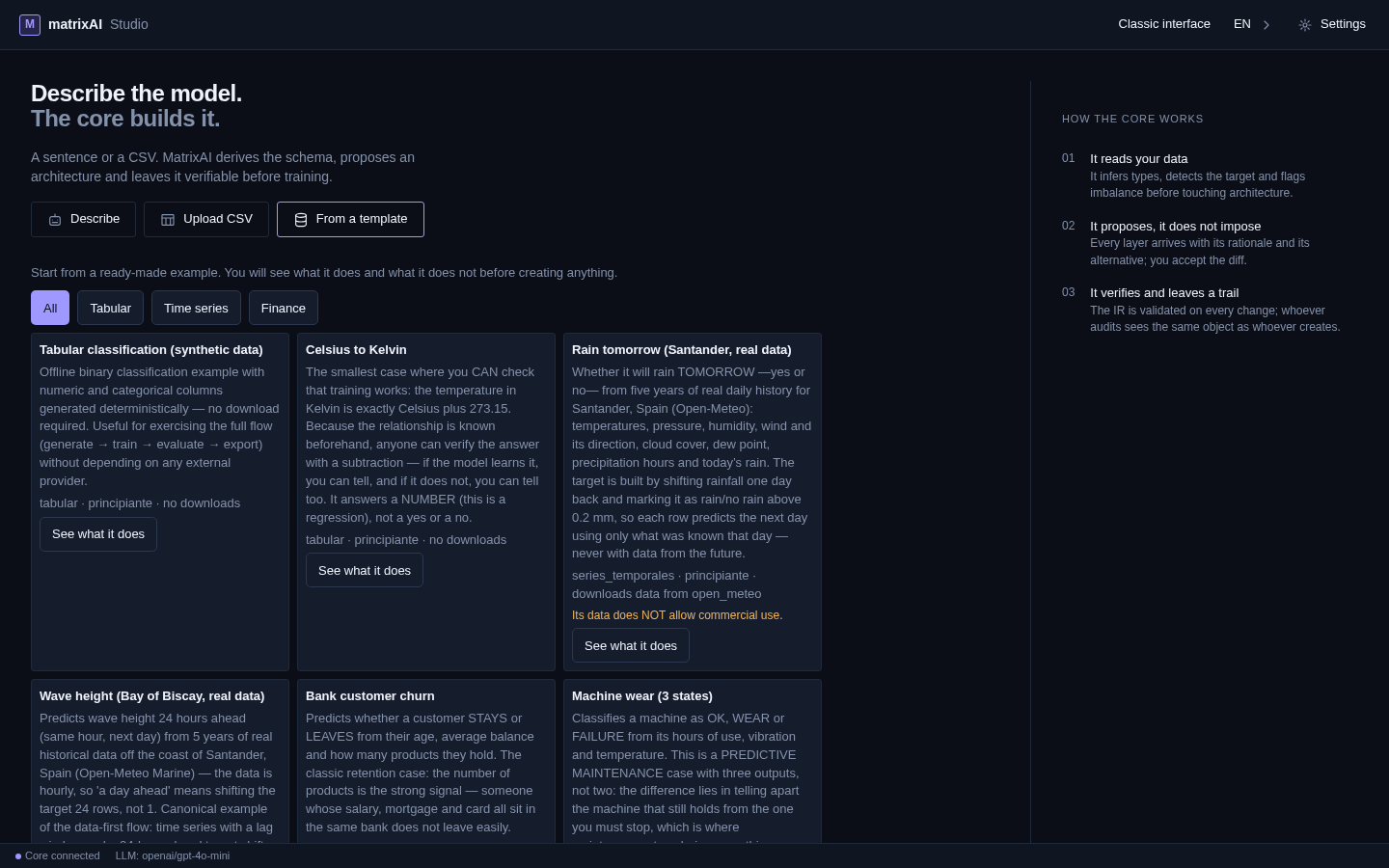
The full expert-mode cycle, screen by screen, is in its manual — captured from a driven session and honest about its numbers: its walkthrough trains on generated rows and reports a chance-level result as exactly that, because showing that the product declares a bad run is worth more than a prettier screenshot. The main path, the study, is in the tour.
What it does not do
This product states its limits on every screen, and this page follows the same rule. Read these before you download — the rest is easier to trust afterwards.
Try it without installing
The demo runs in the browser against the real core, with sample data — no account, nothing to install. It is limited: training has a cap on epochs and seconds, it does not export models, and a file you upload there goes to our server, which the download never does. The tour and the manuals show every screen of the real Studio from driven sessions. The core is AGPL, on GitHub. When you want it on your machine, the download is one ZIP and one script.