The data recipe,
line by line
A few lines you write to say how your columns relate to what you want to predict. The core reads them, labels every generated row with them, and hands you back the rule it used and a fingerprint of the data.
Every screenshot on this page comes from a real session, driven from the first screen to the last. Nothing here is a mock-up.
The model was built from one sentence with its ranges declared in it, so the numbers you see can be checked: debt_euros runs from 0 to 500,000 euros and age_years from 18 to 95. And the recipe was not typed — it is the example the product writes for you with your own columns, put in the box with one click. That is why its thresholds are 350,000 and 41.
The box sits in phase 2, Data, under GENERATE DATA WITH THE CORE — above the button, so that what it says about generating without one is read before you press, not after you train. The Workbench has the same box in the Data view of the model: same language, same texts, same core. A short version of this manual travels inside the product too, folded under How to write a recipe right next to the box.
Without a recipe, the target is drawn at random
Generated rows used to get their answer from a coin toss, and that is measured, not felt. Over 400 rows, any correlation below 0.098 is indistinguishable from chance. The highest correlation between any input column and the target was 0.049 for a binary target and 0.054 for a continuous one. There was nothing in there to learn.
The consequence landed on whoever had just installed the Studio: generate data, train, and read about 50 % accuracy. The product reported that honestly — and anyone looking concluded the product did not work.
With a recipe, the same walk-through — one sentence, 200 generated rows, a rule with 8 % declared noise — trained to 87.5 % accuracy. Measured end to end on 2026-08-18, driving the application.
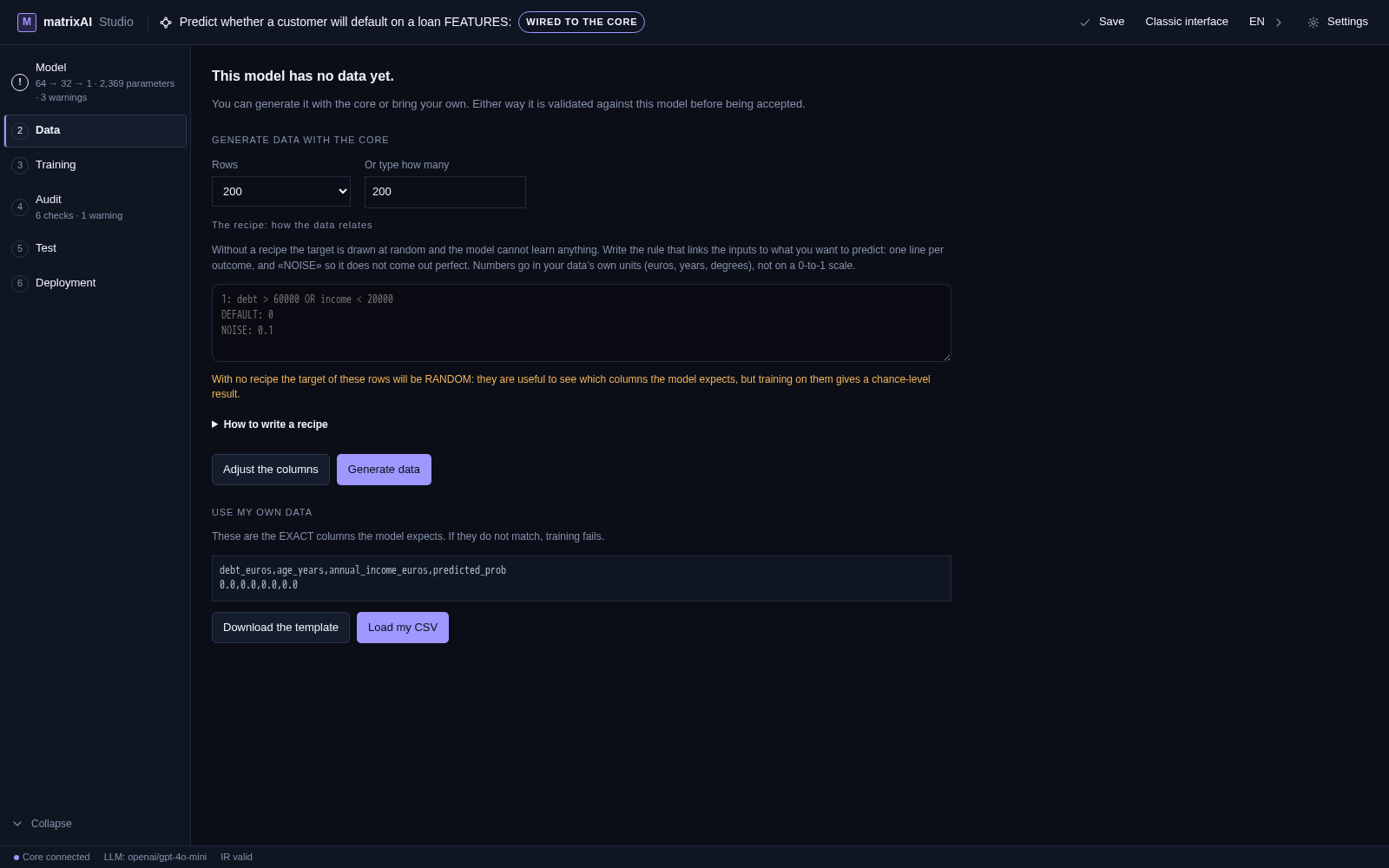
The shape of a recipe
A recipe for a target with classes is a list of rule lines and one DEFAULT. This is the one the third screenshot on this page was generated with:
# the first matching line wins
1: debt_euros > 350000 AND age_years > 41
DEFAULT: 0
NOISE: 0.08
BALANCE: 1=0.3, 0=0.7- Each rule line is
label: condition. The label is either a name (HIGH,LOW) or a number (1,0) — both are accepted, because a binary target's labels are not identifiers. It has to be one of the labels your model declares. - It is read top-down and the first line that matches wins. A row claimed by an earlier line is never offered to a later one, so the order of your lines is part of what they mean.
DEFAULT:is what every other row gets. It is required — a recipe whose default is missing, or names a label the model does not have, is rejected.- At least two different labels have to be reachable between your rules and the
DEFAULT. One outcome for everything is not a rule, it is a constant, and it is rejected as such. - Lines starting with
#are comments.
What a condition can say — and what it cannot
A condition is exactly column OPERATOR number, and the operators are <, <=, >, >=, == and =. The last two mean the same thing and compare with a tolerance of 1e-9, so an equality on a decimal column behaves the way you would expect.
Four things it cannot do, and none of them raise an error:
- compare two columns — the right-hand side is a number, always;
- use parentheses, or any arithmetic inside the condition;
- name a column the model does not have — that one is caught and reported;
- mix
ANDandORon the same line.
The last one is the one that surprises people, so it is worth being blunt: a line with both combiners is discarded whole. The parser does not guess a precedence it was never told, and it does not complain either — the line simply is not there any more. Write two lines instead, and let the order do the work:
# not this — the whole line is dropped
1: debt_euros > 350000 AND age_years > 41 OR age_years < 25

# this — first match wins, so the order is the precedence
1: age_years < 25
1: debt_euros > 350000 AND age_years > 41
DEFAULT: 0The numbers go in your data’s own units
Write debt_euros > 350000, not debt_euros > 0.7. Euros, years, degrees, millimetres — whatever that column is measured in. This is the mistake that breaks more recipes than every other rule on this page put together, and the product's own example used to make it.
The reason it is so easy to make is that the core samples rows in a normalized 0-to-1 space internally, and converts your threshold into it using the range of that column. What it deliberately does not do is clamp: a threshold outside the column's range stays outside, so the condition is correctly never true — instead of being quietly pulled to the edge and half-working.
So debt_euros > 0.6 on a column that runs from 0 to 500,000 is true for every single row. Every row gets the same label, the recipe is perfectly valid and completely useless, and the core notices: it falls back to random labels and says so.
NOISE — the rows that contradict you on purpose
NOISE: 0.1One row in ten does not follow the rule. It is a proportion between 0 and 1, not a spread, and it is written that way because it explains itself in one sentence and works the same for two classes or for five. RUIDO is accepted too; NOISE is the canonical spelling, like DEFAULT, AND and OR.
- Why it exists: a deterministic rule with no noise makes a perfectly separable dataset, and the model trains to about 100 % accuracy. It works, and it is precisely the number that does not survive being shown to anyone technical.
- The contradicting row never keeps its own label. When the alternative could include the label the rule had already chosen, half the flips changed nothing and a declared 10 % came out as 6.5 % — measured. A recipe that declares 10 % and delivers 6.5 % is a recipe that lies, and this recipe gets published with the model.
- A value outside 0-to-1 is ignored, not rejected. The rest of the recipe still runs, in keeping with the rest of the parser.
BALANCE — asking for the split you want
BALANCE: 1=0.3, 0=0.7Thirty per cent of the rows should be class 1. 1=30% works as well, and REPARTO is accepted as a synonym. Without it the split is whatever the rule and the ranges happen to produce.
That matters more than it sounds. In real life the default, the failure and the readmission are the minority, and being the minority is exactly what makes them hard to learn. A dataset where the rare class is not rare teaches a problem nobody has.
How the split is reached is part of the promise. Rows are not relabelled — that would break the rule, and the dataset would stop obeying its own recipe. The surplus rows are resampled, over and over, until the rule by itself produces the split you asked for. And if it cannot get there, that is declared rather than quietly missed.
When what you predict is a quantity
A rule with labels is no use for a continuous target: there is no label to pick, there is an amount to compute. So the recipe becomes an expression.
usage = 0.05*sqm + 1.2*people + 5
NOISE: 0.1- Left of the
=is the target. Right of it is a sum ofcoefficient*columnterms and a constant. A term written without a coefficient counts as 1, and the sign belongs to the term. - That is the entire grammar: no functions, no piecewise conditions, no interactions. The scope was closed deliberately — everything else made the evaluator grow without an end in sight.
- Coefficients are written in the scale of your domain, the same as the thresholds of a class rule.
NOISE means something different here, and it is worth saying out loud: a continuous target cannot be «contradicted», it drifts. NOISE: 0.1 shifts each value by up to 10 % of the range the target actually covers. Without it the fit comes out perfect, and an R² of 1.000 does not survive a second look either.Before this existed, a continuous target was filled with a uniform draw between its bounds — pure noise, correlation 0.054 — so a regression model had nothing to converge on.
The screen tells you what happened, not what you asked for
Generating does not just hand you rows. Next to the data you get the rule the core actually applied, who wrote it, the fingerprint of the dataset, and any warning it raised.
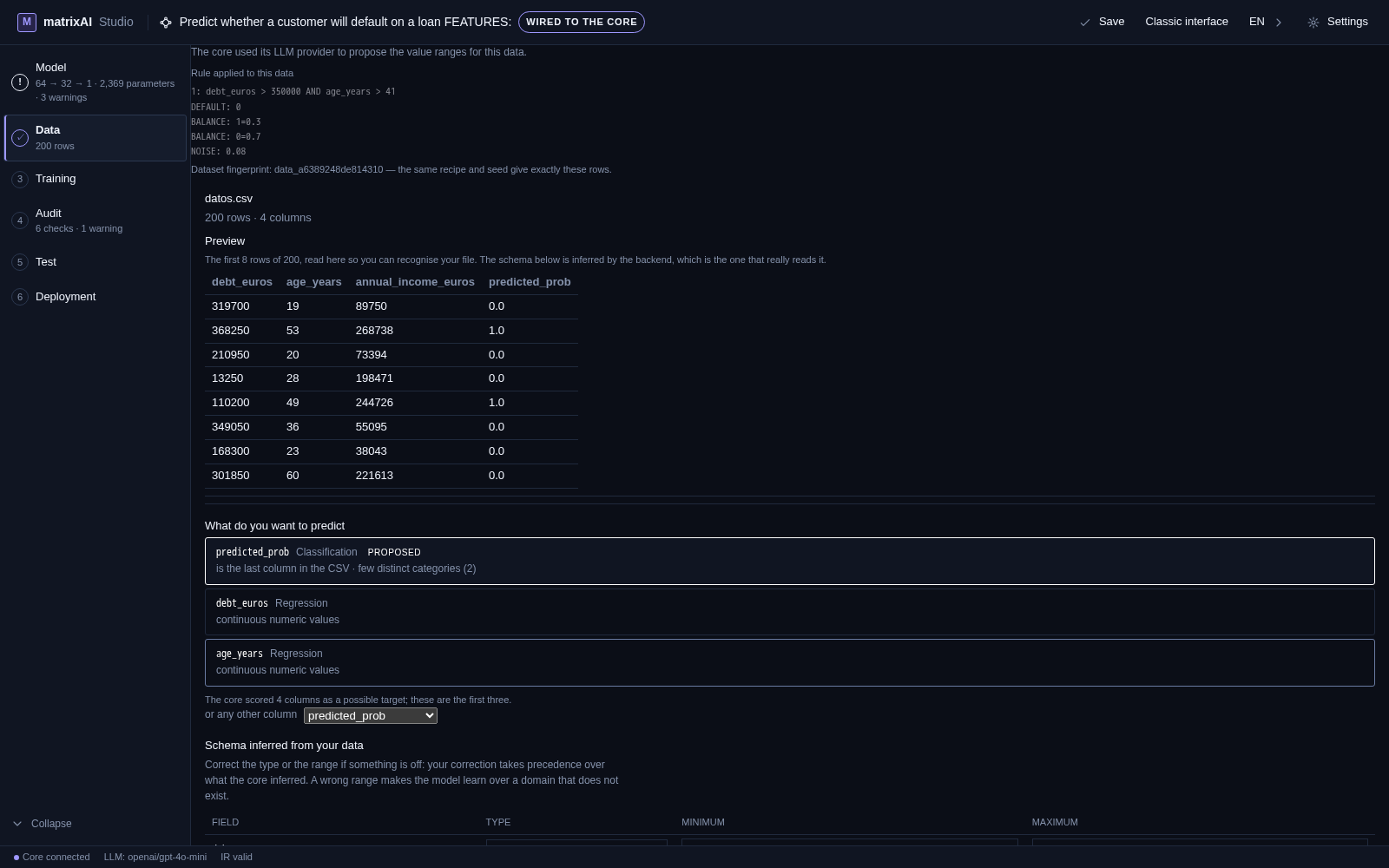
- The rule shown is the parsed one, not your text.
BALANCE: 1=0.3, 0=0.7comes back as one line per label, andNOISEis printed last. If a line of yours is missing from here, the parser dropped it — which is the fastest way to find a typo. - Three outcomes, three messages. The recipe was applied; or it could not be read and the core labelled at random; or it was read and did not separate the data, so the core labelled at random anyway. They are not the same problem and they do not get the same advice.
- Who wrote the rule is stated. If you left the box empty and an LLM provider is configured, the core may propose the rules itself — and the screen says so instead of crediting you with a decision you did not make.
The manual that lives inside the product sits one click from the box, and it writes its examples with your model's columns and ranges, so they can be used without translating anything:
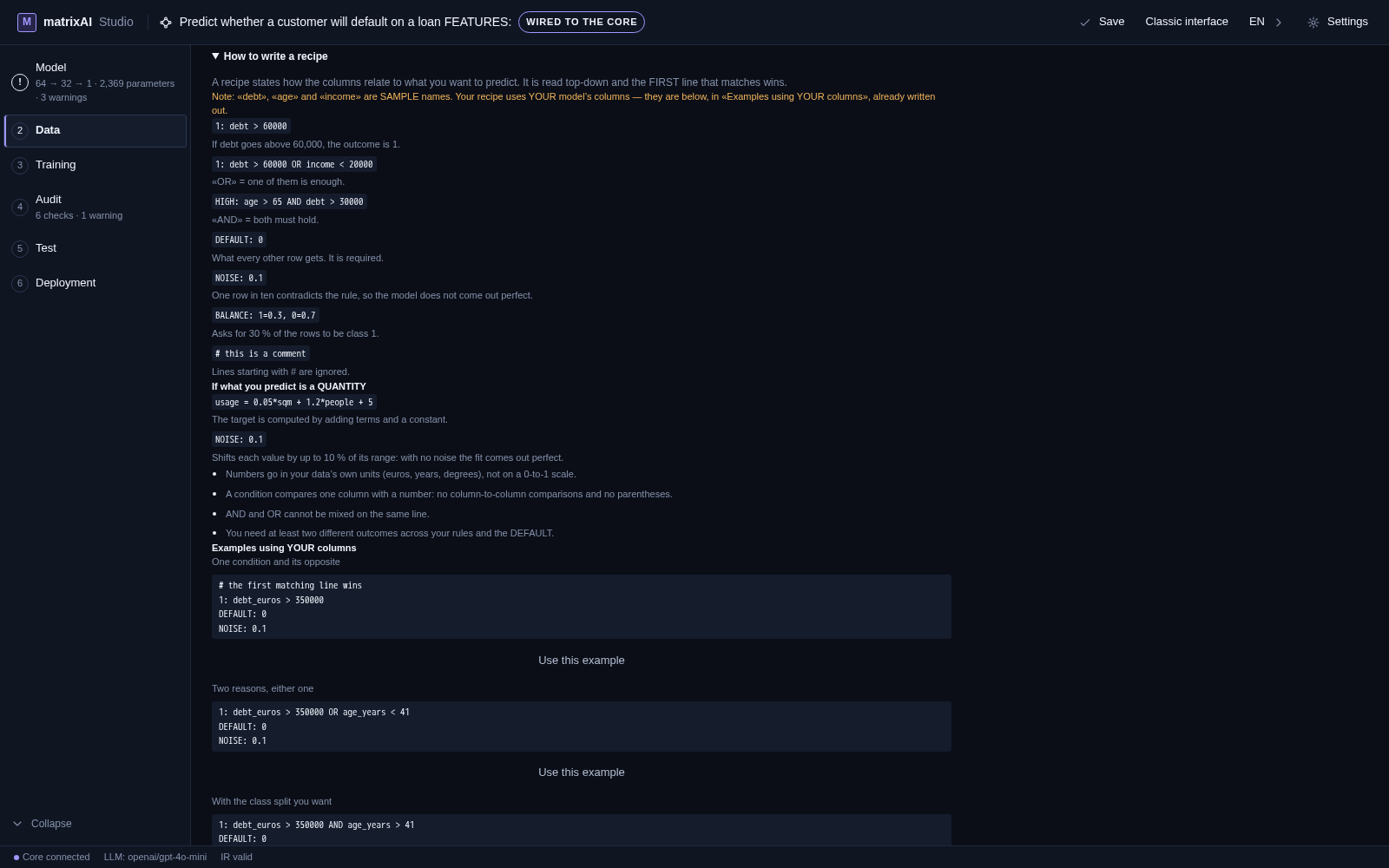
Same recipe, same rows — and the recipe goes with the model
- The fingerprint is checkable. It is
data_followed by the first 16 hexadecimal characters of the sha256 of the generated CSV. The same recipe with the same seed gives the same fingerprint and therefore exactly the same rows — the noise and the resampling draw from the same random stream as the columns, so the seed still rules. - It is saved with the model (
data_recipe) and comes back with it: close the Studio, reopen the project, and the dataset can be rebuilt. - It ships inside the exported bundle as
data_recipe.txt, next to the inference spec — so whoever receives a model can read what data trained it and under which rule. - It is ten lines of text. It lives in its own file rather than inside the training program, which means it can be pasted into a post or an article and read by someone who has never opened the Studio.
What a recipe is not
- It is not real data. A recipe generates synthetic rows, declared as such. For production, bring your own CSV — that door is right below the box and takes the same validation.
- It does not replace the template catalogue. Celsius to Kelvin, the Santander rain data, EUR/USD from the ECB: those are real measurements, and they remain the best door for anyone who wants to see the product work on something true.
- It does not improve the training engine. Not one line of it changed. What changed is what the engine is fed.
- It does not know your domain. The core guarantees that the rows obey the rule you wrote and that you can reproduce them. Whether that rule is true of the world is your call, and it is the one part nobody can check for you.