Mathematical Functions, CLI & API
A complete guide to every function MatrixAI can execute, how to call them from the terminal, and how to integrate them in your application via the HTTP API. No prior knowledge of the technical contracts is required.

1. What are mathematical functions in MatrixAI?
When you define a model in MatrixAI (using a .mxai or .mx file), you describe what calculations that model should perform using mathematical functions. Think of it as a powerful spreadsheet that can also learn from data.
There are three layers worth distinguishing:
| Layer | What is it? | Example |
|---|---|---|
| `.mx` registry | Mini-language for writing custom formulas | score(x) = 0.6 * relevance(x) + 0.4 * coherence(x) |
| `.mxai` kinds | How MatrixAI classifies each expression internally | `softmax_linear`, `sigmoid_linear`, `symbolic_expr`… |
| Trainable backend | Which functions can adjust their parameters from real data | Only `softmax_linear` and `sigmoid_linear` today |
Formulas are written in .mx files with syntax close to standard mathematical notation:
# Example: score.mx
score(x) = 0.6 * relevance(x) + 0.4 * coherence(x)
utility(x) = score(x) - 0.2 * cost(x)
MatrixAI first looks for a function you defined yourself. If it doesn't find one, it falls back to the native registry documented in this manual.
2. Basic numeric operations
Standard arithmetic functions available in all .mx expressions:
| Function | What it does | Example |
|---|---|---|
add(a, b) | Addition | add(3, 5)` → `8.0 |
sub(a, b) | Subtraction | sub(10, 4)` → `6.0 |
mul(a, b) | Multiplication | mul(2.5, 4)` → `10.0 |
div(a, b) | Division (rejects division by zero) | div(9, 3)` → `3.0 |
pow(base, exp) | Power / exponent | pow(2, 8)` → `256.0 |
sqrt(x) | Square root | sqrt(16)` → `4.0 |
abs(x) | Absolute value | abs(-7)` → `7.0 |
min(...) | Minimum of several values | min(3, 1, 7)` → `1.0 |
max(...) | Maximum of several values | max(3, 1, 7)` → `7.0 |
mean(...) | Arithmetic mean | mean(2, 4, 6)` → `4.0 |
sum(...) | Sum of all values | sum(1, 2, 3, 4)` → `10.0 |
# candidatos.mx — scoring candidates for a position
score(c)      = 0.5 * c.experience + 0.5 * c.technical_test
delta(c1, c2) = sub(score(c1), score(c2))
best(c1, c2)  = max(score(c1), score(c2))
3. Transformations and probability
These functions transform values: clamp them, rescale them, or convert them into probability distributions.
normalize(x) — Clip to [0, 1]
normalize(1.5)  → 1.0   # clamped to maximum
normalize(-0.3) → 0.0   # clamped to minimum
normalize(0.7)  → 0.7   # unchanged
clip(x, lo, hi) — Clip to any range
clip(150, 0, 100)  → 100.0   # score cannot exceed 100
clip(-5, 0, 10)   → 0.0     # cannot be negative
clip(7, 0, 10)    → 7.0     # within range, unchanged
scale(x, old_min, old_max, new_min, new_max) — Rescale ranges
# Convert a grade from 0-10 to 0-100
scale(7.5, 0, 10, 0, 100)  → 75.0

# Convert temperature Celsius to 0-1
scale(37, 35, 42, 0, 1)    → 0.285...
sigmoid(x) — Convert any number to a probability
sigmoid maps any real number to a value between 0 and 1. Ideal for binary decisions.
sigmoid(0)   → 0.5      # equilibrium: 50% probability
sigmoid(5)   → 0.993    # very likely yes
sigmoid(-5)  → 0.007    # very likely no
sigmoid(2)   → 0.88     # quite probable

# credit_risk.mxai
risk(client) = sigmoid(2.5 * client.default_history - 1.8 * client.income + 0.3)
softmax(values) — Scores → probabilities summing to 1
softmax([2.0, 1.0, 0.5]) → [0.626, 0.230, 0.143]
# 62.6% probability for option 1, 23% for option 2, 14.3% for option 3
4. Semantic scoring functions
Designed to evaluate conceptual properties of data: relevance, coherence, safety, etc. Very useful when models work with text or qualitative assessments. They accept both a direct number and a dictionary (from which they read a specific key automatically).
| Function | Dict key | Default | Use |
|---|---|---|---|
relevance(x) | "relevance" | 0.0 | How relevant is this result to the query? |
coherence(x) | "coherence" | 0.0 | Is it internally consistent? |
confidence(x) | "confidence" | 0.0 | How confident is the model in its answer? |
novelty(x) | "novelty" | 0.0 | Is it new, non-repeated information? |
safety(x) | "safety" | 1.0 | Is it safe? (optimistic default: 1.0) |
quality(x) | "quality" | 0.0 | General result quality |
# ranking.mx — ranking search results
score(r) = 0.4 * relevance(r) + 0.3 * coherence(r) + 0.2 * confidence(r) + 0.1 * safety(r)
# r = {"relevance": 0.9, "coherence": 0.7, "confidence": 0.8, "safety": 1.0}
5. Cost functions
Complement scoring functions: while relevance or quality measure things you want to maximise, cost functions measure things you want to minimise.
| Function | Dict key | Use |
|---|---|---|
cost(x) | "cost" | General cost (compute, money, resources) |
latency(x) | "latency" | Response time |
token_cost(x) | "token_cost" | Token cost (useful with LLMs) |
# efficiency.mx — select the most efficient provider
utility(option) = quality(option) - 0.3 * cost(option) - 0.2 * latency(option)
6. Selection and ranking
These functions work with lists of options to select the best ones, sort them, or filter them.
| Function | What it does |
|---|---|
argmax(items, score_fn) | Returns the element with the highest score |
topk(items, score_fn, k) | Returns the top k elements in descending score order |
threshold(items, score_fn, min_score) | Returns only elements that exceed a minimum score |
rank(items, score_fn) | Returns the full list sorted from highest to lowest score |
# candidates = ["A", "B", "C"] with scores: A=0.7, B=0.9, C=0.4
argmax(candidates, my_score_fn)       → "B"
topk(candidates, my_score_fn, 2)      → ["B", "A"]
threshold(candidates, my_score_fn, 0.6) → ["A", "B"]
rank(candidates, my_score_fn)         → ["B", "A", "C"]
7. Trainable architectures: what MatrixAI can learn
Not all functions can "learn". Trainable functions have parameters (weights) that are adjusted during training. Today MatrixAI supports two trainable types:
Multiclass classification — softmax_linear
Learns to classify inputs into multiple categories. Trained with cross_entropy.
# email_classifier.mxai (fragment)
predict(email) = softmax(W1 * email + b1)
# W1 (weights) and b1 (bias) are learned from labelled examples
Use cases: email classification (spam/normal/urgent), ticket categorisation, intent recognition.
Binary classification / risk — sigmoid_linear
Learns to estimate a probability from 0 to 1. Trained with binary_cross_entropy.
# fall_risk.mxai (fragment)
risk(patient) = sigmoid(W1 * patient + b1)
Use cases: credit risk (approve/reject), fraud detection, binary medical risk, churn prediction.
What is not yet trainable (but is executable)
These expressions work correctly in your models but won't learn from data:
- Manual weighted sums (
symbolic_weighted_sum) - Normalisation and scaling
- Aggregations (mean, max, min over lists)
- Discrete rules (argmax, vote)
- Attention, trainable embeddings, transformers, arbitrary deep networks
8. Translating discrete rules to continuous mathematics
mathematize translates "if X then Y" rules into continuous mathematical expressions that models can process and audit.
Business rules are often written like this:
if risk > 0.8 then alert
if income < 20000 and debt > 0.5 then reject
This discrete logic is not differentiable, which prevents its use in training. MatrixAI converts it to continuous equivalents:
| Input rule | Generated expression | Type |
|---|---|---|
if risk > 0.8 then alert | sigmoid(20 * (risk - 0.8)) | Soft threshold |
if x < 0.2 then action | sigmoid(20 * (0.2 - x)) | Inverted soft threshold |
if a > 0.5 and b > 0.7 | sigmoid(a - 0.5) * sigmoid(b - 0.7) | Probabilistic AND |
classify x into a, b, c | softmax([score_a, score_b, score_c]) | Multiclass |
score = 0.6 * a + 0.4 * b | Symbolic weighted sum | Weighted sum |
pick the best of candidates | argmax(scores) | Selection |
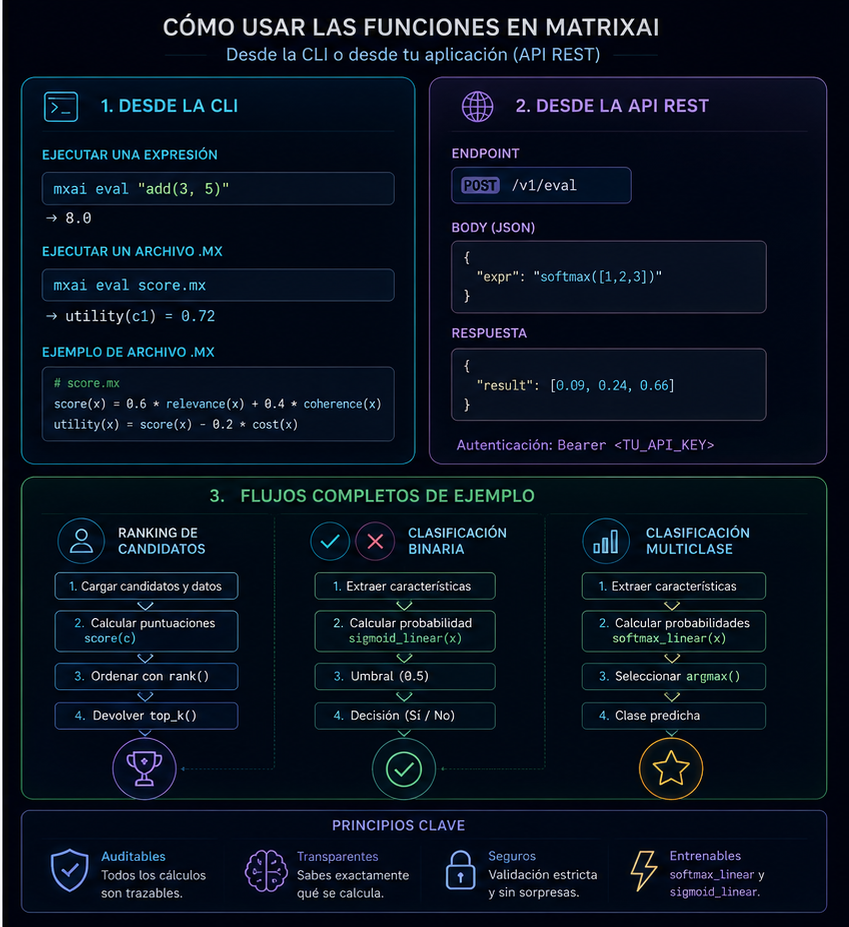
9. Using functions from the CLI
The MatrixAI CLI is the most direct way to work with mathematical functions, models and data from the terminal.
Installation and basic use
matrixai <command> [options]
# or directly from the repository:
python -m matrixai <command> [options]
Common flags
| Flag | What it does |
|---|---|
--json | Returns result as JSON (useful for scripting) |
--output <path>` / `-o <path> | Saves result to a file instead of stdout |
Evaluate a mathematical expression
matrixai eval score.mx --input data.json
matrixai eval score.mx --input data.json --trace       # step-by-step detail
matrixai eval score.mx --input data.json --call score  # specific function only
Translate discrete rules to continuous math
matrixai mathematize my_rules.txt
echo "if risk > 0.8 then alert" | matrixai mathematize -
Validate and inspect models
matrixai validate my_model.mxai
matrixai lint my_model.mxai
matrixai backend-report my_model.mxai
matrixai backend-report my_model.mxai --target torch
matrixai graph my_model.mxai --format mermaid
matrixai graph my_model.mxai --format dot -o graph.dot
Run a prediction
matrixai run my_model.mxai --input input.json --params params.json

matrixai run email_classifier.mxai \
  --input '{"subject": "Exclusive offer", "sender_score": 0.2}' \
  --params runs/email_v1/params.best.json
Train a model
# Full workflow in one command:
matrixai train-supervised "a model that classifies emails as spam, normal or urgent" \
  --train-data emails_train.csv \
  --eval-data emails_eval.csv \
  -o runs/email_v1/

# Step by step:
matrixai prompt "classify emails as spam, normal or urgent" -o email.mxai
matrixai generate-training email.mxai "classify emails" -o email.mxtrain
matrixai generate-dataset email.mxai --training email.mxtrain --rows 500 -o data/
matrixai train email.mxai --training email.mxtrain -o runs/email_v1/
matrixai evaluate email.mxai --params runs/email_v1/params.best.json --training email.mxtrain
Serve the model as an HTTP API
matrixai serve email.mxai \
  --params runs/email_v1/params.best.json \
  --port 8000 \
  --api-key my_secret_key

# Open Studio in browser:
matrixai studio --port 8765 --open
10. Using functions from the REST API
MatrixAI exposes two independent HTTP servers:
| Server | Default port | Purpose |
|---|---|---|
| Production | 8000 | Serve trained models. Requires API key. |
| Studio | 8080 | Develop, train and explore models. No auth (do not expose publicly). |
Authentication (production server)
# Option A: Authorization header
curl -H "Authorization: Bearer my_secret_key" http://localhost:8000/predict ...

# Option B: X-API-Key header
curl -H "X-API-Key: my_secret_key" http://localhost:8000/predict ...
Response format
// Success:
{ "ok": true, ...data }

// Error:
{ "ok": false, "error": "description", "code": "ERROR_CODE" }
Health check
curl http://localhost:8000/health
# → { "status": "ok", "service": "MatrixAI Server", "backend": "numpy", ... }
Run a prediction
curl -X POST http://localhost:8000/predict \
  -H "Authorization: Bearer my_key" \
  -H "Content-Type: application/json" \
  -d '{"age": 35, "income": 52000, "credit_history": "good"}'

# Batch — send an array, get an array back:
curl -X POST http://localhost:8000/predict \
  -H "Authorization: Bearer my_key" \
  -H "Content-Type: application/json" \
  -d '[{"age": 35, "income": 52000}, {"age": 28, "income": 31000}]'
Generate model from natural language (Studio)
curl -X POST http://localhost:8080/api/studio/generate \
  -H "Content-Type: application/json" \
  -d '{
    "prompt": "A model that predicts 30-day hospital readmission risk",
    "input_json": "{"age": 72, "diagnosis": "CHF"}"
  }'
Async training
# 1. Start job — get job_id immediately
curl -X POST http://localhost:8080/api/train-start \
  -d '{ "mxai_text": "...", "training_text": "...", "csv_text": "..." }'
# → { "ok": true, "job_id": "job-20260603-xyz789" }

# 2. Poll status
curl http://localhost:8080/api/train-status/job-20260603-xyz789

# 3. Cancel if needed
curl -X POST http://localhost:8080/api/train-cancel \
  -d '{ "job_id": "job-20260603-xyz789" }'

# Status values: running | done | error | cancelled | timeout
11. Complete workflow examples
Example 1: Email classifier from scratch
# Step 1: Generate model from a description
matrixai prompt "classify emails as spam, normal or urgent" -o email.mxai

# Step 2: Inspect and lint
matrixai lint email.mxai
matrixai graph email.mxai --format mermaid

# Step 3: Generate training contract + dataset template
matrixai generate-training email.mxai "classify emails" -o email.mxtrain --dataset-output template.csv

# Step 4: Generate 500 coherent synthetic examples
matrixai generate-dataset email.mxai --training email.mxtrain --rows 500 --mode coherent -o data/

# Step 5: Train
matrixai train email.mxai --training email.mxtrain -o runs/email_v1/

# Step 6: Evaluate
matrixai evaluate email.mxai --params runs/email_v1/params.best.json --training email.mxtrain

# Step 7: Test a single prediction
matrixai run email.mxai --params runs/email_v1/params.best.json \
  --input '{"subject": "Exclusive offer", "sender_score": 0.15}'

# Step 8: Serve as API
matrixai serve email.mxai --params runs/email_v1/params.best.json --api-key my_key --port 8000
Example 2: Evaluate a custom scoring formula
# File: my_scoring.mx
score(opt) = quality(opt) - 0.3 * cost(opt) - 0.2 * latency(opt)
best(a, b) = argmax([a, b], score)

# File: options.json
# { "a": {"quality": 0.9, "cost": 0.7, "latency": 0.8},
#   "b": {"quality": 0.75, "cost": 0.2, "latency": 0.3} }

matrixai eval my_scoring.mx --input options.json --trace
Example 3: Translate business rules to math
# File: credit_rules.txt
# if default_history > 0.6 then auto_reject
# if income < 15000 and debt > 0.5 then high_risk
# classify application into approved, manual_review, rejected

matrixai mathematize credit_rules.txt
# Output: sigmoid and softmax expressions ready to embed in your .mxai
12. Quick reference
Functions available in .mx
| Function | Type | Trainable |
|---|---|---|
add`, `sub`, `mul`, `div | Arithmetic | No |
pow`, `sqrt`, `abs | Arithmetic | No |
min`, `max`, `mean`, `sum | Aggregation | No |
normalize(x) | Transform | No |
clip(x, lo, hi) | Transform | No |
scale(x, old_min, old_max, new_min, new_max) | Transform | No |
sigmoid(x) | Probability | Yes (in `sigmoid_linear`) |
softmax(values) | Probability | Yes (in `softmax_linear`) |
relevance`, `coherence`, `confidence | Semantic | No |
novelty`, `safety`, `quality | Semantic | No |
cost`, `latency`, `token_cost | Cost | No |
argmax`, `topk`, `threshold`, `rank | Selection | No |
Most used CLI commands
| Goal | Command |
|---|---|
| Evaluate a `.mx` formula | matrixai eval file.mx --input data.json |
| Translate rules to math | matrixai mathematize rules.txt |
| Validate a model | matrixai validate model.mxai |
| View model graph | matrixai graph model.mxai |
| Generate model from text | matrixai prompt "description" -o model.mxai |
| Train a model | matrixai train model.mxai --training contract.mxtrain -o runs/ |
| Run a prediction | matrixai run model.mxai --input in.json --params params.json |
| Serve as API | matrixai serve model.mxai --params params.json --api-key key |
| Open Studio in browser | matrixai studio --open |
| Backend compatibility report | matrixai backend-report model.mxai |
HTTP error codes
| Code | Meaning |
|---|---|
200 | Success |
400 | Malformed JSON in request |
401 | Missing or incorrect API key |
404 | Resource not found (job_id, case_id…) |
422 | Validation failed (incorrect model, incompatible data) |
429 | Too many requests (> 60/minute) |
500 | Internal server error |