Manual
Registry, continual policy and drift
Training a model is the easy half. The hard half starts the day it is running and the world stops looking like the data it learned from. These three views answer three different questions: what is published, what the model promised to watch, and what has actually changed since.
Status: in the download, not in the public demo
These three views ship in the package you download — in the phases interface, as the seventh phase, and in the Workbench. They are not in the public demo, which serves the phases interface only and stops at the model you just built.
Watch is locked until the model is signed: before that there is nothing deployed to watch, and the interface says so instead of opening panels that would answer with blanks. Read the last section too — it is what these three views deliberately do not do.
The model in these screenshots
Everything on this page was measured driving the application with one real model, not assembled from mock-ups. It is a small dense network — 915 trainable parameters, five inputs, three classes — that sorts support tickets into baja / media / alta. It was trained the normal way, on 400 rows generated by the core from a data recipe.
The numbers you will see — the thresholds, the four drift checks, the fingerprint — are the ones that came out of that session. Nothing here is illustrative.
1 · Registry — what is published
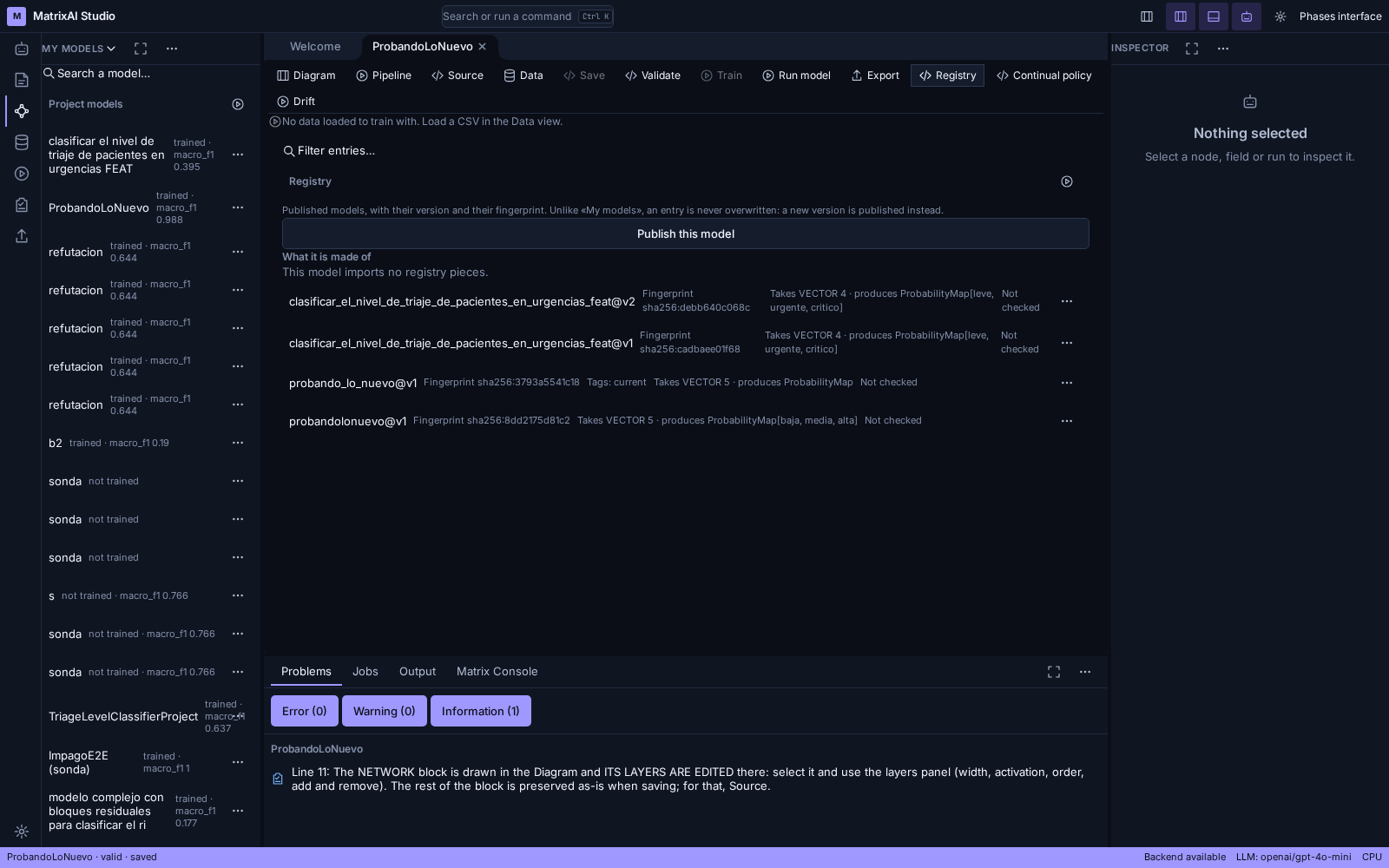
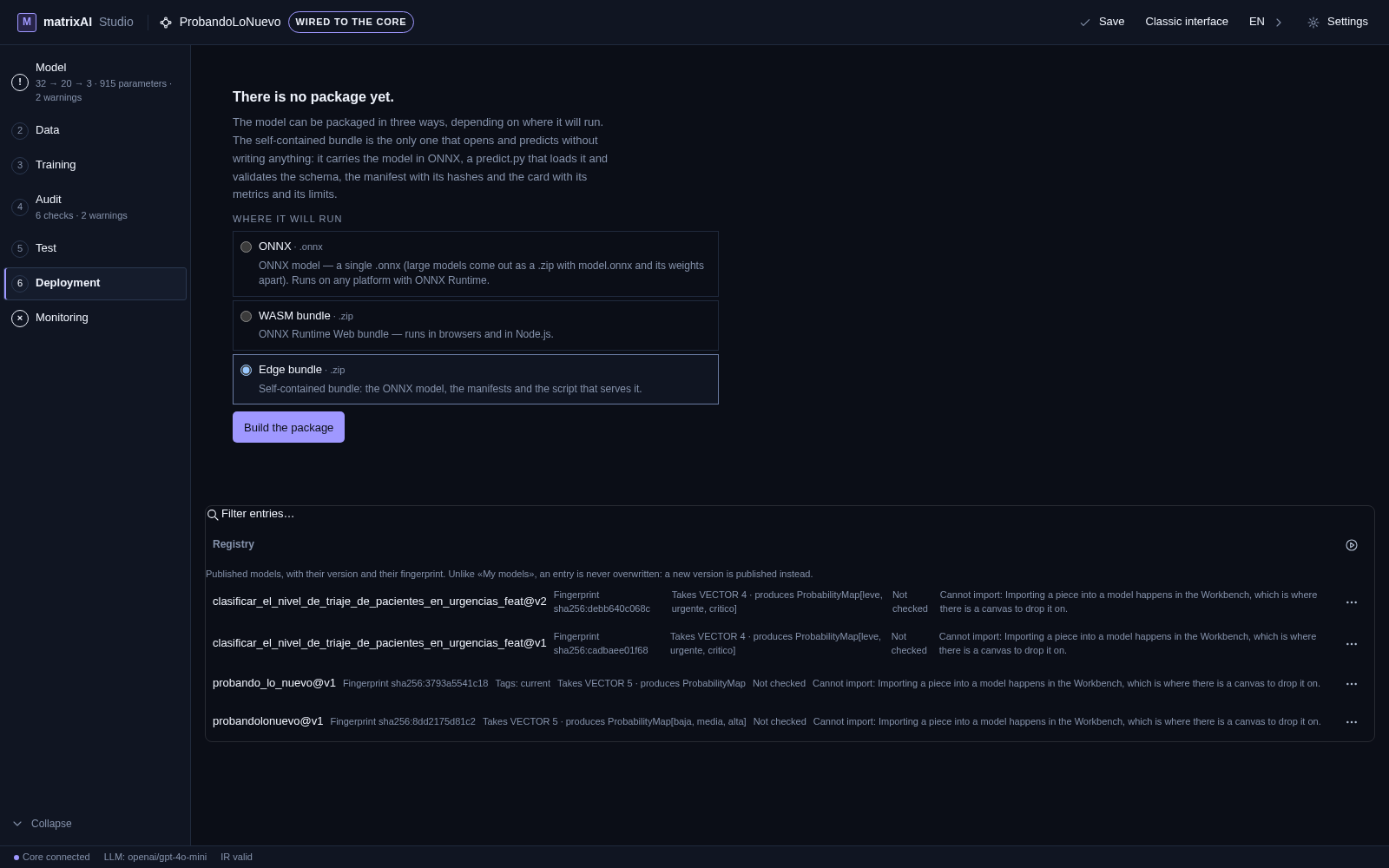
My models is your workbench: you save, you overwrite, you throw away. The Registry is the opposite — an entry is never overwritten. Publishing again creates a new version next to the old one, and the old one keeps working for whoever was already using it.
Each entry carries, and the panel shows them:
- its fingerprint (sha256:3793a5541c18…) — the hash of everything the entry contains. Change one weight and it changes.
- its types: Takes VECTOR 5 · produces ProbabilityMap. This is what lets the core say whether two pieces can be wired together — without them it would have to approve by omission.
- its tags: current is the one that means «this is what is deployed». It is moved by promoting, and moved back by a rollback.
- a Verify action that recomputes the fingerprint and says whether the entry is intact. Until you ask, it says Not checked — which is not «intact».
The registry is not created by opening the panel. If this installation has none, the view says so and what would create it. A GET that leaves files behind is an effect nobody asked for.
2 · Continual policy — what the model promised to watch
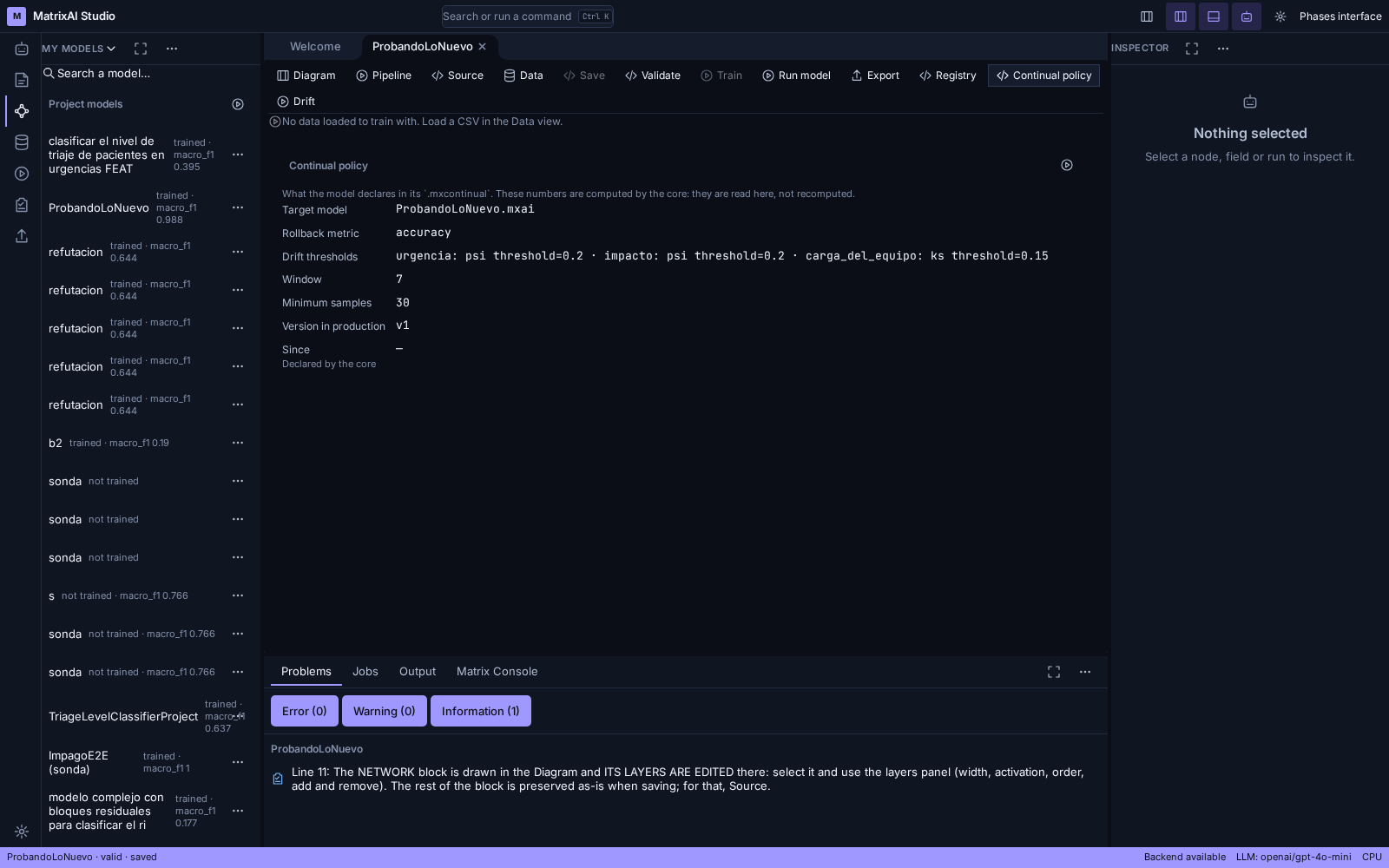
A model can travel with a .mxcontinual file next to it: a policy that declares, before anything drifts, what would count as drifting and what would be done about it. The panel reads it and shows it. It recomputes nothing — every number there is the core's, and the panel says so at the bottom.
What the rows mean, with the values from this model:
- Target model — which model the policy is about.
- Drift thresholds — per column, the method and the number that has to be crossed: urgencia: psi threshold=0.2 · impacto: psi threshold=0.2 · carga_del_equipo: ks threshold=0.15. A column with no method declared is never measured, and the drift view says that instead of reporting a zero.
- Window (7) — how many days of ground truth count.
- Minimum samples (30) — how much production data is needed before the policy is willing to have an opinion at all.
- Version in production (v1) — read from the registry's current tag. If nobody has tagged one, the panel says why there is none rather than showing a dash.
- Rollback metric — which metric a rollback would watch.
A model without a policy does not get an empty panel: it gets a panel that says it has none and what file would give it one.
3 · Drift — what has actually changed
At the top there is Check with a batch. You upload one file, and it is worth saying exactly which:
- Which CSV. One with new data: what the model is being fed now, or any batch you want to compare against its training.
- What it must carry. The columns the policy watches — the panel names them — and at least as many rows as its Minimum samples says. The answer is not needed: what is being looked at is whether the inputs have changed.
- Where it comes from. Studio does not generate it: it is yours. To try it out, Data has two downloads and they are not the same: Download template gives the columns empty, and Download the training data gives the CSV with rows the model trained on. That second one is your starting point: change the values and you have a batch.
- The reference is not uploaded. The data the model was trained on is supplied by Studio: comparing against something else would measure something else.
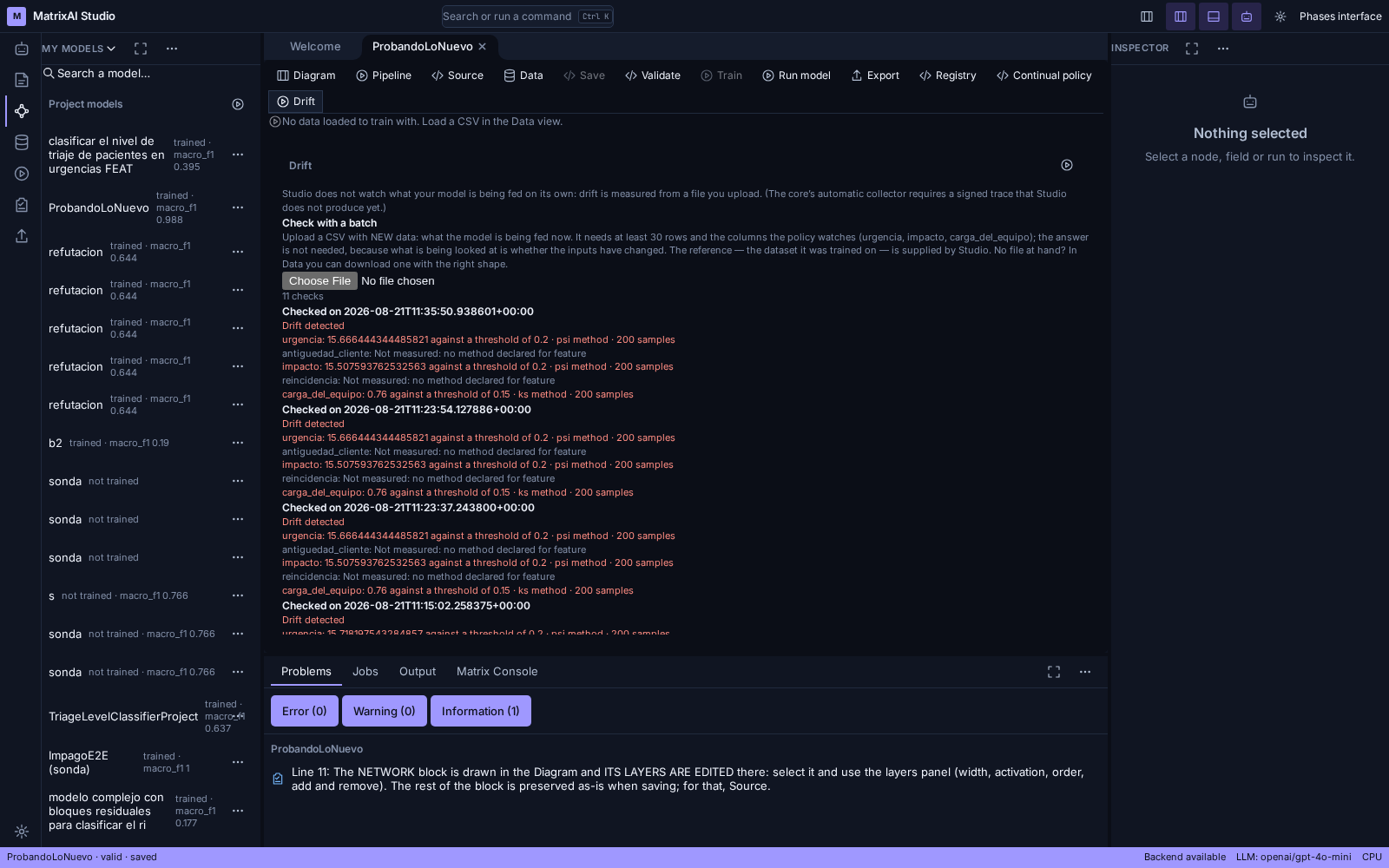
Every check is stored, so the view is a history and not a single snapshot, and it reads newest first: the one you just ran is at the top. The core computes the verdict; the panel shows it.
In the screenshot there are seven checks on the same model, and they do not all say the same thing:
- the ones at the top say Drift detected, in red, and name the column that crossed its threshold: urgencia: 15.71… against a threshold of 0.2 · psi method · 200 samples;
- further down, the ones that stayed under their thresholds say No drift;
- two columns say Not measured: no method declared for feature. That is not a zero and it is not «fine»: the policy simply never said how to watch them;
- and one says Not measured: no reference data for feature, which is a different thing: the reference did not carry that column, so there was nothing to compare it to.
A model that has never been measured says exactly that. An empty chart would read as «no drift», and those are two very different things.
Some models cannot have their drift measured at all, and that is said before you upload anything: if the model did not keep its dataset and its capture cannot regenerate it — no seed, for instance — there is nothing to compare any batch against. The panel then offers no door: it shows the reason and stops there. To measure drift on it you would have to train it again, keeping the dataset.
And when measuring fails, it says so right there, in red and next to the file you just dropped: if the batch carries none of the watched columns, it names them; and if the regenerated dataset does not match the hash the model declares, it is not used either. Measuring against something that is not what the model trained on would give a verdict about something else wearing this model's face.
And then what: proposing and deciding
When drift has been measured, the drift view can ask for a refinement proposal: a diff over the prompt that produced the model. Three things about it are deliberate.
- It needs the prompt. A saved model keeps a label, which is an extract — refining the extract would produce a proposal about a truncated text that reads like a proposal about the original.
- Rejecting requires a reason, and every decision records who and when. A silent rejection would record that someone said no and nothing else.
- Accepting does not deploy. It leaves a candidate you can look at and discard. Turning a proposed prompt into a versioned model means retraining, and promoting is a separate, human act. The response says so before you click.
In the phases interface it is arranged differently — on purpose
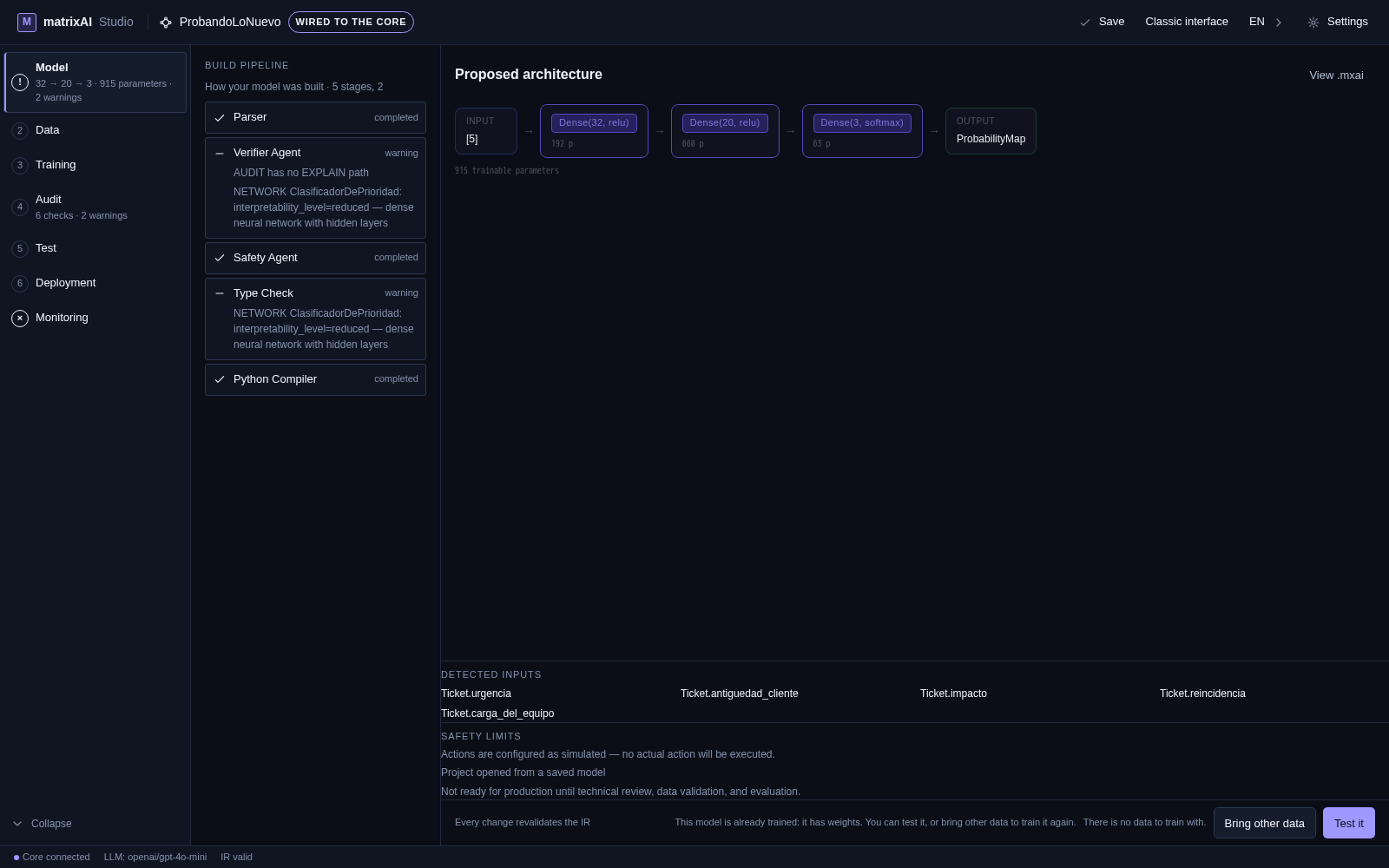
In the Workbench the three sit in the model's own toolbar, next to Diagram, Pipeline, Source, Data and Export — and clicking one opens it in the centre, exactly like those. They are views of the model you have open, so they live where its other views live. The phases interface is a lifecycle, so the same three things sit where they happen instead.
- Deployment shows what you can publish and what is already published: the registry entry sits right under the packaging options. Publishing without being able to see the result would send you elsewhere to check what you just did.
- Monitoring is a seventh phase, after Deployment, and holds the policy and the drift together — they are the same question seen from its two sides: what the model promised to watch, and what happened.
- It stays locked until the model is signed. With nothing deployed there is nothing to watch, and lighting it up would lead to empty panels.
What this does not do
- Drift is measured with a batch you upload, not from live production traffic. Collecting production automatically needs a signed action trace the Studio does not produce yet.
- Nothing here retrains, promotes or rolls back on its own. The policy declares what would be done; doing it is a separate, human act.
- A column with no declared method is never watched. The panel says so on every check rather than quietly reporting it as fine.