CLI Reference & Workflows
Every CLI command explained with context and real examples: from creating a project to serving a model in production. 13 command groups, 4 complete workflow examples and a full quick reference.
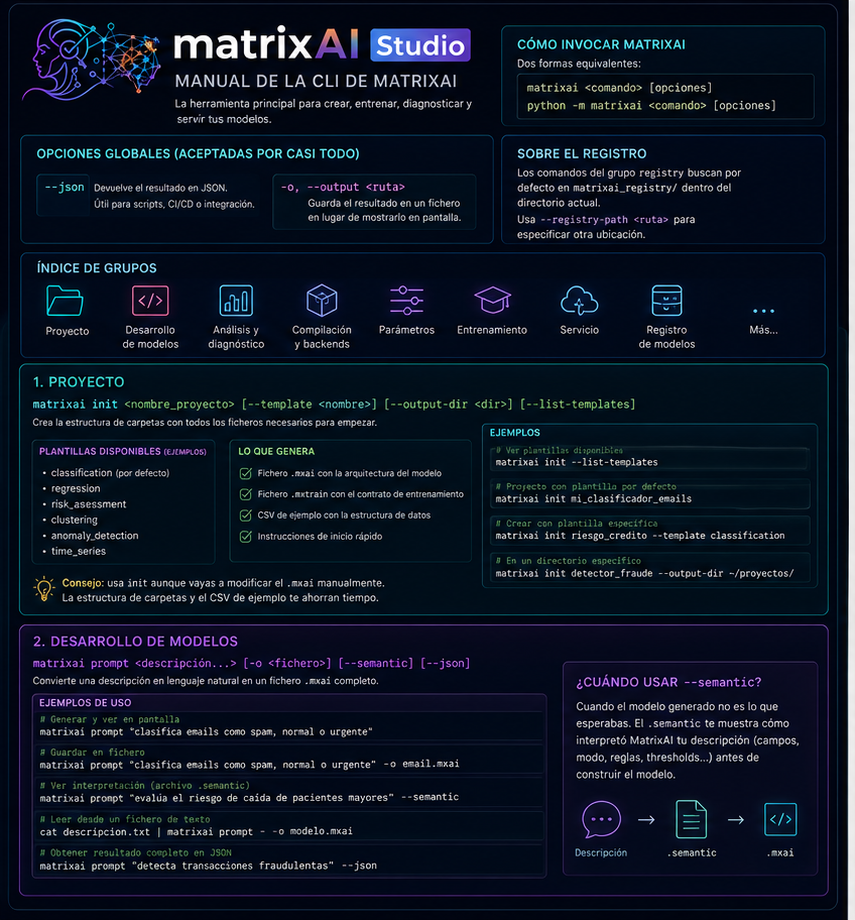
How to invoke MatrixAI
This manual is for any developer working with MatrixAI. The CLI is the main tool to create models, train them, diagnose them, serve them, package them and manage them in production.
# Installed globally:
matrixai <command> [options]

# Directly from the repository (no install):
python -m matrixai <command> [options]| Option | What it does |
|---|---|
--json | Returns result as JSON. Useful for scripts, CI/CD or integration with other tools. |
--output <path>` / `-o <path> | Saves result to a file instead of printing to screen. |
1. Project
matrixai init — Create a new project
matrixai init <project_name> [--template <name>] [--output-dir <dir>] [--list-templates]| Option | Default | Description |
|---|---|---|
project_name | — | Project name (folder to create) |
--template | classification | Starting template |
--output-dir | . | Where to create the project folder |
--list-templates | — | Show all available templates and exit |
What it generates: a .mxai model file, a .mxtrain training contract, a sample CSV, and a quick-start instructions file.
matrixai init --list-templates
matrixai init my_email_classifier
matrixai init credit_risk --template classification
matrixai init fraud_detector --output-dir ~/projects/2. Model development
matrixai prompt — Generate a model from text
matrixai prompt <description...> [-o <file>] [--semantic] [--json]| Option | Default | Description |
|---|---|---|
description | — | Your model description. Use `-` to read from stdin |
-o, --output | stdout | Save the generated `.mxai` to this file |
--semantic | — | Also show the intermediate `.semantic` (useful to understand how the system interpreted your description) |
--json | — | Return the full synthesis result as JSON |
matrixai prompt "classify emails as spam, normal or urgent"
matrixai prompt "classify emails as spam, normal or urgent" -o email.mxai
matrixai prompt "assess fall risk for elderly patients" --semantic
cat description.txt | matrixai prompt - -o model.mxai
matrixai prompt "detect fraudulent transactions" --jsonmatrixai propose — Generate proposals with LLM
matrixai propose <description...> [--max-candidates <n>] [--provider <name>] [--json] [--include-compiled]| Option | Default | Description |
|---|---|---|
--max-candidates | — | How many proposals to generate |
--provider | deterministic | deterministic` (no external LLM) or `chat-completions-compatible |
--json | — | Print the decision as JSON |
--include-compiled | — | Include compiled Python in JSON output |
matrixai propose "classify legal documents" --max-candidates 3
matrixai propose "pharmacy dispensing system" --provider chat-completions-compatible
matrixai propose "churn predictor" --json --include-compiledmatrixai supervise-prompt / architect / validate / lint / format / typecheck / parse
| Command | What it adds |
|---|---|
supervise-prompt | Supervises an existing `.semantic` proposal or generates one from a prompt, then produces the `.mxai` |
architect | Converts a valid `.semantic` directly into `.mxai` |
validate | Checks that a `.mxai` is structurally correct; exits `0` if valid and `1` if not |
validate-plan | Validates a `.semantic` before generating the `.mxai` |
lint | Reports blocking errors, warnings and suggestions; `--strict` fails on warnings for CI |
format | Applies MatrixAI canonical formatting to `.semantic` or `.mxai` |
typecheck | Checks that field and expression types are consistent |
parse | Shows the internal representation as JSON |
# Supervise an existing .semantic
matrixai supervise-prompt "my model" --proposal my_model.semantic

# Convert .semantic to .mxai directly
matrixai architect my_model.semantic -o my_model.mxai

# Validate structure (exit 0 = OK, exit 1 = error)
matrixai validate email_classifier.mxai

# Validate semantic plan before generating .mxai
matrixai validate-plan my_model.semantic

# Lint: errors + warnings + suggestions
matrixai lint email_classifier.mxai
matrixai lint email_classifier.mxai --strict   # fail on any warning (for CI)
matrixai lint email_classifier.mxai --json

# Format: apply canonical MatrixAI formatting
matrixai format email_classifier.mxai           # preview
matrixai format email_classifier.mxai --write  # format in place
matrixai format email_classifier.mxai --check  # CI check

# Type-check field and expression types
matrixai typecheck email_classifier.mxai

# Show internal representation (IR) as JSON
matrixai parse email_classifier.mxai3. Analysis & diagnostics
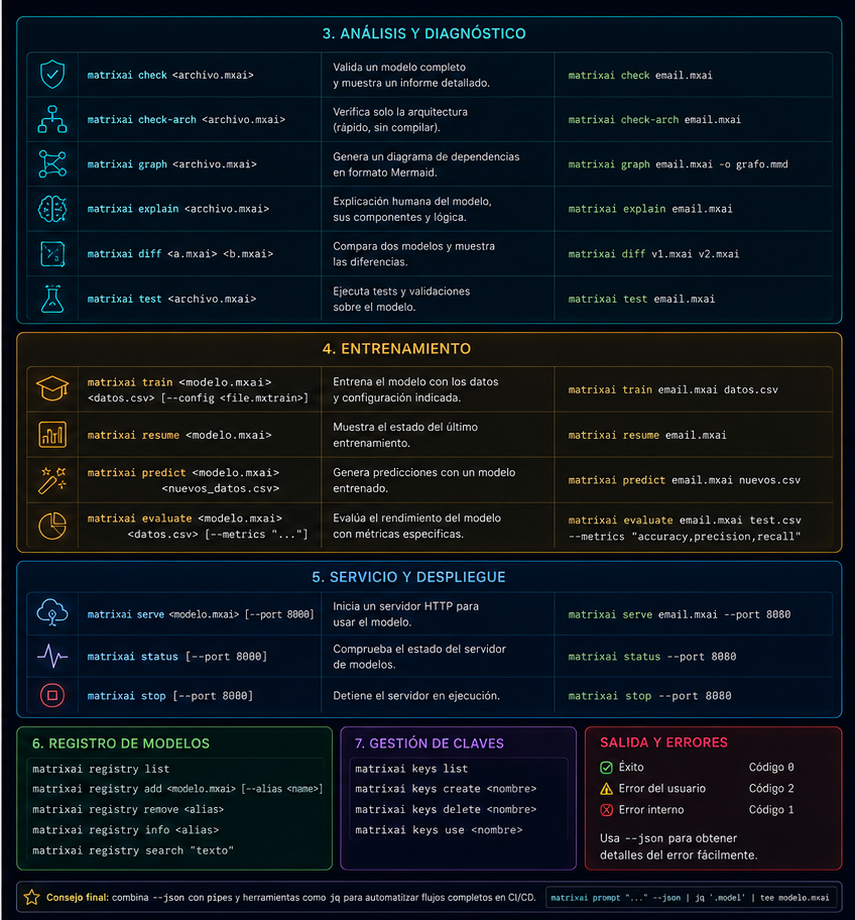
matrixai graph — View the computation graph
| Option | Default | Description |
|---|---|---|
--format | mermaid | mermaid` for mermaid.live, `dot` for Graphviz, or `json |
-o | stdout | Save the graph to a file |
matrixai graph email_classifier.mxai                         # Mermaid (paste at mermaid.live)
matrixai graph email_classifier.mxai --format dot -o graph.dot  # Graphviz
matrixai graph email_classifier.mxai --format jsonmatrixai diagnose — Compare runtime vs compiled
Runs the model with the same data on both the interpreter and the Python compiler and compares results. Detects numerical discrepancies between backends.
| Option | Default | Description |
|---|---|---|
--input | required | JSON file with input data |
--tolerance | 1e-9 | Maximum accepted numerical difference between results |
--json | — | Full report as JSON |
echo '{"subject": "Exclusive offer", "sender_score": 0.2, "body_length": 450}' > input.json
matrixai diagnose email_classifier.mxai --input input.json
matrixai diagnose email_classifier.mxai --input input.json --tolerance 1e-6 --jsonmatrixai optimize / permissions / mathematize
# Optimization suggestions (read-only — never modifies the model)
matrixai optimize email_classifier.mxai

# Review sandbox permissions for actions
matrixai permissions email_classifier.mxai

# Translate if/then business rules to continuous mathematics
matrixai mathematize business_rules.txt
echo "if risk > 0.8 then alert" | matrixai mathematize -

# Expected output:
# if risk > 0.8 then alert
#   -> sigmoid(20 * (risk - 0.8))
4. Compilation & backends
matrixai compile — Compile the model
| Option | Default | Description |
|---|---|---|
--target | python | `python` for direct execution or `differentiable-python` for training |
-o | stdout | Save compiled code to a file |
matrixai compile email_classifier.mxai -o email_compiled.py
matrixai compile email_classifier.mxai --target differentiable-python -o email_diff.py
matrixai eval — Evaluate a .mx formula file
| Option | Description |
|---|---|
--input | Input data: path to JSON file or inline JSON string |
--call | Execute only this function from the file |
--trace | Show step-by-step calculation detail |
--graph | Show the computation graph |
--json | Result as JSON |
# scoring.mx:  utility(op) = quality(op) - 0.3 * cost(op) - 0.2 * latency(op)
matrixai eval scoring.mx --input '{"quality": 0.9, "cost": 0.4, "latency": 0.3}'
matrixai eval scoring.mx --input data.json --trace
matrixai eval scoring.mx --input data.json --call utility
matrixai backend-report / backend-run / backend-parameters
# Portability report
matrixai backend-report email_classifier.mxai
matrixai backend-report email_classifier.mxai --target torch

# Run with differentiable backend
matrixai backend-run email_classifier.mxai --input input.json --parameters initial
matrixai backend-run email_classifier.mxai \
  --input input.json \
  --parameters runs/email_v1/params.best.json
matrixai backend-run email_classifier.mxai \
  --input input.json --target torch --device cuda \
  --parameters runs/email_v1/params.best.json

# Inspect expected parameters
matrixai backend-parameters email_classifier.mxai
matrixai backend-parameters email_classifier.mxai --validate runs/email_v1/params.best.json
5. Parameters
# Generate initial parameters
matrixai init-parameters email_classifier.mxai
matrixai init-parameters email_classifier.mxai -o params_initial.json
matrixai init-parameters email_classifier.mxai \
  --parameter-set-id "email_v1_initial" -o params_initial.json

# Validate a parameters file against the model
matrixai validate-parameters email_classifier.mxai --params runs/email_v1/params.best.json6. Training
matrixai validate-training / generate-training / generate-supervised / generate-dataset
# Validate a training contract
matrixai validate-training email.mxtrain

# Generate a training contract from a model + description
matrixai generate-training email_classifier.mxai \
  "classify emails as spam, normal or urgent" \
  -o email.mxtrain \
  --dataset-output email_template.csv

matrixai generate-training email_classifier.mxai "classify emails" \
  -o email.mxtrain --epochs 200 --learning-rate 0.01

matrixai generate-training credit_risk.mxai "classify credit applications" \
  -o credit.mxtrain --labels "approved,rejected,review" --target-name "decision"

# Generate model + contract in one step (starting from scratch)
matrixai generate-supervised \
  "classify emails as spam, normal or urgent" \
  -o models/email/ --stem email_classifier

# Generate synthetic data (200-50000 rows)
matrixai generate-dataset email_classifier.mxai \
  --training email.mxtrain --rows 500 --mode coherent -o data/

matrixai generate-dataset email_classifier.mxai \
--training email.mxtrain --rows 1000 --seed 123 --mode coherent -o data/matrixai train — Train the model
| Option | Default | Description |
|---|---|---|
--training | required | `.mxtrain` file |
-o | required | Output directory for training artefacts |
--backend | from spec | `stdlib` (numpy) or `torch` (PyTorch) |
--device | from spec | cpu`, `cuda` or `mps |
Generated artefacts: params.best.json, params.final.json, metrics.json, training_trace.json, evaluation_report.json
matrixai train email_classifier.mxai --training email.mxtrain -o runs/email_v1/
matrixai train email_classifier.mxai --training email.mxtrain -o runs/email_v1/ --backend torch --device cuda
matrixai train-supervised / evaluate — Full pipeline & evaluation
# Full pipeline in one command: description → trained model
matrixai train-supervised \
  "classify emails as spam, normal or urgent" \
  --train-data data/emails_train.csv \
  --eval-data data/emails_eval.csv \
  --epochs 150 \
  -o runs/email_v1/

# Evaluate a trained model
matrixai evaluate email_classifier.mxai \
  --params runs/email_v1/params.best.json \
  --training email.mxtrain \
  --data data/emails_test.csv \
  -o reports/eval_v1.json
7. Service
matrixai run — Run the model once
# Without parameters (untrained — uses initial values)
matrixai run email_classifier.mxai \
  --input '{"subject": "URGENT", "sender_score": 0.95, "body_length": 120}'

# With trained parameters
matrixai run email_classifier.mxai --input input.json --params runs/email_v1/params.best.json --json
matrixai serve — Serve the model as an HTTP API
| Option | Default | Description |
|---|---|---|
--params | — | Parameters file (trained weights) |
--port | 8000 | HTTP port |
--host | 127.0.0.1 | Bind address (`0.0.0.0` to expose on network) |
--api-key | auto-generated | Full-access key (see also `MATRIXAI_API_KEY`) |
--api-key-read | — | Read-only key (GET and predictions) |
--registry | — | Model registry path (activates `/api/v1/registry/*` endpoints) |
--contract | — | `.mxact` file to enable real actions |
--allow-real-actions | disabled | Enable real actions (requires `--contract`) |
--continual-policy | — | `.mxcontinual` file for drift monitoring |
--rate-limit | 60 | Max requests/min per IP. `0` disables |
--cors-origin | * | Allowed CORS origin. Repeatable for multiple origins |
# Basic server on localhost
matrixai serve email_classifier.mxai \
  --params runs/email_v1/params.best.json \
  --api-key my_secret_key

# Exposed on network with read/write keys
matrixai serve email_classifier.mxai \
  --params runs/email_v1/params.best.json \
  --host 0.0.0.0 --port 8080 \
  --api-key WRITE_KEY --api-key-read READ_KEY

# Serve multiple models from a registry
matrixai serve --registry matrixai_registry/ --api-key my_secret_key

# With drift monitoring in production
matrixai serve email_classifier.mxai \
  --params runs/email_v1/params.best.json \
  --api-key my_secret_key \
  --continual-policy drift_policy.mxcontinual \
--reference-accuracy 0.923matrixai playground / pack — Dev environment & packaging
| Command | Options |
|---|---|
studio` / `playground | --host`, `--port`, `--open |
pack | --params`, `--contract`, `--outdir`, `--docker |
# Open Studio in the browser
matrixai playground --open
matrixai playground --port 9000 --open
matrixai playground --open

# Package for deployment (with optional Docker)
matrixai pack email_classifier.mxai \
  --params runs/email_v1/params.best.json \
  --outdir dist/email_v1/

matrixai pack email_classifier.mxai \
  --params runs/email_v1/params.best.json \
  --docker --outdir dist/email_v1/

cd dist/email_v1/ && docker compose up
8. Export & packaging
| Command | Important options |
|---|---|
export-onnx | --params`, `-o`, `--validate`, `--manifest`, `--json |
export-bundle | --params`, `--outdir`, `--no-validate`, `--force`, `--json |
export-wasm | --params`, `--outdir |
# Export to ONNX (always use --validate for production)
matrixai export-onnx email_classifier.mxai \
  --params runs/email_v1/params.best.json \
  -o exports/email_v1.onnx \
  --validate \
  --manifest exports/email_v1_manifest.json

# Self-contained edge bundle (no MatrixAI server needed)
matrixai export-bundle email_classifier.mxai \
  --params runs/email_v1/params.best.json \
  --outdir exports/email_bundle_v1/

# Browser bundle (WebAssembly / ONNX Runtime Web)
matrixai export-wasm email_classifier.mxai \
  --params runs/email_v1/params.best.json \
  --outdir exports/email_wasm_v1/
9. Actions
Actions allow the model to execute real operations on external systems (send emails, update databases, call APIs). Everything is simulated by default; real actions require an explicit .mxact contract and deliberate enablement.
| Command | What it does |
|---|---|
validate-actions | Checks that the `.mxact` contract is compatible with the `.mxai` model |
dry-run-action | Runs an action in simulation mode and shows exactly what would have happened |
execute-action | Executes the action with real effects, requiring explicit `--allow-real-actions` |
audit-action | Verifies that an ActionTrace was not modified by checking its HMAC signature |
| dry-run option | Description |
|---|---|
--contract-name | Required action contract name |
--input | Input data as JSON or `-` for stdin |
--model-hash | Model hash for the trace |
--param-set | Parameter set identifier |
--json | Report as JSON |
# Validate an actions contract
matrixai validate-actions contract.mxact email_classifier.mxai

# Simulate an action (no real effects)
matrixai dry-run-action contract.mxact email_classifier.mxai \
  --contract-name SendReply \
  --input '{"subject": "URGENT", "sender_score": 0.95}'

# Execute a real action (requires --allow-real-actions)
matrixai execute-action contract.mxact email_classifier.mxai \
  --contract-name SendReply \
  --allow-real-actions \
  --signing-key $MATRIXAI_ACTION_SIGNING_KEY \
  --input '{"subject": "URGENT", "sender_score": 0.95}'

# Verify the HMAC signature of an action trace
matrixai audit-action action_trace.json --signing-key $MATRIXAI_ACTION_SIGNING_KEY10. Model registry
The registry stores trained model versions. Entries are referenced as name@version (e.g. email-classifier@v1.0).
| Command | Purpose |
|---|---|
registry push | Registers a training directory as a model version |
registry list | Lists all registered models, or only versions for one model with `--name` |
registry show | Shows the manifest for one version |
registry tag | Creates aliases such as `latest`, `prod` or `staging` |
registry verify | Verifies that registry files were not modified by checking checksums |
registry diff | Compares two versions |
registry pull | Copies a version between registries |
# Publish a model version
matrixai registry push runs/email_v1/ --name email-classifier --version v1.0

# List all registered models
matrixai registry list
matrixai registry list --name email-classifier

# View a version manifest
matrixai registry show email-classifier@v1.0

# Tag a version (create aliases like latest, prod, staging)
matrixai registry tag email-classifier@v1.0 prod
matrixai registry tag email-classifier@v2.0 latest

# Verify integrity (checksums)
matrixai registry verify email-classifier@v1.0
# exits 0 if intact, 1 if discrepancies are found

# Compare two versions
matrixai registry diff email-classifier@v1.0 email-classifier@v2.0

# Copy a version between registries
matrixai registry pull email-classifier@v1.0 \
  --from matrixai_registry/ --to /backups/registry/
11. Key management
# Rotate a signing key (retires active key, archives in history)
matrixai keys rotate --purpose action
matrixai keys rotate --purpose registry
matrixai keys rotate --purpose action --key $MATRIXAI_ACTION_SIGNING_KEY

# View key history (all keys, active or retired, with fingerprints)
matrixai keys list
matrixai keys list --jsonReceipts and the Ed25519 signature — attest, receipt pubkey, receipt verify
A receipt is the file that records what was measured on a model, with which data and in which environment. These commands sign one with an Ed25519 key and check it from a terminal, with no Studio and no website involved. They need the signature library: pip install 'matrixai[firma]'.
# Sign: a SECOND, asymmetric signature next to the optional HMAC one
matrixai attest model.onnx --data eval.csv --ed25519-key private-key.pem -o receipt.json

# Show the fingerprint and the PUBLIC key of a key file (private or public PEM)
matrixai receipt pubkey private-key.pem

# Check the Ed25519 signature of a receipt you received
matrixai receipt verify receipt.json --pubkey public-key.pem| Option | What it does |
|---|---|
attest --ed25519-key FILE | PEM file with an Ed25519 PRIVATE key (PKCS#8, unencrypted). Adds a second signature to the receipt. The assurance level does not rise because of it: with it alone the receipt stays A0. Combine it with --key (HMAC), --key-id and --in-toto; it does not combine with --sigstore. |
receipt pubkey <file> | Prints the algorithm, the fingerprint (SHA-256 of the 32 raw bytes of the public key) and the public key in PEM. The file can be the private or the public key: only the public one is ever printed. With --json: algorithm, fingerprint, public_key_pem. |
receipt verify --pubkey FILE | Ed25519 PUBLIC key to check the signature with: a PEM, or its 32 bytes in hex or base64. Without it the Ed25519 signature is reported as "could not be checked", never as valid. |
receipt verify --key KEY | Hex or utf-8 key for the HMAC signature. It is the only one that counts for level A1. |
receipt verify --locale es|en | Language of the Ed25519 signature line. The rest of the report stays as is: today its explanatory lines are in Spanish. |
For a throwaway key to try it, any tool that writes an unencrypted Ed25519 PEM works, for example openssl genpkey -algorithm ed25519 -out private-key.pem. This is what a real run prints (a 4-row evaluation of a small ONNX model, signed with only the Ed25519 key):
$ matrixai attest model.onnx --data eval.csv --ed25519-key private-key.pem -o receipt.json

accuracy: 1.0 (on 4 rows)
assurance: A0
  The receipt carries an Ed25519 signature, which does not raise the assurance level; it stays A0 until it is also signed with --key.
  attests: the evaluation, the environment and the inputs
  does NOT attest: how this model was trained, nor with what data: a copied model produces the same receipt as an own one
Receipt written to receipt.json

$ matrixai receipt pubkey private-key.pem
algorithm:   ed25519
fingerprint: f8201d5847bc4c54cb4358ea139a756ffc557864a761facef3b7f1120ee8f0fa
(SHA-256 of the 32 raw bytes of the public key; compare it through ANOTHER channel before trusting it)
-----BEGIN PUBLIC KEY-----
MCowBQYDK2VwAyEALBFrAx9hAtnqly+hVXB/QnwCE5CsYOTH+RuTgGGEUgw=
-----END PUBLIC KEY-----
$ matrixai receipt verify receipt.json --pubkey public-key.pem
assurance: A0 (la firma HMAC no se ha comprobado: sin clave no se puede sostener más; si valiera, sería A0)
verified: schema, signature_ed25519
Ed25519 signature: valid signature (huella f8201d5847bc4c54cb4358ea139a756ffc557864a761facef3b7f1120ee8f0fa)
NOT verified · signature: no se aportó clave, así que la firma no se ha comprobado
NOT verified · key_identity: no hay raíces de confianza decididas: no se puede comprobar que la clave sea de quien dice ser
note · Un recibo cuya firma es válida prueba que estos bytes no han cambiado y que quien tenía la clave los firmó. NO prueba que la decisión del pipeline sea correcta: la trazabilidad no es corrección conceptual.
note · Mientras no se decidan las raíces de confianza, una firma válida demuestra CONSISTENCIA, no autenticidad: nadie ha respaldado que esa clave sea de quien dice ser.The Ed25519 line has exactly three possible phrases (valid signature, the signature does not match, could not be checked) and the exit code tells them apart, so a script can chain on it:
| Exit code | Meaning |
|---|---|
0 | Everything that had to be checked was checked and came out right. |
1 | The file could not be read (the receipt, or the file given to --pubkey or pubkey). |
2 | Something FAILED: the signature does not match these bytes (a receipt edited after signing, or another key), a broken schema. |
3 | It could not be checked (no key given, or the key does not read). It is not a pass and it is not an accusation. |
A Living Report is checked today only on the web page (/verificar); there is no terminal command for it yet.
12. Continual learning
Continual learning lets the model detect when its predictions degrade in production (drift) and manage parameter updates in a controlled, traceable way.
# Validate a continual learning policy
matrixai continual init drift_policy.mxcontinual

# Register a ground-truth label for a past prediction
matrixai continual ingest drift_policy.mxcontinual \
  --trace-id rpt-abc123 --label urgent \
  --signing-key $MATRIXAI_CONTINUAL_SIGNING_KEY

# Current state of the system (production version, monitor metrics, rollback history)
matrixai continual status drift_policy.mxcontinual

# Promote improved parameters to production (with human approval)
matrixai continual promote drift_policy.mxcontinual \
  --approval-report reports/approval_v2.json \
  --candidate-params runs/email_v2/params.best.json \
  --human-approved \
  --approved-by "name@company.com"

# Rollback to previous version
matrixai continual rollback drift_policy.mxcontinual --dry-run  # preview
matrixai continual rollback drift_policy.mxcontinual \
  --signing-key $MATRIXAI_CONTINUAL_SIGNING_KEY

# Audit and refinement suggestions
matrixai continual audit drift_policy.mxcontinual
matrixai continual audit drift_policy.mxcontinual \
  --drift-report reports/drift_june.json \
  --prompt "classify emails as spam, normal or urgent" \
  --drift-persistence-days 7
13. Refinement
Refinement allows iteratively improving a model based on audit results or evaluation metrics, without starting from scratch.
| Option | Description |
|---|---|
--audit | Audit JSON (activates `audit_driven` mode) |
--evaluation | Evaluation report (activates `metric_driven` mode) |
--mxai | Current `.mxai` file (gives the refinement context about the model) |
--hint | Additional hint from you. Repeatable for multiple hints |
--accept | Accept the proposal and write output files |
--max-iterations | Iteration limit. Exits with code `2` if exceeded |
# Refinement based on an evaluation report
matrixai refine "classify emails as spam, normal or urgent" \
  --evaluation runs/email_v1/evaluation_report.json \
  --mxai email_classifier.mxai

# With an additional hint
matrixai refine "classify emails as spam, normal or urgent" \
  --evaluation runs/email_v1/evaluation_report.json \
  --mxai email_classifier.mxai \
  --hint "improve precision on urgent emails"

# Accept the proposal and save output files
matrixai refine "classify emails as spam, normal or urgent" \
  --evaluation runs/email_v1/evaluation_report.json \
  --mxai email_classifier.mxai \
  --accept \
  -o email_classifier_v2.prompt \
  --mxai-output email_classifier_v2.mxai \
  --chain-output refinement_chain.json \
  --iteration 2
14. Environment variables
| Variable | Used by | Description |
|---|---|---|
MATRIXAI_API_KEY | serve | Full-access key for the production server |
MATRIXAI_API_KEY_READ | serve | Read-only key (GET and predictions) |
MATRIXAI_ACTION_SIGNING_KEY | serve`, `execute-action`, `audit-action | Hex HMAC key for action trace signing |
MATRIXAI_CONTINUAL_SIGNING_KEY | continual ingest`, `continual rollback | HMAC key for continual learning events |
MATRIXAI_ALLOW_REAL_ACTIONS | serve | Set to `true` to enable `/execute-action` |
MATRIXAI_RATE_LIMIT | serve | Max requests/min per IP (integer, `0` disables) |
MATRIXAI_CORS_ORIGINS | serve | Allowed CORS origins, comma-separated |
# Example .env for production:
MATRIXAI_API_KEY=long_secure_write_key
MATRIXAI_API_KEY_READ=read_key_for_frontend
MATRIXAI_ACTION_SIGNING_KEY=a3f8b2c1d4e5f6a7b8c9d0e1f2a3b4c5d6e7f8a9b0c1d2e3f4a5b6c7d8e9f0a1
MATRIXAI_CONTINUAL_SIGNING_KEY=b4a7c2d8e5f1a3b6c9d2e7f4a1b8c3d5e9f2a4b7c0d3e6f1a8b2c5d7e0f3a9b4
MATRIXAI_RATE_LIMIT=120
MATRIXAI_CORS_ORIGINS=https://my-app.com,https://staging.my-app.com
15. Exit codes
| Code | Meaning |
|---|---|
0 | Success — command completed without errors |
1 | Error — parse, validation or runtime failure. Read the error message |
2 | Iteration limit exceeded — only in `matrixai refine` |
16. Complete workflow examples
Flow A — From description to production API
# 1. Create project structure
matrixai init email_classifier && cd email_classifier/

# 2. Generate model + contract from description
matrixai generate-supervised \
  "classify incoming emails as spam, normal or urgent, using subject, sender score and body length" \
  -o . --stem email_classifier --epochs 200

# 3. Review the generated model
matrixai lint email_classifier.mxai
matrixai graph email_classifier.mxai --format mermaid

# 4. Generate synthetic test data
matrixai generate-dataset email_classifier.mxai \
  --training email_classifier.mxtrain --rows 1000 --mode coherent -o data/

# 5. Train
matrixai train email_classifier.mxai --training email_classifier.mxtrain -o runs/v1/

# 6. Check results
cat runs/v1/evaluation_report.json

# 7. Manual test
matrixai run email_classifier.mxai \
  --params runs/v1/params.best.json \
  --input '{"subject": "Exclusive offer", "sender_score": 0.1, "body_length": 800}'

# 8. Register the version
matrixai registry push runs/v1/ --name email-classifier --version v1.0
matrixai registry tag email-classifier@v1.0 prod

# 9. Serve as API
matrixai serve email_classifier.mxai \
  --params runs/v1/params.best.json \
  --api-key $MATRIXAI_API_KEY --port 8000
Flow B — Diagnose a model with problems
matrixai validate email_classifier.mxai         # structural errors
matrixai lint email_classifier.mxai             # errors + warnings
matrixai graph email_classifier.mxai            # visualise the computation graph
matrixai backend-report email_classifier.mxai   # backend compatibility
matrixai diagnose email_classifier.mxai --input test_input.json  # runtime vs compiled
matrixai optimize email_classifier.mxai         # optimisation suggestions
matrixai typecheck email_classifier.mxai        # type consistency
matrixai parse email_classifier.mxai            # internal representation
Flow C — Controlled production update with traceability
matrixai continual status drift_policy.mxcontinual
matrixai continual audit drift_policy.mxcontinual \
  --drift-report reports/drift_week.json \
  --prompt "classify emails as spam, normal or urgent"

matrixai refine "classify emails as spam, normal or urgent" \
  --evaluation runs/v1/evaluation_report.json \
  --mxai email_classifier.mxai --hint "improve urgent recall" \
  --accept --mxai-output email_v2.mxai --chain-output chain_v2.json --iteration 2

matrixai train email_v2.mxai --training email_classifier.mxtrain -o runs/v2/
matrixai evaluate email_v2.mxai --params runs/v2/params.best.json \
  --training email_classifier.mxtrain -o reports/eval_v2.json

matrixai registry push runs/v2/ --name email-classifier --version v2.0

matrixai continual promote drift_policy.mxcontinual \
  --approval-report reports/approval_v2.json \
  --candidate-params runs/v2/params.best.json \
  --human-approved --approved-by "name@company.com"

# Emergency rollback if needed:
matrixai continual rollback drift_policy.mxcontinual --dry-run
matrixai continual rollback drift_policy.mxcontinual
Flow D — Export for edge or browser deployment
# Option 1: ONNX for external runtime
matrixai export-onnx email_classifier.mxai --params runs/v1/params.best.json \
  -o exports/email_v1.onnx --validate --manifest exports/email_v1_manifest.json

# Option 2: Full edge bundle
matrixai export-bundle email_classifier.mxai --params runs/v1/params.best.json \
  --outdir exports/edge_bundle/

# Option 3: Browser bundle (WebAssembly)
matrixai export-wasm email_classifier.mxai --params runs/v1/params.best.json \
  --outdir exports/wasm_bundle/

# Option 4: Docker image ready to deploy
matrixai pack email_classifier.mxai --params runs/v1/params.best.json \
  --docker --outdir dist/email_v1/
cd dist/email_v1/ && docker compose up
17. Quick reference
| I want to… | Command |
|---|---|
| Create a new project | matrixai init <name> |
| Generate model from text | matrixai prompt "description" -o model.mxai |
| Generate model + contract at once | matrixai generate-supervised "description" -o dir/ |
| Full pipeline (prompt → train) | matrixai train-supervised "description" --train-data data.csv -o runs/v1/ |
| Validate a model | matrixai validate model.mxai |
| Analysis with warnings | matrixai lint model.mxai |
| View model graph | matrixai graph model.mxai |
| Test with one input | matrixai run model.mxai --input input.json --params params.json |
| Evaluate .mx formulas | matrixai eval formulas.mx --input data.json --trace |
| Translate if/then rules | matrixai mathematize rules.txt |
| Check backend compatibility | matrixai backend-report model.mxai |
| Compare runtime vs compiled | matrixai diagnose model.mxai --input input.json |
| Generate synthetic data | matrixai generate-dataset model.mxai --training contract.mxtrain --rows 500 --mode coherent |
| Train the model | matrixai train model.mxai --training contract.mxtrain -o runs/v1/ |
| Serve as HTTP API | matrixai serve model.mxai --params params.json --api-key KEY |
| Open Studio in browser | matrixai playground --open |
| Export to ONNX | matrixai export-onnx model.mxai --params params.json -o model.onnx --validate |
| Package with Docker | matrixai pack model.mxai --params params.json --docker --outdir dist/ |
| Publish to registry | matrixai registry push runs/v1/ --name my-model --version v1.0 |
| List registered versions | matrixai registry list |
| Tag version as production | matrixai registry tag my-model@v1.0 prod |
| Production system status | matrixai continual status policy.mxcontinual |
| Promote new parameters | matrixai continual promote policy.mxcontinual --approval-report ap.json --candidate-params params.json --human-approved |
| Emergency rollback | matrixai continual rollback policy.mxcontinual |
| Refine model with metrics | matrixai refine "original description" --evaluation eval_report.json --mxai model.mxai |
| Sign a receipt with Ed25519 | matrixai attest model.onnx --data eval.csv --ed25519-key private-key.pem -o receipt.json |
| Show the fingerprint of a key | matrixai receipt pubkey private-key.pem |
| Check the Ed25519 signature of a receipt | matrixai receipt verify receipt.json --pubkey public-key.pem |
MatrixAI file formats
| Extension | What it is |
|---|---|
.mxai | Declarative model definition |
.semantic | Intermediate semantic specification (step before `.mxai`) |
.mx | Mathematical formula file |
.mxtrain | Supervised training contract |
.mxact | Real actions contract |
.mxcontinual | Continual learning and drift detection policy |
params.best.json | Best parameters found during training |
params.final.json | Parameters from the last training epoch |
metrics.json | Training metrics per epoch |
training_trace.json | Cryptographic training trace |
evaluation_report.json | Model evaluation report |