REST API Complete Reference
The complete MatrixAI Studio API lifecycle: architecture, authentication, prediction, Studio generation, training, registry versioning, real actions, feedback, monitoring, recipes, troubleshooting and quick reference.
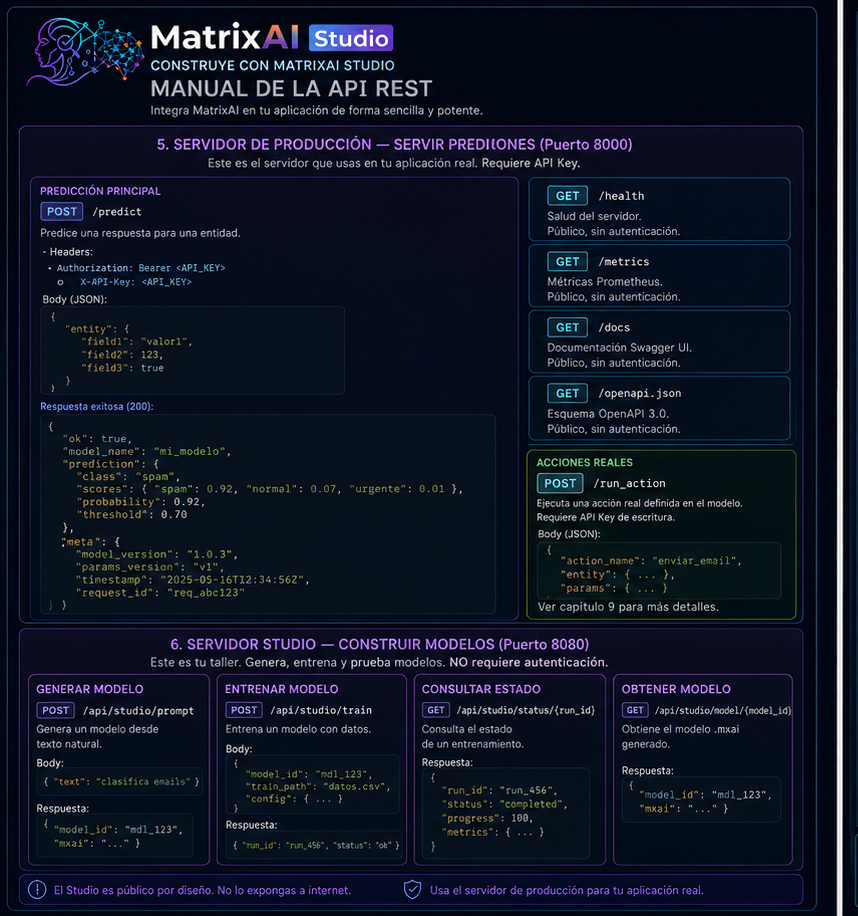
1. Architecture in two minutes
MatrixAI exposes two completely independent HTTP servers. The split matters because each server has a different purpose and security model.
| Server | Port | Purpose | Expose? |
|---|---|---|---|
| Production | 8000 | Predictions, actions, registry, feedback and metrics. | Yes, with API key. |
| Studio | 8080 | Generate, validate, train and simulate models. | Never publicly. |
matrixai serve model.mxai --params runs/v1/params.best.json --api-key MY_KEY --port 8000
matrixai studio --port 8080 --open2. Before the first call
Start the production server:
matrixai serve mi_modelo.mxai \
  --params runs/v1/params.best.json \
  --api-key mi_clave_secreta \
  --port 8000
Start the Studio:
matrixai studio --port 8080 --openVerify both are running:
# Production
curl http://localhost:8000/health

# Studio
curl http://localhost:8080/api/studio/status
If you see "status": "ok" on production and "ok": true on Studio (which includes llm_mode, capabilities, degradation_messages and production_steps), you are ready. If not, jump to section 13.
Explore the API with the interactive docs:
# Interactive Swagger UI (auto-generated from your loaded model)
open http://localhost:8000/docs

# OpenAPI 3.0 schema — use it to generate clients automatically
curl http://localhost:8000/openapi.json3. Authentication: the key to the castle
Only the production server requires authentication. The Studio is completely public — which is exactly why you must never expose it to the internet.
Two ways to send the key — both valid:
# Option A — Authorization Bearer (standard OAuth2)
curl -H "Authorization: Bearer my_secret_key" http://localhost:8000/predict ...

# Option B — X-API-Key header (simpler for internal scripts)
curl -H "X-API-Key: my_secret_key" http://localhost:8000/predict ...
Two access levels:
| Key | Config | Can do |
|---|---|---|
| Write | --api-key / MATRIXAI_API_KEY | Everything: prediction, actions, feedback and registry management. |
| Read-only | --api-key-read / MATRIXAI_API_KEY_READ | Prediction, registry read, pull and verify. |
# Start with two access levels
matrixai serve mi_modelo.mxai \
  --params runs/v1/params.best.json \
  --api-key WRITE_KEY_FULL_ACCESS \
  --api-key-read READ_KEY_PREDICTIONS_ONLY
Typical use case: your analytics backend only needs predictions — give it the read key. Your MLOps system that updates models gets the write key. If the analytics key leaks, the blast radius is contained: no one can overwrite your models.
Public endpoints — no key required:
GET /health, GET /metrics, GET /docs, GET /openapi.json and CORS preflight OPTIONS are always public. Load balancers, monitoring systems and documentation explorers need them without authentication.
What happens when the key is wrong:
HTTP 401
{
  "ok": false,
  "error": "Invalid or missing API key",
  "code": "UNAUTHORIZED"
}
4. How to read responses
All versioned endpoints (/api/v1/*) always wrap their response in a standard envelope:
// Success
{ "ok": true, ...data }

// Error
{ "ok": false, "error": "readable description", "code": "MACHINE_CODE" }
The code field is your friend for programmatic error handling. No need to parse text strings — just switch on code:
const res = await fetch('/api/v1/predict', { ... });
const data = await res.json();

if (!data.ok) {
  switch (data.code) {
    case 'UNAUTHORIZED':         return redirectToLogin();
    case 'NOT_FOUND':            return showError('Model not found');
    case 'REGISTRY_NOT_LOADED':  return showError('Registry not loaded');
    default:                     return showError(data.error);
  }
}

// data.ok === true — safe to use the data| HTTP | Meaning | Action |
|---|---|---|
200 | OK | Read ok and payload. |
400 | Malformed JSON. | Fix body. |
401 | Bad key. | Fix auth header. |
404 | Resource not found. | Verify ID. |
409 | Conflict, often duplicate registry version. | Use a new version. |
422 | Validation failed. | Read error detail. |
429 | Rate limit exceeded. | Respect Retry-After. |
500 | Internal server error. | Check logs. |
Rate limiting — 60 req/min per IP by default. When exceeded:
HTTP 429
Retry-After: 60
{ "error": "Rate limit exceeded" }
Always implement exponential backoff in your client:
async function fetchWithRetry(url, options, attempts = 3) {
  for (let i = 0; i < attempts; i++) {
    const res = await fetch(url, options);
    if (res.status !== 429) return res;
    const wait = Math.pow(2, i) * 1000; // 1s, 2s, 4s
    await new Promise(r => setTimeout(r, wait));
  }
  throw new Error('Rate limit exceeded after retries');
}
5. Production server: serving predictions
GET /health — is it alive? Use it as your load balancer health check.
curl http://localhost:8000/health{
"status": "ok",
"service": "MatrixAI Server",
"backend": "numpy",
"metrics": {
"requests_total": 142,
"requests_successful": 140,
"requests_failed": 2,
"uptime_seconds": 3600
}
}POST /predict — individual prediction:
curl -X POST http://localhost:8000/predict \
  -H "Authorization: Bearer my_key" \
  -H "Content-Type: application/json" \
  -d '{ "age": 35, "income": 52000, "credit_history": "good" }'
{ "ok": true, "result": 0.9998245440617306, "model": "CreditScoring", "parameter_set": "v1.0_best" }Batch prediction — send one array, get one array back (order preserved):
curl -X POST http://localhost:8000/predict \
  -H "Authorization: Bearer my_key" \
  -H "Content-Type: application/json" \
  -d '[
    { "age": 35, "income": 52000, "credit_history": "good" },
    { "age": 28, "income": 31000, "credit_history": "fair" },
    { "age": 52, "income": 89000, "credit_history": "excellent" }
  ]'
[
{ "ok": true, "result": 0.9998, "model": "CreditScoring", "parameter_set": "v1.0_best" },
{ "ok": true, "result": 0.3421, "model": "CreditScoring", "parameter_set": "v1.0_best" },
{ "ok": true, "result": 0.9999, "model": "CreditScoring", "parameter_set": "v1.0_best" }
]JavaScript:
async function predict(input) {
  const response = await fetch(PRODUCTION_URL + '/predict', {
    method: 'POST',
    headers: { Authorization: 'Bearer ' + API_KEY, 'Content-Type': 'application/json' },
    body: JSON.stringify(input),
  });
  if (!response.ok) throw new Error((await response.json()).error);
  return response.json();
}

// Individual
const result = await predict({ age: 35, income: 52000, credit_history: 'good' });
console.log('Probability:', result.result);

// Batch
const batch = await predict([
  { age: 35, income: 52000, credit_history: 'good' },
  { age: 28, income: 31000, credit_history: 'fair' }
]);
batch.forEach((r, i) => console.log('Record ' + i + ':', r.result));
Python:
import requests, os

HEADERS = {
  'Authorization': f'Bearer {os.environ["MATRIXAI_API_KEY"]}',
  'Content-Type': 'application/json'
}

def predict(data):
    res = requests.post('http://localhost:8000/predict', json=data, headers=HEADERS)
    res.raise_for_status()
    return res.json()

# Individual
result = predict({'age': 35, 'income': 52000, 'credit_history': 'good'})
print(f"Probability: {result['result']:.4f}")

# Batch
batch = predict([
    {'age': 35, 'income': 52000, 'credit_history': 'good'},
    {'age': 28, 'income': 31000, 'credit_history': 'fair'}
])
for i, r in enumerate(batch):
    print(f"Record {i}: {r['result']:.4f}")
Predict from the registry — any registered version or tag:
curl -X POST http://localhost:8000/api/v1/registry/credit-scoring/v1.0/predict -H "Authorization: Bearer my_key" -H "Content-Type: application/json" -d '{ "age": 35 }'
curl -X POST http://localhost:8000/api/v1/registry/credit-scoring/latest/predict -H "Authorization: Bearer my_key" -H "Content-Type: application/json" -d '{ "age": 35 }'
6. Studio server: building models
The Studio is where model creation happens. All its endpoints are public — no authentication needed.
GET /api/studio/status — what can the Studio do?
curl http://localhost:8080/api/studio/status{
"ok": true,
"llm_mode": { "active": false, "provider": "deterministic", "model": null },
"capabilities": { ... },
"degradation_messages": [],
"production_steps": [...]
}If llm_mode.active is false, the Studio uses the deterministic PromptAgent (no external LLM). Configure MATRIXAI_LLM_* variables before starting the Studio to activate an external LLM.
POST /api/studio/generate — generate a model from natural language:
curl -X POST http://localhost:8080/api/studio/generate \
  -H "Content-Type: application/json" \
  -d '{
    "prompt": "A model that predicts 30-day hospital readmission risk based on diagnosis, age and medication",
    "input_json": "{ \"age\": 72, \"diagnosis\": \"CHF\", \"medication_count\": 5 }"
  }'
{
"ok": true,
"pipeline_ok": true,
"mxai": "PROGRAM ReadmissionRisk\n VECTOR Patient...",
"semantic_text": "PROJECT ReadmissionRisk\nINTENT...",
"pipeline_stages": [
{ "name": "prompt_agent", "ok": true },
{ "name": "architect", "ok": true },
{ "name": "verifier", "ok": true },
{ "name": "safety", "ok": true },
{ "name": "compiler", "ok": true }
],
"executive_result": {
"decision": "high_risk",
"confidence": 0.81,
"action_proposed": "schedule_followup",
"action_status": "SIMULATED"
}
}Key fields: pipeline_ok: true means all agents accepted the model. mxai is the generated model code — save it and reuse it. executive_result shows the model running on your input_json. If pipeline_ok is false, pipeline_stages tells you exactly which agent rejected it.
POST /api/analyze — validate any artifact (3 modes):
| Situation | Mode |
|---|---|
| Only a description in plain text. | prompt |
| Intermediate .semantic edited by hand. | semantic |
| Final .mxai to validate before committing. | mxai |
# Mode prompt — just a description
curl -X POST http://localhost:8080/api/analyze -H "Content-Type: application/json" \
  -d '{ "prompt": "Classify emails as spam, normal or urgent" }'

# Mode mxai — validate existing model code
curl -X POST http://localhost:8080/api/analyze -H "Content-Type: application/json" \
  -d '{ "mode": "mxai", "mxai_text": "PROGRAM EmailClassifier\n  VECTOR Email..." }'

# Mode semantic — validate intermediate .semantic file
curl -X POST http://localhost:8080/api/analyze -H "Content-Type: application/json" \
  -d '{ "mode": "semantic", "prompt": "PROJECT EmailClassifier\nINTENT classify emails..." }'
POST /api/studio/run-executive — run an existing .mxai with audit output:
curl -X POST http://localhost:8080/api/studio/run-executive \
  -H "Content-Type: application/json" \
  -d '{
    "mxai": "PROGRAM CreditScoring\n  VECTOR Cliente...",
    "input_json": "{ \"age\": 35, \"income\": 52000, \"credit_history\": \"good\" }",
    "mxai_name": "CreditScoring"
  }'
{
"ok": true,
"executive_result": {
"decision": "approved",
"confidence": 0.9998,
"confidence_label": "HIGH",
"action_proposed": "grant_credit",
"action_status": "SIMULATED",
"explanation": "Client shows excellent credit history and adequate income level...",
"influential_factors": [
"credit_history: good (highest weight)",
"income: 52000 (above threshold)",
"age: 35 (stable profile)"
],
"audit_trail": ["Client", "CreditScoring", "RiskEvaluator", "Categorical", "Action"]
}
}Guided cases — prototype quickly with predefined use cases:
# List all available cases
curl http://localhost:8080/api/studio/cases

# Detail of a specific case
curl http://localhost:8080/api/studio/cases/credit-scoring

# Simulate a case with your own data
curl -X POST http://localhost:8080/api/studio/simulate \
  -H "Content-Type: application/json" \
  -d '{ "case_id": "fall-risk", "input_values": { "age": 78, "balance_score": 0.28, "previous_falls": 2 } }'
{
"ok": true,
"executive_result": {
"summary": "Patient with HIGH fall risk. Immediate evaluation recommended.",
"confidence": 0.87,
"audit_trail": ["Patient", "BalanceAssessment", "RiskScoring", "FallRisk", "Action"]
}
}Preloaded examples — everything ready to use:
curl http://localhost:8080/api/defaults
curl http://localhost:8080/api/example/credit-scoring
The example response includes mxai_text, training_text, input_json, manifest_text and evaluation_report_text — everything you need to start working with that use case without generating anything from scratch.
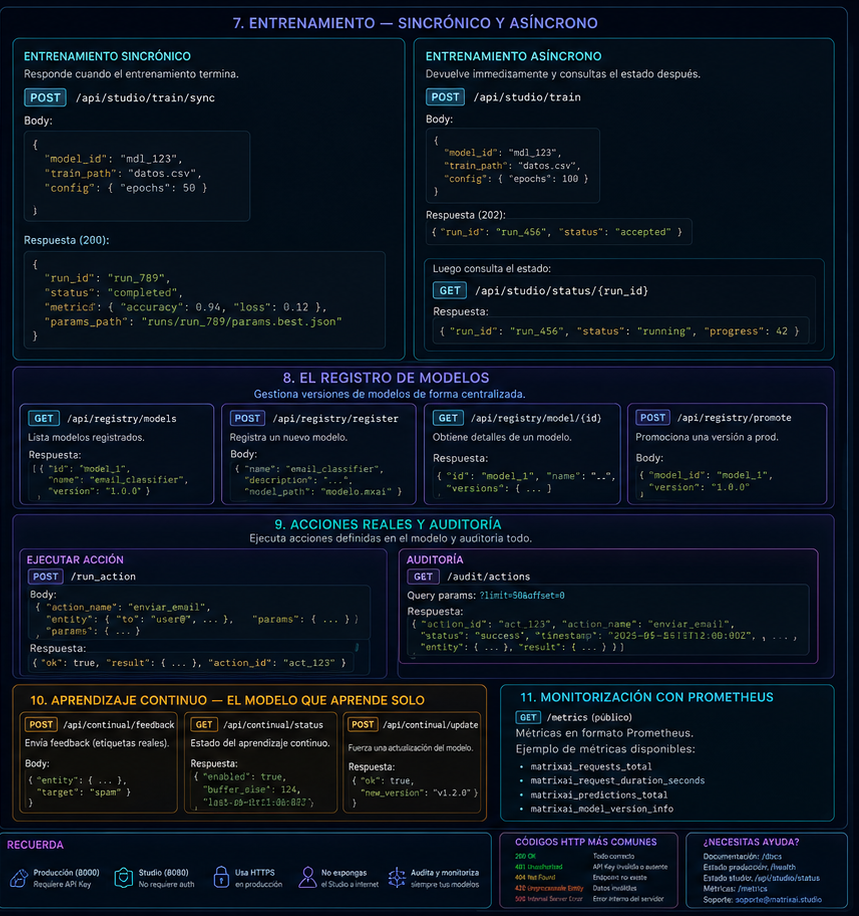
7. Training: synchronous and asynchronous
The Studio exposes three training options. Which one to use depends on how long you expect it to take.
Preparation step 1 — generate the training contract:
curl -X POST http://localhost:8080/api/generate-training \
  -H "Content-Type: application/json" \
  -d '{ "mxai_text": "PROGRAM CreditScoring..." }'
{
"ok": true,
"training_text": "TRAINING CreditScoring\n DATASET credito\n TARGET label\n ...",
"dataset_template_text": "age,income,credit_history,label\n",
"warnings": [],
"source": "generated"
}Preparation step 2 — generate synthetic data (if you do not have real data yet):
curl -X POST http://localhost:8080/api/generate-dataset \
  -H "Content-Type: application/json" \
  -d '{ "mxai_text": "...", "training_text": "...", "rows": 500, "seed": 42, "mode": "coherent" }'
{
"ok": true,
"csv_text": "age,income,credit_history,label\n35,52000,good,approved\n...",
"rows": 500,
"columns": ["age", "income", "credit_history"],
"labels": ["approved", "rejected"]
}Preparation step 2b — validate your CSV before training:
curl -X POST http://localhost:8080/api/validate-csv \
  -H "Content-Type: application/json" \
  -d '{ "mxai_text": "...", "training_text": "...", "csv_text": "age,income,label\n35,52000,approved" }'
{ "ok": true, "rows": 450, "warnings": ["Column 'income' has 3 empty values — they will be ignored"] }Option A — Synchronous training (small models, ≤200 epochs, max 30s):
curl -X POST http://localhost:8080/api/train \
  -H "Content-Type: application/json" \
  -d '{ "mxai_text": "...", "training_text": "...", "csv_text": "...", "epochs_override": 100 }'
{
"ok": true,
"run_id": "run-abc123",
"best_epoch": 87,
"best_validation_loss": 0.112,
"accuracy": 0.923,
"epochs": [
{ "epoch": 1, "train_loss": 0.892, "val_loss": 0.871 },
{ "epoch": 50, "train_loss": 0.231, "val_loss": 0.298 },
{ "epoch": 87, "train_loss": 0.098, "val_loss": 0.112 }
],
"params_best": { "W1": [...], "b1": [...] }
}Option B — Asynchronous training (large models or long runs):
# 1. Start — get job_id immediately
curl -X POST http://localhost:8080/api/train-start \
  -H "Content-Type: application/json" \
  -d '{ "mxai_text": "...", "training_text": "...", "csv_text": "..." }'
# → { "ok": true, "job_id": "job-20260603-xyz789" }

# 2. Poll status
curl http://localhost:8080/api/train-status/job-20260603-xyz789
# → { "ok": true, "status": "running", "epochs": [...] }

# 3. Cancel if needed
curl -X POST http://localhost:8080/api/train-cancel \
  -H "Content-Type: application/json" \
  -d '{ "job_id": "job-20260603-xyz789" }'
// When done:
{ "ok": true, "job_id": "job-20260603-xyz789", "status": "done", "accuracy": 0.923, "best_epoch": 87, "params_best": { ... } }JavaScript polling implementation:
async function trainWithPolling(payload, intervalMs = 2000) {
  const start = await fetch('http://localhost:8080/api/train-start', {
    method: 'POST',
    headers: { 'Content-Type': 'application/json' },
    body: JSON.stringify(payload)
  }).then(r => r.json());

  const jobId = start.job_id;
  console.log('Training started:', jobId);

  while (true) {
    await new Promise(r => setTimeout(r, intervalMs));
    const status = await fetch('http://localhost:8080/api/train-status/' + jobId).then(r => r.json());
    console.log('Status:', status.status, '| Epochs:', status.epochs?.length ?? 0);

    if (status.status === 'done') {
      console.log('Training complete. Accuracy:', status.accuracy);
      return status;
    }
    if (['error', 'cancelled', 'timeout'].includes(status.status)) {
      throw new Error('Training failed: ' + status.status);
    }
  }
}| Status | Meaning | Action |
|---|---|---|
running | Job is in progress. | Keep polling. |
done | Finished correctly. | Read params_best and accuracy. |
error | Failed due to an error. | Inspect the error field. |
cancelled | Cancelled manually. | Restart if needed. |
timeout | Exceeded time limit. | Reduce epochs or use CLI for long runs. |
Option C — Run with existing trained parameters (no retraining):
curl -X POST http://localhost:8080/api/run-with-params \
  -H "Content-Type: application/json" \
  -d '{
    "mxai_text": "PROGRAM CreditScoring...",
    "params_json": "{ \"W1\": [...], \"b1\": [...] }",
    "input_json": "{ \"age\": 35, \"income\": 52000, \"credit_history\": \"good\" }"
  }'
{ "ok": true, "result": { "approved": 0.9998, "rejected": 0.0002 } }8. The Model Registry
The registry lets you manage trained model versions like version control for your weights. Activate it by starting the production server with --registry:
matrixai serve model.mxai \
  --params runs/v1/params.best.json \
  --registry matrixai_registry/ \
  --api-key my_key
List all registered versions:
curl -H "X-API-Key: my_key" "http://localhost:8000/api/v1/registry"
curl -H "X-API-Key: my_key" "http://localhost:8000/api/v1/registry?name=credit-scoring&page=1&limit=10"
{
"ok": true,
"models": [
{ "name": "credit-scoring", "version": "v1.0", "metrics": { "accuracy": 0.923 }, "created_at": "2026-05-30T10:00:00+00:00" },
{ "name": "credit-scoring", "version": "v1.1", "metrics": { "accuracy": 0.941 }, "created_at": "2026-06-01T14:30:00+00:00" }
],
"page": 1, "limit": 20, "total": 2
}View the manifest of a specific version:
curl -H "X-API-Key: my_key" http://localhost:8000/api/v1/registry/credit-scoring/v1.0{
"ok": true,
"model": {
"name": "credit-scoring", "version": "v1.0",
"entry_hash": "sha256:...", "model_hash": "sha256:...",
"parameter_set_id": "ps_v1",
"metrics": { "accuracy": 0.923 },
"created_at": "2026-05-30T10:00:00+00:00"
}
}View tags:
curl -H "X-API-Key: my_key" http://localhost:8000/api/v1/registry/credit-scoring/tags{ "ok": true, "name": "credit-scoring",
"tags": [{ "tag": "latest", "version": "v1.1" }, { "tag": "prod", "version": "v1.0" }]
}Register a new version (write key required):
curl -X POST http://localhost:8000/api/v1/registry/push \
  -H "Authorization: Bearer write_key" \
  -H "Content-Type: application/json" \
  -d '{ "name": "credit-scoring", "version": "v1.1", "run_dir": "/server/runs/v1.1" }'
# → HTTP 201  { "ok": true, "name": "credit-scoring", "version": "v1.1" }
Tag a version:
curl -X POST http://localhost:8000/api/v1/registry/credit-scoring/tag/latest \
  -H "Authorization: Bearer write_key" \
  -H "Content-Type: application/json" \
  -d '{ "version": "v1.1" }'
# → { "ok": true, "name": "credit-scoring", "tag": "latest", "version": "v1.1" }
Download model and parameters (for clients without filesystem access):
curl -H "X-API-Key: my_key" http://localhost:8000/api/v1/registry/credit-scoring/v1.0/pull{ "ok": true, "name": "credit-scoring", "version": "v1.0",
"model_text": "PROGRAM CreditScoring...",
"params": { "parameter_set_id": "ps_v1", "parameters": { "W1": [...], "b1": [...] } }
}Verify integrity:
curl -X POST http://localhost:8000/api/v1/registry/credit-scoring/v1.0/verify -H "Authorization: Bearer my_key"
# OK:    { "ok": true, "verified": true, "warnings": [] }
# FAIL: HTTP 409 { "ok": false, "error": "Integrity mismatch", "code": "INTEGRITY_MISMATCH" }9. Real actions and audit
Actions allow the model to not just predict but also act: send notifications, update records, call external APIs. Every action is signed and audited. To enable them, the server needs a .mxact contract and --allow-real-actions:
matrixai serve model.mxai \
  --params runs/v1/params.best.json \
  --contract action_contract.mxact \
  --allow-real-actions \
  --signing-key $MATRIXAI_ACTION_SIGNING_KEY \
  --api-key my_key
Execute an action:
curl -X POST http://localhost:8000/execute-action \
  -H "Authorization: Bearer my_key" \
  -H "Content-Type: application/json" \
  -d '{
    "contract_name": "CreditDecision",
    "input_data": { "age": 35, "income": 52000, "credit_history": "good" },
    "model_hash": "mxai_20d8ce3f...",
    "parameter_set_id": "v1.0_best"
  }'
{
"ok": true,
"report_id": "rpt-20260603-abc123",
"model_hash": "mxai_20d8ce3f...",
"parameter_set_id": "v1.0_best",
"action_contract_hash": "sha256:...",
"executed_at": "2026-06-03T10:30:00",
"executor_kind": "real",
"ok_action": true,
"response_summary": "Credit approved — notification sent",
"latency_ms": 3.2,
"hmac_signature": "a3f8b2c1d4..."
}Store report_id and hmac_signature as audit evidence. With them you can verify that the action happened exactly as recorded. The report also includes hashes, execution time, executor kind, action status and latency.
10. Continuous learning
If your model serves predictions in production and you can know later whether it was right (deferred ground truth), feed that feedback to the server so it detects when the model starts degrading.
Register feedback (POST /feedback):
curl -X POST http://localhost:8000/feedback \
  -H "Authorization: Bearer my_key" \
  -H "Content-Type: application/json" \
  -d '{
    "prediction": "approved",
    "ground_truth": "rejected",
    "trace_id": "trace-abc123",
    "observed_at": "2026-06-03T15:00:00",
    "parameter_set_id": "v1.0_best"
  }'
{ "ok": true, "recorded": true, "correct": false, "trace_id": "trace-abc123" }Drift metrics in /metrics (when continual learning is active):
matrixai_drift_window_accuracy{project="CreditScoring"} 0.891
matrixai_drift_window_samples{project="CreditScoring"} 47
matrixai_drift_degradation_detected{project="CreditScoring"} 0.0
matrixai_drift_actual_degradation{project="CreditScoring"} 0.032
When matrixai_drift_degradation_detected reaches 1.0, the model has crossed its degradation threshold and it is time to retrain. Set up a Grafana alert on this metric to trigger automated retraining pipelines.
11. Monitoring with Prometheus
The /metrics endpoint returns metrics in standard Prometheus format. Configure your scraper:
scrape_configs:
  - job_name: matrixai_production
    static_configs:
      - targets: ['localhost:8000']
    scrape_interval: 15s
Always-available metrics:
| Metric | Type | Purpose |
|---|---|---|
matrixai_requests_total | Counter | Total request volume. |
matrixai_requests_successful | Counter | 2xx responses. |
matrixai_requests_failed | Counter | 4xx/5xx responses. |
matrixai_requests_rate_limited | Counter | Rejected by rate limit. |
matrixai_items_processed | Counter | Batch items processed individually. |
matrixai_last_request_duration_milliseconds | Gauge | Last request latency. |
matrixai_uptime_seconds | Gauge | Server uptime. |
Drift metrics (only when continual learning is active):
| Metric | Type | Purpose |
|---|---|---|
matrixai_drift_window_accuracy | Gauge | Accuracy in the current monitoring window. |
matrixai_drift_window_samples | Gauge | Feedback samples in the current window. |
matrixai_drift_degradation_detected | Gauge | 1.0 when degradation threshold is crossed. |
matrixai_drift_actual_degradation | Gauge | Magnitude of the drop from baseline. |
12. Complete recipes by use case
Recipe 1 — Basic web app integration:
// matrixai-client.js — reusable client
const CONFIG = {
  baseUrl: process.env.MATRIXAI_URL || 'http://localhost:8000',
  apiKey: process.env.MATRIXAI_API_KEY
};

async function predict(input) {
  const res = await fetch(CONFIG.baseUrl + '/predict', {
    method: 'POST',
    headers: { 'Authorization': 'Bearer ' + CONFIG.apiKey, 'Content-Type': 'application/json' },
    body: JSON.stringify(input)
  });
  const data = await res.json();
  if (!data.ok) throw new Error('MatrixAI [' + data.code + ']: ' + data.error);
  return data.result;
}

// Usage in a component
const creditScore = await predict({ age: user.age, income: user.annualIncome, credit_history: user.creditHistory });

if (creditScore > 0.85)     showApproval();
else if (creditScore > 0.5) sendToManualReview();
else                        showRejection();
Recipe 2 — Full generation and training pipeline:
async function generateAndTrain(description, csvData) {
  const STUDIO = 'http://localhost:8080';

  // 1. Generate the model
  const gen = await fetch(STUDIO + '/api/studio/generate', {
    method: 'POST', headers: { 'Content-Type': 'application/json' },
    body: JSON.stringify({ prompt: description })
  }).then(r => r.json());
  if (!gen.ok || !gen.pipeline_ok) throw new Error('Model could not be generated');

  // 2. Generate the training contract
  const contract = await fetch(STUDIO + '/api/generate-training', {
    method: 'POST', headers: { 'Content-Type': 'application/json' },
    body: JSON.stringify({ mxai_text: gen.mxai })
  }).then(r => r.json());

  // 3. Validate the CSV data
  const validation = await fetch(STUDIO + '/api/validate-csv', {
    method: 'POST', headers: { 'Content-Type': 'application/json' },
    body: JSON.stringify({ mxai_text: gen.mxai, training_text: contract.training_text, csv_text: csvData })
  }).then(r => r.json());
  if (validation.warnings.length > 0) console.warn('Data warnings:', validation.warnings);

  // 4. Start async training
  const start = await fetch(STUDIO + '/api/train-start', {
    method: 'POST', headers: { 'Content-Type': 'application/json' },
    body: JSON.stringify({ mxai_text: gen.mxai, training_text: contract.training_text, csv_text: csvData })
  }).then(r => r.json());

  // 5. Poll until done
  let status;
  do {
    await new Promise(r => setTimeout(r, 2000));
    status = await fetch(STUDIO + '/api/train-status/' + start.job_id).then(r => r.json());
    console.log('Training...', status.status, '| epochs:', status.epochs?.length ?? 0);
  } while (status.status === 'running');
  if (status.status !== 'done') throw new Error('Training failed: ' + status.status);

  return { model: gen.mxai, params: status.params_best, accuracy: status.accuracy };
}
Recipe 3 — Iterative model refinement:
async function refineModel(originalPrompt, trainingResult, currentMxai, hint = '') {
  const res = await fetch('http://localhost:8080/api/refine', {
    method: 'POST',
    headers: { 'Content-Type': 'application/json' },
    body: JSON.stringify({
      prompt: originalPrompt, run_result: trainingResult, mxai_text: currentMxai,
      hints: hint, iteration_count: 1, max_iterations: 5
    })
  }).then(r => r.json());
  if (!res.ok) throw new Error(res.error);
  console.log('Refined prompt (iteration ' + res.iteration + '):', res.proposed_prompt);
  return res; // use res.proposed_prompt to generate an improved model
}

const refinement = await refineModel(
  'Classify emails as spam, normal or urgent',
  trainingResult, currentMxai,
  'Improve precision on urgent emails'
);
Recipe 4 — Drift monitoring system:
import requests, time
from datetime import datetime

PROD_URL = 'http://localhost:8000'
HEADERS = {'Authorization': 'Bearer my_key', 'Content-Type': 'application/json'}

def register_feedback(prediction, ground_truth, trace_id):
    return requests.post(PROD_URL + '/feedback', headers=HEADERS, json={
        'prediction': str(prediction), 'ground_truth': str(ground_truth),
        'trace_id': trace_id, 'observed_at': datetime.utcnow().isoformat(),
        'parameter_set_id': 'v1.0_best'
    }).json()

def check_drift():
    for line in requests.get(PROD_URL + '/metrics').text.split('\n'):
        if 'matrixai_drift_degradation_detected' in line and not line.startswith('#'):
            if float(line.split(' ')[1]) == 1.0:
                print('DRIFT DETECTED — consider retraining')
                return True
    return False

# Monitoring loop
while True:
    if check_drift():
        pass  # trigger retraining or alert here
    time.sleep(300)  # check every 5 minutes
13. Common errors and how to recover
401 UNAUTHORIZED — key does not authenticate
# Check the variable is actually set
echo $MATRIXAI_API_KEY

# Test with the key hardcoded to rule out the variable issue
curl -H "Authorization: Bearer THE_KEY_HERE" http://localhost:8000/predict \
  -H "Content-Type: application/json" -d '{...}'
404 on /feedback — drift monitor not loaded
# Start the server with --continual-policy
matrixai serve model.mxai --params params.json --api-key key \
  --continual-policy drift_policy.mxcontinual
409 DUPLICATE_ENTRY — pushing a version that already exists
# Check existing versions
curl -H "X-API-Key: my_key" "http://localhost:8000/api/v1/registry?name=my-model"

# Use a new version number
curl -X POST http://localhost:8000/api/v1/registry/push \
  -H "Authorization: Bearer my_key" \
  -H "Content-Type: application/json" \
  -d '{ "name": "my-model", "version": "v1.2", "run_dir": "..." }'
422 on /predict — fields do not match the model
# See the exact schema your model expects
curl http://localhost:8000/openapi.json | python3 -m json.tool | grep -A 20 '"properties"'

# The schema comes from the VECTOR in your .mxai:
# VECTOR Client { age, income, credit_history }
# → you must send exactly: { "age": ..., "income": ..., "credit_history": ... }
429 Too Many Requests — rate limit exceeded
# Option 1: raise the limit when starting the server
matrixai serve model.mxai --rate-limit 200 ...

# Option 2: disable entirely (not recommended for public production)
matrixai serve model.mxai --rate-limit 0 ...

# Option 3: implement backoff in your client (see section 4)
pipeline_ok: false — description could not become a valid model
# The response shows which agent failed in pipeline_stages:
# { "name": "mathematical_rules_resolved", "ok": false,
#   "error": "Rule 'if category matches text' unresolved" }

# Fix: rewrite avoiding free-text conditions.
# Instead of: "if the subject contains the word urgent..."
# Use: "if the urgency score exceeds 0.8..."
Studio LLM inactive
# Check Studio status
curl http://localhost:8080/api/studio/status | python3 -m json.tool

# If llm_mode.active is false, verify env vars:
echo $MATRIXAI_LLM_API_KEY
echo $MATRIXAI_LLM_ENDPOINT
echo $MATRIXAI_LLM_MODEL

# If set but still false, the Studio could not reach the provider — check server logs.
14. Quick reference
| Method | Route | Auth | Purpose |
|---|---|---|---|
| GET | /health | Public | Health and basic metrics. |
| GET | /metrics | Public | Prometheus metrics. |
| GET | /docs | Public | Swagger UI |
| GET | /openapi.json | Public | Model OpenAPI schema. |
| POST | /predict | Required | Single or batch prediction. |
| POST | /execute-action | Write | Audited real action. |
| POST | /feedback | Write | Ground truth for drift. |
| GET | /api/v1/registry | Read/write | List registry. |
| GET | /api/v1/registry/{name}/{version} | Required | Version manifest. |
| GET | /api/v1/registry/{name}/tags | Required | Tags. |
| GET | /api/v1/registry/{name}/{version}/pull | Required | Download model and params. |
| POST | /api/v1/registry/{name}/{version}/predict | Required | Registry prediction. |
| POST | /api/v1/registry/{name}/{version}/verify | Required | Integrity check. |
| POST | /api/v1/registry/push | Write | Register new version. |
| POST | /api/v1/registry/{name}/tag/{tag} | Write | Create or move tag. |
| Method | Studio route | Purpose |
|---|---|---|
| GET | /api/studio/status | Capabilities and LLM mode. |
| GET | /api/studio/cases | List guided cases. |
| GET | /api/studio/cases/{id} | Case detail. |
| GET | /api/defaults | Defaults. |
| GET | /api/example/{id} | Full example artifacts. |
| POST | /api/studio/generate | Generate model. |
| POST | /api/studio/simulate | Simulate case. |
| POST | /api/studio/run-executive | Run .mxai. |
| POST | /api/analyze | Validate prompt/semantic/mxai. |
| POST | /api/generate-training | Generate .mxtrain. |
| POST | /api/generate-dataset | Synthetic dataset max 5000 rows. |
| POST | /api/validate-csv | Validate CSV max 5000 rows. |
| POST | /api/train | Sync training. |
| POST | /api/train-start | Start async training. |
| GET | /api/train-status/{job_id} | Job status. |
| POST | /api/train-cancel | Cancel job. |
| POST | /api/run-with-params | Run with params. |
| POST | /api/refine | Refine prompt. |
| Environment variable | Controls |
|---|---|
MATRIXAI_API_KEY | Full access key. |
MATRIXAI_API_KEY_READ | Read-only key. |
MATRIXAI_ACTION_SIGNING_KEY | HMAC action signature key. |
MATRIXAI_ALLOW_REAL_ACTIONS | Enable real actions. |
MATRIXAI_RATE_LIMIT | Requests/min/IP, 0 disables. |
MATRIXAI_CORS_ORIGINS | Allowed CORS origins. |
MATRIXAI_LLM_API_KEY | External LLM key for Studio. |
MATRIXAI_LLM_MODEL | External model ID. |
MATRIXAI_LLM_ENDPOINT | Provider base URL. |