Referencia completa de la API REST
El ciclo de vida completo de la API de MatrixAI Studio: arquitectura, autenticacion, prediccion, generacion en Studio, entrenamiento, versionado en registro, acciones reales, feedback, monitorizacion, recetas, errores y referencia rapida.
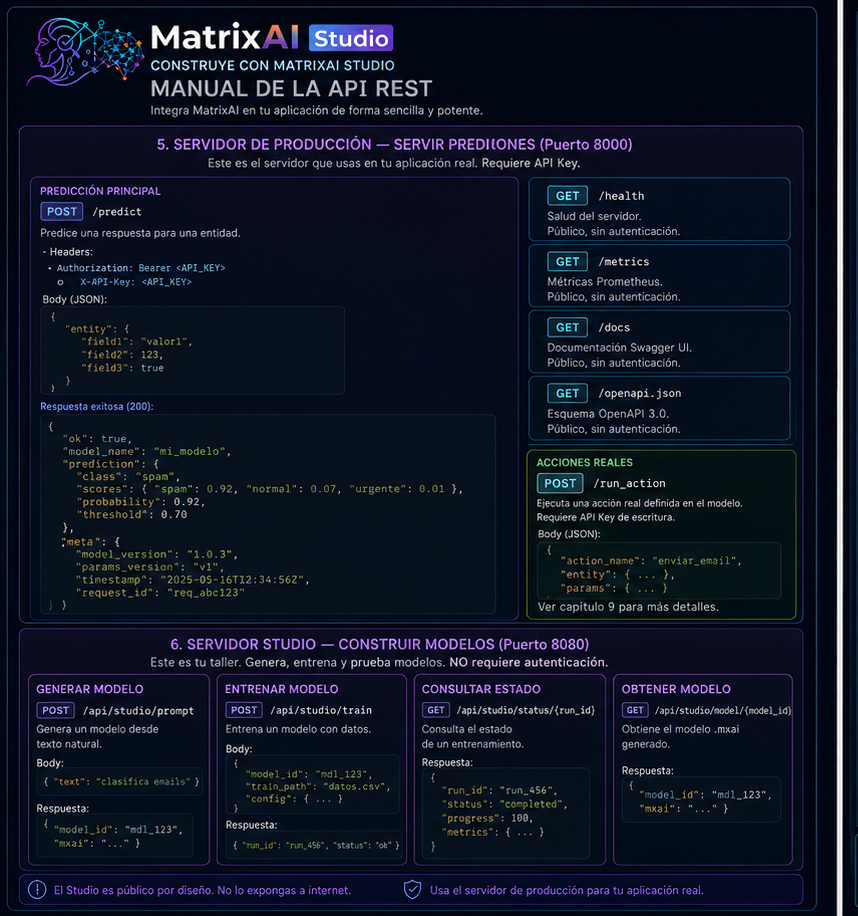
1. La arquitectura en dos minutos
MatrixAI expone dos servidores HTTP completamente independientes. La separacion importa porque cada servidor tiene un proposito y un modelo de seguridad distinto.
| Servidor | Puerto | Proposito | Exponer? |
|---|---|---|---|
| Produccion | 8000 | Predicciones, acciones, registro, feedback y metricas. | Si, con API key. |
| Studio | 8080 | Generar, validar, entrenar y simular modelos. | Nunca publicamente. |
matrixai serve model.mxai --params runs/v1/params.best.json --api-key MY_KEY --port 8000
matrixai studio --port 8080 --open2. Antes de la primera llamada
Arrancar el servidor de producción:
matrixai serve mi_modelo.mxai \
  --params runs/v1/params.best.json \
  --api-key mi_clave_secreta \
  --port 8000
Arrancar el Studio:
matrixai studio --port 8080 --openComprobar que todo está vivo:
# Production
curl http://localhost:8000/health

# Studio
curl http://localhost:8080/api/studio/status
Si ves "status": "ok" en producción y "ok": true en el Studio (que incluye llm_mode, capabilities, degradation_messages y production_steps), estás listo. Si no, consulta la sección 13.
Explorar la API con la documentación interactiva:
# Interactive Swagger UI (auto-generated from your loaded model)
open http://localhost:8000/docs

# OpenAPI 3.0 schema — use it to generate clients automatically
curl http://localhost:8000/openapi.json3. Autenticación: la llave del castillo
Solo el servidor de producción requiere autenticación. El Studio es completamente público — que es exactamente por qué no debes exponerlo a internet.
Dos formas de enviar la clave — ambas válidas:
# Option A — Authorization Bearer (standard OAuth2)
curl -H "Authorization: Bearer my_secret_key" http://localhost:8000/predict ...

# Option B — X-API-Key header (simpler for internal scripts)
curl -H "X-API-Key: my_secret_key" http://localhost:8000/predict ...
Dos niveles de acceso:
| Clave | Config | Puede hacer |
|---|---|---|
| Escritura | --api-key / MATRIXAI_API_KEY | Todo: predicción, acciones, feedback y gestión del registro. |
| Solo lectura | --api-key-read / MATRIXAI_API_KEY_READ | Predicción, lectura del registro, pull y verify. |
# Start with two access levels
matrixai serve mi_modelo.mxai \
  --params runs/v1/params.best.json \
  --api-key WRITE_KEY_FULL_ACCESS \
  --api-key-read READ_KEY_PREDICTIONS_ONLY
Caso típico: tu backend de analytics solo necesita predicciones — dale la clave de lectura. Tu sistema de MLOps que actualiza modelos recibe la clave de escritura. Si la clave de analytics se filtra, el daño está contenido: nadie puede sobrescribir tus modelos.
Endpoints públicos — sin clave:
GET /health, GET /metrics, GET /docs, GET /openapi.json y los preflight CORS OPTIONS son siempre públicos. Los load balancers, sistemas de monitorización y exploradores de documentación los necesitan sin autenticación.
Qué pasa si la clave es incorrecta:
HTTP 401
{
  "ok": false,
  "error": "Invalid or missing API key",
  "code": "UNAUTHORIZED"
}
4. Cómo leer las respuestas
Todos los endpoints versionados (/api/v1/*) siempre envuelven su respuesta en un sobre estándar:
// Success
{ "ok": true, ...data }

// Error
{ "ok": false, "error": "readable description", "code": "MACHINE_CODE" }
El campo code es tu amigo para el manejo programático de errores. No necesitas parsear el texto — simplemente haz un switch sobre code:
const res = await fetch('/api/v1/predict', { ... });
const data = await res.json();

if (!data.ok) {
  switch (data.code) {
    case 'UNAUTHORIZED':         return redirectToLogin();
    case 'NOT_FOUND':            return showError('Model not found');
    case 'REGISTRY_NOT_LOADED':  return showError('Registry not loaded');
    default:                     return showError(data.error);
  }
}

// data.ok === true — safe to use the data| HTTP | Significado | Acción |
|---|---|---|
200 | OK | Leer ok y payload. |
400 | JSON malformado. | Corregir body. |
401 | Clave incorrecta. | Corregir cabecera auth. |
404 | Recurso no encontrado. | Verificar ID. |
409 | Conflicto, normalmente versión duplicada. | Usar versión nueva. |
422 | Validación fallida. | Leer detalle en error. |
429 | Rate limit superado. | Respetar Retry-After. |
500 | Error interno. | Revisar logs. |
Límite de velocidad — 60 req/min por IP por defecto. Cuando se supera:
HTTP 429
Retry-After: 60
{ "error": "Rate limit exceeded" }
Implementa siempre un backoff exponencial en tu cliente:
async function fetchWithRetry(url, options, attempts = 3) {
  for (let i = 0; i < attempts; i++) {
    const res = await fetch(url, options);
    if (res.status !== 429) return res;
    const wait = Math.pow(2, i) * 1000; // 1s, 2s, 4s
    await new Promise(r => setTimeout(r, wait));
  }
  throw new Error('Rate limit exceeded after retries');
}
5. Servidor de Producción: servir predicciones
GET /health — ¿está vivo? Úsalo en el health check de tu load balancer.
curl http://localhost:8000/health{
"status": "ok",
"service": "MatrixAI Server",
"backend": "numpy",
"metrics": {
"requests_total": 142,
"requests_successful": 140,
"requests_failed": 2,
"uptime_seconds": 3600
}
}POST /predict — predicción individual:
curl -X POST http://localhost:8000/predict \
  -H "Authorization: Bearer my_key" \
  -H "Content-Type: application/json" \
  -d '{ "age": 35, "income": 52000, "credit_history": "good" }'
{ "ok": true, "result": 0.9998245440617306, "model": "CreditScoring", "parameter_set": "v1.0_best" }Predicción en lote — envía un array, recibe un array (orden preservado):
curl -X POST http://localhost:8000/predict \
  -H "Authorization: Bearer my_key" \
  -H "Content-Type: application/json" \
  -d '[
    { "age": 35, "income": 52000, "credit_history": "good" },
    { "age": 28, "income": 31000, "credit_history": "fair" },
    { "age": 52, "income": 89000, "credit_history": "excellent" }
  ]'
[
{ "ok": true, "result": 0.9998, "model": "CreditScoring", "parameter_set": "v1.0_best" },
{ "ok": true, "result": 0.3421, "model": "CreditScoring", "parameter_set": "v1.0_best" },
{ "ok": true, "result": 0.9999, "model": "CreditScoring", "parameter_set": "v1.0_best" }
]JavaScript:
async function predict(input) {
  const response = await fetch(PRODUCTION_URL + '/predict', {
    method: 'POST',
    headers: { Authorization: 'Bearer ' + API_KEY, 'Content-Type': 'application/json' },
    body: JSON.stringify(input),
  });
  if (!response.ok) throw new Error((await response.json()).error);
  return response.json();
}

// Individual
const result = await predict({ age: 35, income: 52000, credit_history: 'good' });
console.log('Probability:', result.result);

// Batch
const batch = await predict([
  { age: 35, income: 52000, credit_history: 'good' },
  { age: 28, income: 31000, credit_history: 'fair' }
]);
batch.forEach((r, i) => console.log('Record ' + i + ':', r.result));
Python:
import requests, os

HEADERS = {
  'Authorization': f'Bearer {os.environ["MATRIXAI_API_KEY"]}',
  'Content-Type': 'application/json'
}

def predict(data):
    res = requests.post('http://localhost:8000/predict', json=data, headers=HEADERS)
    res.raise_for_status()
    return res.json()

# Individual
result = predict({'age': 35, 'income': 52000, 'credit_history': 'good'})
print(f"Probability: {result['result']:.4f}")

# Batch
batch = predict([
    {'age': 35, 'income': 52000, 'credit_history': 'good'},
    {'age': 28, 'income': 31000, 'credit_history': 'fair'}
])
for i, r in enumerate(batch):
    print(f"Record {i}: {r['result']:.4f}")
Predecir desde el registro — cualquier versión o tag registrado:
curl -X POST http://localhost:8000/api/v1/registry/credit-scoring/v1.0/predict -H "Authorization: Bearer my_key" -H "Content-Type: application/json" -d '{ "age": 35 }'
curl -X POST http://localhost:8000/api/v1/registry/credit-scoring/latest/predict -H "Authorization: Bearer my_key" -H "Content-Type: application/json" -d '{ "age": 35 }'
6. Servidor Studio: construir modelos
El Studio es donde ocurre la creación de modelos. Todos sus endpoints son públicos — no necesitan autenticación.
GET /api/studio/status — ¿qué puede hacer el Studio?
curl http://localhost:8080/api/studio/status{
"ok": true,
"llm_mode": { "active": false, "provider": "deterministic", "model": null },
"capabilities": { ... },
"degradation_messages": [],
"production_steps": [...]
}Si llm_mode.active es false, el Studio usa el PromptAgent determinista (sin LLM externo). Configura las variables MATRIXAI_LLM_* antes de arrancar el Studio para activar un LLM externo.
POST /api/studio/generate — generar un modelo desde lenguaje natural:
curl -X POST http://localhost:8080/api/studio/generate \
  -H "Content-Type: application/json" \
  -d '{
    "prompt": "A model that predicts 30-day hospital readmission risk based on diagnosis, age and medication",
    "input_json": "{ \"age\": 72, \"diagnosis\": \"CHF\", \"medication_count\": 5 }"
  }'
{
"ok": true,
"pipeline_ok": true,
"mxai": "PROGRAM ReadmissionRisk\n VECTOR Patient...",
"semantic_text": "PROJECT ReadmissionRisk\nINTENT...",
"pipeline_stages": [
{ "name": "prompt_agent", "ok": true },
{ "name": "architect", "ok": true },
{ "name": "verifier", "ok": true },
{ "name": "safety", "ok": true },
{ "name": "compiler", "ok": true }
],
"executive_result": {
"decision": "high_risk",
"confidence": 0.81,
"action_proposed": "schedule_followup",
"action_status": "SIMULATED"
}
}Campos clave: pipeline_ok: true significa que todos los agentes aceptaron el modelo. mxai es el código del modelo generado — guárdalo y reutilízalo. executive_result muestra el modelo ejecutado con tu input_json. Si pipeline_ok es false, pipeline_stages indica exactamente qué agente lo rechazó.
POST /api/analyze — validar cualquier artefacto (3 modos):
| Situación | Modo |
|---|---|
| Solo una descripción en texto. | prompt |
| .semantic intermedio editado a mano. | semantic |
| .mxai final para validar antes del commit. | mxai |
# Mode prompt — just a description
curl -X POST http://localhost:8080/api/analyze -H "Content-Type: application/json" \
  -d '{ "prompt": "Classify emails as spam, normal or urgent" }'

# Mode mxai — validate existing model code
curl -X POST http://localhost:8080/api/analyze -H "Content-Type: application/json" \
  -d '{ "mode": "mxai", "mxai_text": "PROGRAM EmailClassifier\n  VECTOR Email..." }'

# Mode semantic — validate intermediate .semantic file
curl -X POST http://localhost:8080/api/analyze -H "Content-Type: application/json" \
  -d '{ "mode": "semantic", "prompt": "PROJECT EmailClassifier\nINTENT classify emails..." }'
POST /api/studio/run-executive — ejecutar un .mxai existente con salida de auditoría:
curl -X POST http://localhost:8080/api/studio/run-executive \
  -H "Content-Type: application/json" \
  -d '{
    "mxai": "PROGRAM CreditScoring\n  VECTOR Cliente...",
    "input_json": "{ \"age\": 35, \"income\": 52000, \"credit_history\": \"good\" }",
    "mxai_name": "CreditScoring"
  }'
{
"ok": true,
"executive_result": {
"decision": "approved",
"confidence": 0.9998,
"confidence_label": "HIGH",
"action_proposed": "grant_credit",
"action_status": "SIMULATED",
"explanation": "Client shows excellent credit history and adequate income level...",
"influential_factors": [
"credit_history: good (highest weight)",
"income: 52000 (above threshold)",
"age: 35 (stable profile)"
],
"audit_trail": ["Client", "CreditScoring", "RiskEvaluator", "Categorical", "Action"]
}
}Casos guiados — prototipar rápido con casos de uso predefinidos:
# List all available cases
curl http://localhost:8080/api/studio/cases

# Detail of a specific case
curl http://localhost:8080/api/studio/cases/credit-scoring

# Simulate a case with your own data
curl -X POST http://localhost:8080/api/studio/simulate \
  -H "Content-Type: application/json" \
  -d '{ "case_id": "fall-risk", "input_values": { "age": 78, "balance_score": 0.28, "previous_falls": 2 } }'
{
"ok": true,
"executive_result": {
"summary": "Patient with HIGH fall risk. Immediate evaluation recommended.",
"confidence": 0.87,
"audit_trail": ["Patient", "BalanceAssessment", "RiskScoring", "FallRisk", "Action"]
}
}Ejemplos precargados — todo listo para usar:
curl http://localhost:8080/api/defaults
curl http://localhost:8080/api/example/credit-scoring
La respuesta del ejemplo incluye mxai_text, training_text, input_json, manifest_text y evaluation_report_text — todo lo que necesitas para empezar a trabajar con ese caso sin generar nada desde cero.
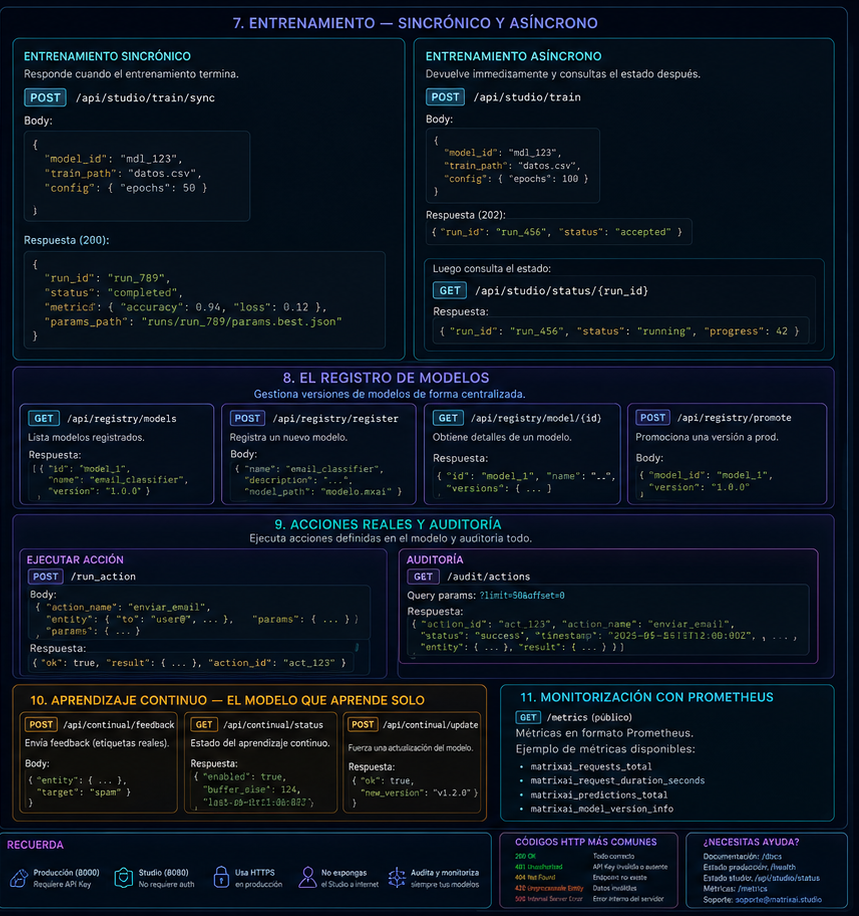
7. Entrenamiento: síncrono y asíncrono
El Studio expone tres opciones de entrenamiento. Cuál usar depende del tiempo que esperes que tarde.
Preparación paso 1 — generar el contrato de entrenamiento:
curl -X POST http://localhost:8080/api/generate-training \
  -H "Content-Type: application/json" \
  -d '{ "mxai_text": "PROGRAM CreditScoring..." }'
{
"ok": true,
"training_text": "TRAINING CreditScoring\n DATASET credito\n TARGET label\n ...",
"dataset_template_text": "age,income,credit_history,label\n",
"warnings": [],
"source": "generated"
}Preparación paso 2 — generar datos sintéticos (si aún no tienes datos reales):
curl -X POST http://localhost:8080/api/generate-dataset \
  -H "Content-Type: application/json" \
  -d '{ "mxai_text": "...", "training_text": "...", "rows": 500, "seed": 42, "mode": "coherent" }'
{
"ok": true,
"csv_text": "age,income,credit_history,label\n35,52000,good,approved\n...",
"rows": 500,
"columns": ["age", "income", "credit_history"],
"labels": ["approved", "rejected"]
}Preparación paso 2b — validar tu CSV antes de entrenar:
curl -X POST http://localhost:8080/api/validate-csv \
  -H "Content-Type: application/json" \
  -d '{ "mxai_text": "...", "training_text": "...", "csv_text": "age,income,label\n35,52000,approved" }'
{ "ok": true, "rows": 450, "warnings": ["Column 'income' has 3 empty values — they will be ignored"] }Opción A — Entrenamiento síncrono (modelos pequeños, ≤200 épocas, máx 30s):
curl -X POST http://localhost:8080/api/train \
  -H "Content-Type: application/json" \
  -d '{ "mxai_text": "...", "training_text": "...", "csv_text": "...", "epochs_override": 100 }'
{
"ok": true,
"run_id": "run-abc123",
"best_epoch": 87,
"best_validation_loss": 0.112,
"accuracy": 0.923,
"epochs": [
{ "epoch": 1, "train_loss": 0.892, "val_loss": 0.871 },
{ "epoch": 50, "train_loss": 0.231, "val_loss": 0.298 },
{ "epoch": 87, "train_loss": 0.098, "val_loss": 0.112 }
],
"params_best": { "W1": [...], "b1": [...] }
}Opción B — Entrenamiento asíncrono (modelos grandes o épocas largas):
# 1. Start — get job_id immediately
curl -X POST http://localhost:8080/api/train-start \
  -H "Content-Type: application/json" \
  -d '{ "mxai_text": "...", "training_text": "...", "csv_text": "..." }'
# → { "ok": true, "job_id": "job-20260603-xyz789" }

# 2. Poll status
curl http://localhost:8080/api/train-status/job-20260603-xyz789
# → { "ok": true, "status": "running", "epochs": [...] }

# 3. Cancel if needed
curl -X POST http://localhost:8080/api/train-cancel \
  -H "Content-Type: application/json" \
  -d '{ "job_id": "job-20260603-xyz789" }'
// When done:
{ "ok": true, "job_id": "job-20260603-xyz789", "status": "done", "accuracy": 0.923, "best_epoch": 87, "params_best": { ... } }Implementación del polling en JavaScript:
async function trainWithPolling(payload, intervalMs = 2000) {
  const start = await fetch('http://localhost:8080/api/train-start', {
    method: 'POST',
    headers: { 'Content-Type': 'application/json' },
    body: JSON.stringify(payload)
  }).then(r => r.json());

  const jobId = start.job_id;
  console.log('Training started:', jobId);

  while (true) {
    await new Promise(r => setTimeout(r, intervalMs));
    const status = await fetch('http://localhost:8080/api/train-status/' + jobId).then(r => r.json());
    console.log('Status:', status.status, '| Epochs:', status.epochs?.length ?? 0);

    if (status.status === 'done') {
      console.log('Training complete. Accuracy:', status.accuracy);
      return status;
    }
    if (['error', 'cancelled', 'timeout'].includes(status.status)) {
      throw new Error('Training failed: ' + status.status);
    }
  }
}| Status | Significado | Acción |
|---|---|---|
running | El job está en marcha. | Seguir haciendo polling. |
done | Terminó correctamente. | Leer params_best y accuracy. |
error | Falló por un error. | Revisar el campo error. |
cancelled | Cancelado manualmente. | Reiniciar si es necesario. |
timeout | Superó el tiempo límite. | Reducir épocas o usar la CLI para entrenamientos largos. |
Opción C — Ejecutar con parámetros ya entrenados (sin reentrenar):
curl -X POST http://localhost:8080/api/run-with-params \
  -H "Content-Type: application/json" \
  -d '{
    "mxai_text": "PROGRAM CreditScoring...",
    "params_json": "{ \"W1\": [...], \"b1\": [...] }",
    "input_json": "{ \"age\": 35, \"income\": 52000, \"credit_history\": \"good\" }"
  }'
{ "ok": true, "result": { "approved": 0.9998, "rejected": 0.0002 } }8. El Registro de Modelos
El registro te permite gestionar versiones de modelos entrenados como control de versiones para tus pesos. Actívalo arrancando el servidor de producción con --registry:
matrixai serve model.mxai \
  --params runs/v1/params.best.json \
  --registry matrixai_registry/ \
  --api-key my_key
Listar todas las versiones registradas:
curl -H "X-API-Key: my_key" "http://localhost:8000/api/v1/registry"
curl -H "X-API-Key: my_key" "http://localhost:8000/api/v1/registry?name=credit-scoring&page=1&limit=10"
{
"ok": true,
"models": [
{ "name": "credit-scoring", "version": "v1.0", "metrics": { "accuracy": 0.923 }, "created_at": "2026-05-30T10:00:00+00:00" },
{ "name": "credit-scoring", "version": "v1.1", "metrics": { "accuracy": 0.941 }, "created_at": "2026-06-01T14:30:00+00:00" }
],
"page": 1, "limit": 20, "total": 2
}Ver el manifiesto de una versión concreta:
curl -H "X-API-Key: my_key" http://localhost:8000/api/v1/registry/credit-scoring/v1.0{
"ok": true,
"model": {
"name": "credit-scoring", "version": "v1.0",
"entry_hash": "sha256:...", "model_hash": "sha256:...",
"parameter_set_id": "ps_v1",
"metrics": { "accuracy": 0.923 },
"created_at": "2026-05-30T10:00:00+00:00"
}
}Ver las etiquetas:
curl -H "X-API-Key: my_key" http://localhost:8000/api/v1/registry/credit-scoring/tags{ "ok": true, "name": "credit-scoring",
"tags": [{ "tag": "latest", "version": "v1.1" }, { "tag": "prod", "version": "v1.0" }]
}Registrar una nueva versión (requiere clave de escritura):
curl -X POST http://localhost:8000/api/v1/registry/push \
  -H "Authorization: Bearer write_key" \
  -H "Content-Type: application/json" \
  -d '{ "name": "credit-scoring", "version": "v1.1", "run_dir": "/server/runs/v1.1" }'
# → HTTP 201  { "ok": true, "name": "credit-scoring", "version": "v1.1" }
Etiquetar una versión:
curl -X POST http://localhost:8000/api/v1/registry/credit-scoring/tag/latest \
  -H "Authorization: Bearer write_key" \
  -H "Content-Type: application/json" \
  -d '{ "version": "v1.1" }'
# → { "ok": true, "name": "credit-scoring", "tag": "latest", "version": "v1.1" }
Descargar modelo y parámetros (para clientes sin acceso al filesystem):
curl -H "X-API-Key: my_key" http://localhost:8000/api/v1/registry/credit-scoring/v1.0/pull{ "ok": true, "name": "credit-scoring", "version": "v1.0",
"model_text": "PROGRAM CreditScoring...",
"params": { "parameter_set_id": "ps_v1", "parameters": { "W1": [...], "b1": [...] } }
}Verificar la integridad:
curl -X POST http://localhost:8000/api/v1/registry/credit-scoring/v1.0/verify -H "Authorization: Bearer my_key"
# OK:    { "ok": true, "verified": true, "warnings": [] }
# FAIL: HTTP 409 { "ok": false, "error": "Integrity mismatch", "code": "INTEGRITY_MISMATCH" }9. Acciones reales y auditoría
Las acciones permiten que el modelo no solo prediga, sino que también actúe: enviar notificaciones, actualizar registros, llamar a APIs externas. Toda acción queda firmada y auditada. Para habilitarlas, el servidor necesita un contrato .mxact y --allow-real-actions:
matrixai serve model.mxai \
  --params runs/v1/params.best.json \
  --contract action_contract.mxact \
  --allow-real-actions \
  --signing-key $MATRIXAI_ACTION_SIGNING_KEY \
  --api-key my_key
Ejecutar una acción:
curl -X POST http://localhost:8000/execute-action \
  -H "Authorization: Bearer my_key" \
  -H "Content-Type: application/json" \
  -d '{
    "contract_name": "CreditDecision",
    "input_data": { "age": 35, "income": 52000, "credit_history": "good" },
    "model_hash": "mxai_20d8ce3f...",
    "parameter_set_id": "v1.0_best"
  }'
{
"ok": true,
"report_id": "rpt-20260603-abc123",
"model_hash": "mxai_20d8ce3f...",
"parameter_set_id": "v1.0_best",
"action_contract_hash": "sha256:...",
"executed_at": "2026-06-03T10:30:00",
"executor_kind": "real",
"ok_action": true,
"response_summary": "Credit approved — notification sent",
"latency_ms": 3.2,
"hmac_signature": "a3f8b2c1d4..."
}Guarda report_id y hmac_signature como prueba de auditoría. Con ellos puedes verificar que la acción ocurrió exactamente como dice el registro. El informe también incluye hashes, hora de ejecución, tipo de ejecutor, estado de acción y latencia.
10. Aprendizaje continuo
Si tu modelo sirve predicciones en producción y puedes saber después si acertó (verdad absoluta diferida), alimenta ese feedback al servidor para que detecte cuándo el modelo empieza a degradarse.
Registrar feedback (POST /feedback):
curl -X POST http://localhost:8000/feedback \
  -H "Authorization: Bearer my_key" \
  -H "Content-Type: application/json" \
  -d '{
    "prediction": "approved",
    "ground_truth": "rejected",
    "trace_id": "trace-abc123",
    "observed_at": "2026-06-03T15:00:00",
    "parameter_set_id": "v1.0_best"
  }'
{ "ok": true, "recorded": true, "correct": false, "trace_id": "trace-abc123" }Métricas de drift en /metrics (cuando el aprendizaje continuo está activo):
matrixai_drift_window_accuracy{project="CreditScoring"} 0.891
matrixai_drift_window_samples{project="CreditScoring"} 47
matrixai_drift_degradation_detected{project="CreditScoring"} 0.0
matrixai_drift_actual_degradation{project="CreditScoring"} 0.032
Cuando matrixai_drift_degradation_detected llega a 1.0, el modelo ha cruzado su umbral de degradación y es hora de reentrenar. Configura una alerta en Grafana sobre esta métrica para disparar pipelines de reentrenamiento automatizados.
11. Monitorización con Prometheus
El endpoint /metrics devuelve métricas en formato Prometheus estándar. Configura tu scraper:
scrape_configs:
  - job_name: matrixai_production
    static_configs:
      - targets: ['localhost:8000']
    scrape_interval: 15s
Métricas siempre disponibles:
| Métrica | Type | Para qué |
|---|---|---|
matrixai_requests_total | Counter | Volumen total de peticiones. |
matrixai_requests_successful | Counter | Respuestas 2xx. |
matrixai_requests_failed | Counter | Respuestas 4xx/5xx. |
matrixai_requests_rate_limited | Counter | Rechazadas por rate limit. |
matrixai_items_processed | Counter | Ítems de lote procesados individualmente. |
matrixai_last_request_duration_milliseconds | Gauge | Latencia de la última petición. |
matrixai_uptime_seconds | Gauge | Tiempo de actividad del servidor. |
Métricas de drift (solo cuando el aprendizaje continuo está activo):
| Métrica | Type | Para qué |
|---|---|---|
matrixai_drift_window_accuracy | Gauge | Precisión en la ventana actual de monitorización. |
matrixai_drift_window_samples | Gauge | Muestras de feedback en la ventana actual. |
matrixai_drift_degradation_detected | Gauge | 1.0 cuando se supera el umbral de degradación. |
matrixai_drift_actual_degradation | Gauge | Magnitud del descenso respecto a la línea base. |
12. Recetas completas por caso de uso
Receta 1 — Integración básica en una app web:
// matrixai-client.js — reusable client
const CONFIG = {
  baseUrl: process.env.MATRIXAI_URL || 'http://localhost:8000',
  apiKey: process.env.MATRIXAI_API_KEY
};

async function predict(input) {
  const res = await fetch(CONFIG.baseUrl + '/predict', {
    method: 'POST',
    headers: { 'Authorization': 'Bearer ' + CONFIG.apiKey, 'Content-Type': 'application/json' },
    body: JSON.stringify(input)
  });
  const data = await res.json();
  if (!data.ok) throw new Error('MatrixAI [' + data.code + ']: ' + data.error);
  return data.result;
}

// Usage in a component
const creditScore = await predict({ age: user.age, income: user.annualIncome, credit_history: user.creditHistory });

if (creditScore > 0.85)     showApproval();
else if (creditScore > 0.5) sendToManualReview();
else                        showRejection();
Receta 2 — Pipeline completo de generación y entrenamiento:
async function generateAndTrain(description, csvData) {
  const STUDIO = 'http://localhost:8080';

  // 1. Generate the model
  const gen = await fetch(STUDIO + '/api/studio/generate', {
    method: 'POST', headers: { 'Content-Type': 'application/json' },
    body: JSON.stringify({ prompt: description })
  }).then(r => r.json());
  if (!gen.ok || !gen.pipeline_ok) throw new Error('Model could not be generated');

  // 2. Generate the training contract
  const contract = await fetch(STUDIO + '/api/generate-training', {
    method: 'POST', headers: { 'Content-Type': 'application/json' },
    body: JSON.stringify({ mxai_text: gen.mxai })
  }).then(r => r.json());

  // 3. Validate the CSV data
  const validation = await fetch(STUDIO + '/api/validate-csv', {
    method: 'POST', headers: { 'Content-Type': 'application/json' },
    body: JSON.stringify({ mxai_text: gen.mxai, training_text: contract.training_text, csv_text: csvData })
  }).then(r => r.json());
  if (validation.warnings.length > 0) console.warn('Data warnings:', validation.warnings);

  // 4. Start async training
  const start = await fetch(STUDIO + '/api/train-start', {
    method: 'POST', headers: { 'Content-Type': 'application/json' },
    body: JSON.stringify({ mxai_text: gen.mxai, training_text: contract.training_text, csv_text: csvData })
  }).then(r => r.json());

  // 5. Poll until done
  let status;
  do {
    await new Promise(r => setTimeout(r, 2000));
    status = await fetch(STUDIO + '/api/train-status/' + start.job_id).then(r => r.json());
    console.log('Training...', status.status, '| epochs:', status.epochs?.length ?? 0);
  } while (status.status === 'running');
  if (status.status !== 'done') throw new Error('Training failed: ' + status.status);

  return { model: gen.mxai, params: status.params_best, accuracy: status.accuracy };
}
Receta 3 — Refinamiento iterativo del modelo:
async function refineModel(originalPrompt, trainingResult, currentMxai, hint = '') {
  const res = await fetch('http://localhost:8080/api/refine', {
    method: 'POST',
    headers: { 'Content-Type': 'application/json' },
    body: JSON.stringify({
      prompt: originalPrompt, run_result: trainingResult, mxai_text: currentMxai,
      hints: hint, iteration_count: 1, max_iterations: 5
    })
  }).then(r => r.json());
  if (!res.ok) throw new Error(res.error);
  console.log('Refined prompt (iteration ' + res.iteration + '):', res.proposed_prompt);
  return res; // use res.proposed_prompt to generate an improved model
}

const refinement = await refineModel(
  'Classify emails as spam, normal or urgent',
  trainingResult, currentMxai,
  'Improve precision on urgent emails'
);
Receta 4 — Sistema de monitorización de drift:
import requests, time
from datetime import datetime

PROD_URL = 'http://localhost:8000'
HEADERS = {'Authorization': 'Bearer my_key', 'Content-Type': 'application/json'}

def register_feedback(prediction, ground_truth, trace_id):
    return requests.post(PROD_URL + '/feedback', headers=HEADERS, json={
        'prediction': str(prediction), 'ground_truth': str(ground_truth),
        'trace_id': trace_id, 'observed_at': datetime.utcnow().isoformat(),
        'parameter_set_id': 'v1.0_best'
    }).json()

def check_drift():
    for line in requests.get(PROD_URL + '/metrics').text.split('\n'):
        if 'matrixai_drift_degradation_detected' in line and not line.startswith('#'):
            if float(line.split(' ')[1]) == 1.0:
                print('DRIFT DETECTED — consider retraining')
                return True
    return False

# Monitoring loop
while True:
    if check_drift():
        pass  # trigger retraining or alert here
    time.sleep(300)  # check every 5 minutes
13. Errores frecuentes y cómo salir de ellos
401 UNAUTHORIZED — la clave no se autentica
# Check the variable is actually set
echo $MATRIXAI_API_KEY

# Test with the key hardcoded to rule out the variable issue
curl -H "Authorization: Bearer THE_KEY_HERE" http://localhost:8000/predict \
  -H "Content-Type: application/json" -d '{...}'
404 en /feedback — el monitor de drift no está cargado
# Start the server with --continual-policy
matrixai serve model.mxai --params params.json --api-key key \
  --continual-policy drift_policy.mxcontinual
409 DUPLICATE_ENTRY — haciendo push de una versión que ya existe
# Check existing versions
curl -H "X-API-Key: my_key" "http://localhost:8000/api/v1/registry?name=my-model"

# Use a new version number
curl -X POST http://localhost:8000/api/v1/registry/push \
  -H "Authorization: Bearer my_key" \
  -H "Content-Type: application/json" \
  -d '{ "name": "my-model", "version": "v1.2", "run_dir": "..." }'
422 en /predict — los campos no coinciden con el modelo
# See the exact schema your model expects
curl http://localhost:8000/openapi.json | python3 -m json.tool | grep -A 20 '"properties"'

# The schema comes from the VECTOR in your .mxai:
# VECTOR Client { age, income, credit_history }
# → you must send exactly: { "age": ..., "income": ..., "credit_history": ... }
429 Too Many Requests — rate limit superado
# Option 1: raise the limit when starting the server
matrixai serve model.mxai --rate-limit 200 ...

# Option 2: disable entirely (not recommended for public production)
matrixai serve model.mxai --rate-limit 0 ...

# Option 3: implement backoff in your client (see section 4)
pipeline_ok: false — la descripción no pudo convertirse en modelo válido
# The response shows which agent failed in pipeline_stages:
# { "name": "mathematical_rules_resolved", "ok": false,
#   "error": "Rule 'if category matches text' unresolved" }

# Fix: rewrite avoiding free-text conditions.
# Instead of: "if the subject contains the word urgent..."
# Use: "if the urgency score exceeds 0.8..."
LLM de Studio inactivo
# Check Studio status
curl http://localhost:8080/api/studio/status | python3 -m json.tool

# If llm_mode.active is false, verify env vars:
echo $MATRIXAI_LLM_API_KEY
echo $MATRIXAI_LLM_ENDPOINT
echo $MATRIXAI_LLM_MODEL

# If set but still false, the Studio could not reach the provider — check server logs.
14. Referencia rapida
| Method | Route | Auth | Que hace |
|---|---|---|---|
| GET | /health | Publica | Estado y metricas basicas. |
| GET | /metrics | Publica | Metricas Prometheus. |
| GET | /docs | Publica | Swagger UI |
| GET | /openapi.json | Publica | OpenAPI del modelo. |
| POST | /predict | Requerida | Prediccion individual o lote. |
| POST | /execute-action | Escritura | Accion real auditada. |
| POST | /feedback | Escritura | Ground truth para drift. |
| GET | /api/v1/registry | Lectura/escritura | Listar registro. |
| GET | /api/v1/registry/{name}/{version} | Requerida | Manifiesto de version. |
| GET | /api/v1/registry/{name}/tags | Requerida | Etiquetas. |
| GET | /api/v1/registry/{name}/{version}/pull | Requerida | Descargar modelo y parametros. |
| POST | /api/v1/registry/{name}/{version}/predict | Requerida | Prediccion desde registro. |
| POST | /api/v1/registry/{name}/{version}/verify | Requerida | Verificar integridad. |
| POST | /api/v1/registry/push | Escritura | Registrar nueva version. |
| POST | /api/v1/registry/{name}/tag/{tag} | Escritura | Crear o mover etiqueta. |
| Method | Studio route | Que hace |
|---|---|---|
| GET | /api/studio/status | Capacidades y modo LLM. |
| GET | /api/studio/cases | Listar casos. |
| GET | /api/studio/cases/{id} | Detalle de caso. |
| GET | /api/defaults | Defaults. |
| GET | /api/example/{id} | Artefactos completos. |
| POST | /api/studio/generate | Generar modelo. |
| POST | /api/studio/simulate | Simular caso. |
| POST | /api/studio/run-executive | Ejecutar .mxai. |
| POST | /api/analyze | Validar prompt/semantic/mxai. |
| POST | /api/generate-training | Generar .mxtrain. |
| POST | /api/generate-dataset | Dataset sintetico max 5000 filas. |
| POST | /api/validate-csv | Validar CSV max 5000 filas. |
| POST | /api/train | Entrenamiento sync. |
| POST | /api/train-start | Iniciar async. |
| GET | /api/train-status/{job_id} | Estado de job. |
| POST | /api/train-cancel | Cancelar job. |
| POST | /api/run-with-params | Ejecutar con parametros. |
| POST | /api/refine | Refinar prompt. |
| Variable de entorno | Controla |
|---|---|
MATRIXAI_API_KEY | Clave de acceso completo. |
MATRIXAI_API_KEY_READ | Clave solo lectura. |
MATRIXAI_ACTION_SIGNING_KEY | Clave HMAC para acciones. |
MATRIXAI_ALLOW_REAL_ACTIONS | Habilitar acciones reales. |
MATRIXAI_RATE_LIMIT | Peticiones/min/IP, 0 desactiva. |
MATRIXAI_CORS_ORIGINS | Origenes CORS permitidos. |
MATRIXAI_LLM_API_KEY | Clave LLM externo para Studio. |
MATRIXAI_LLM_MODEL | ID de modelo externo. |
MATRIXAI_LLM_ENDPOINT | URL base del proveedor. |